[ ENGLISH ]
System Menu Setting
+ The Shutter Soundfunction works in both Playerand M.Cam modes.
+ Youcan turn the Shutter Sound on or off, when on, with each press of the PHOTO button the Shutter will Sound.
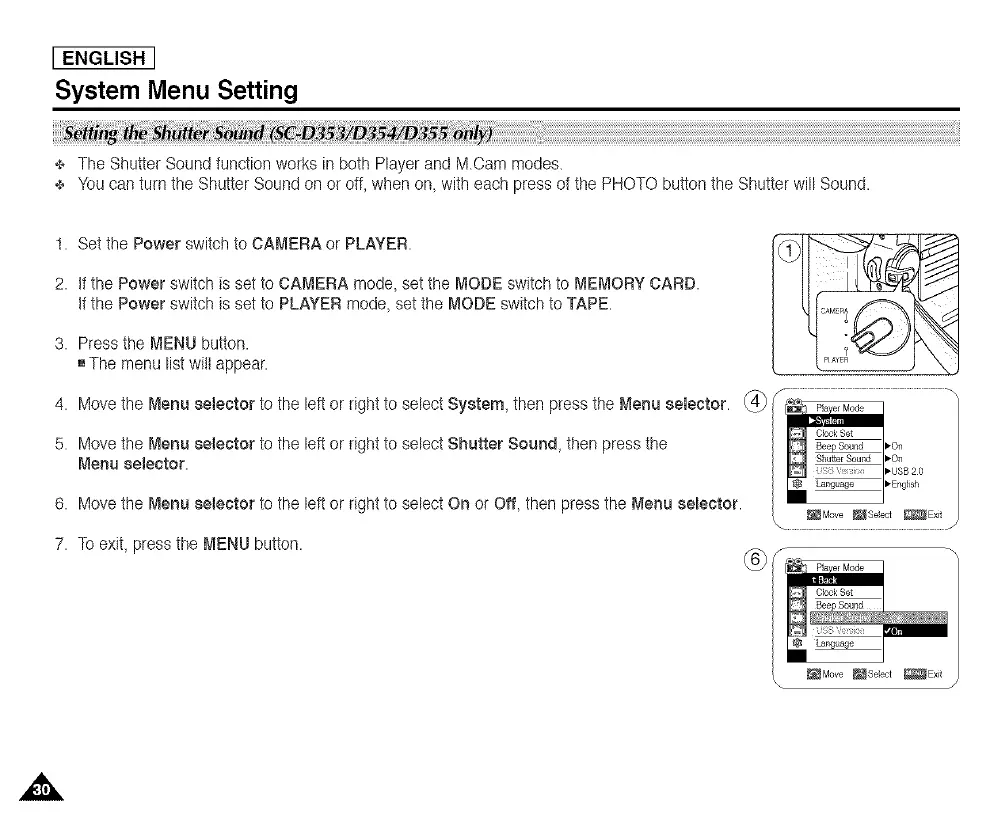
t. Setthe Power switchto CAMERA or PLAYER.
2. if the Power switch is set to CAMERA mode, setthe MODE switch to MEMORY CARD.
if the Power switch is set to PLAYER mode, set the MODE switch to TAPE.
3. Press the MENU button.
[]The menu listwitt appear.
4. Meve the Menu ee_ector te the le_ er right te select Syeter_!J, then press the Menu ee_eetor. _ _ _]
5. Move the Menu eelector to the left or right to select Shutter Sound, then press the __ :o: /
Menu ee_eetor. _-usB20
6. Move the Menu selector to the left or right to select On or Off, then press the Menu eeleetor. E×_
7. TOexit, press the MENU button, f m
Language
_Move _Seect _Exit
\ J














 To Next Page