Display Menu Setting
I ENGLISH I
+ The Date/Timefunction works in Camera/Ptayer/M.Cam/M.PMyermodes.
+ The date and time apeautomaticatIy recorded on a specialdata area of the tape.
1. Set the Power switch to CAMERA or PLAYER.
2. Set the Mode switch to TAPE or MEMORYCARD. (SC-D353/D354/D355only)
3. Press the MENU button.
[]The menu list will appear.
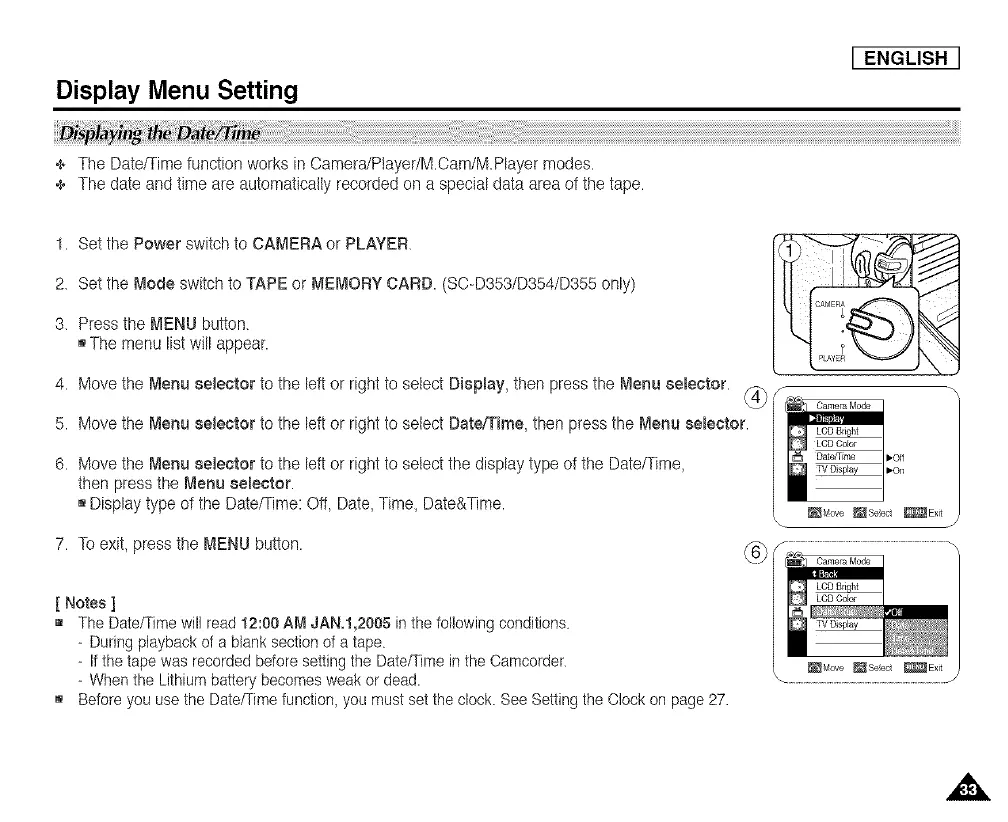
4. Move the Menu selector to the left or right to setect DiepEay,then press the Menu 8eEeetor. _
5. Move the Mer_uselector to the left or right to select Date/Time, then press the Menu eeEeetor.
6. Move the Menu selector to the left or right to select the display type of the Date/Time,
then pressthe Menu selector.
[] Displaytype of the Date/Time:Ot_,Date,Time, Date&Time.
7. To exit,press the MENU button.
@
[ Notes ]
[] The Date/Time will read 12:00 AM JAN,I,2005 in the following conditions.
- During playback of a blank section of a tape.
- If the tape was recorded before setting the Date/Time in the Camcorder.
- When the Lithium battery becomes weak or dead.
[] Before you use the Date/Time function_ you must set the clock. See Setting the Clock on page 27.
_Move _Seect _Exit














 To Next Page