[ ENGLISH ]
Display Menu Setting
+ This function works in Camera/Ptayer/M.Cam/M.Playermodes.
• 'four Camcorder is equippedwith a 2.36 inch color Liquid Crystat Display(LeD) screen, which enables you to view what you
are recording or playing back directly.
+ Depending on the conditions under which you are using the Camcorder (indoorsor outdoors for example), you can adjust;
- LCD Bright
- LCD Color
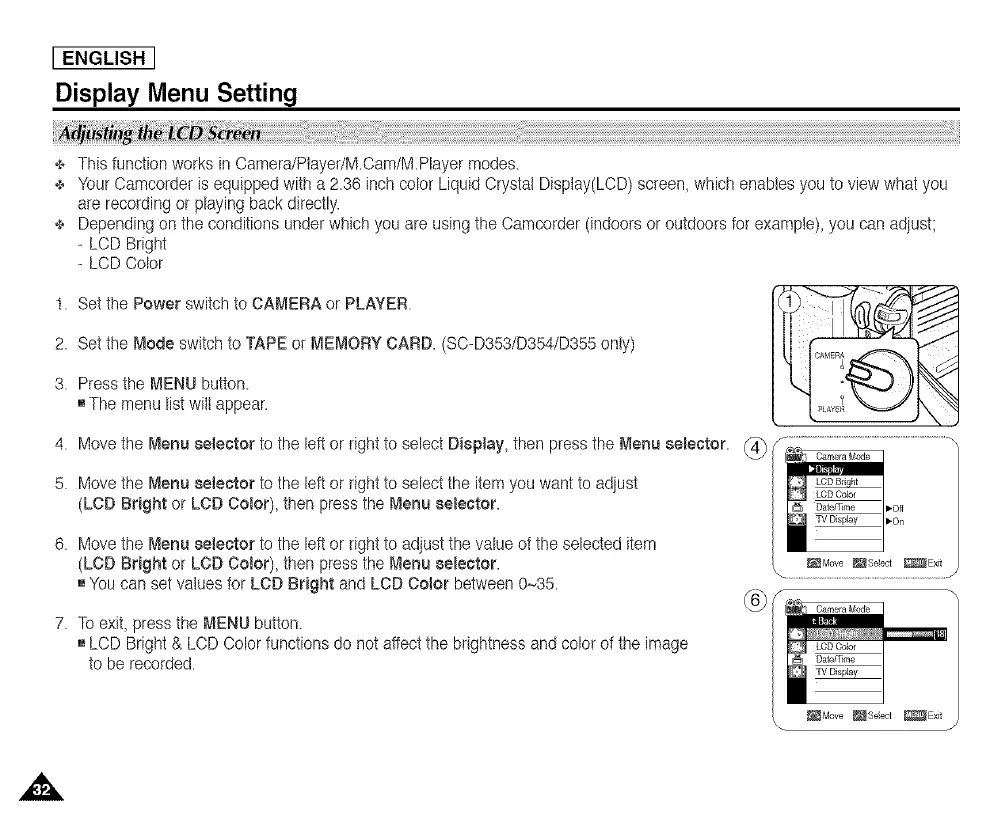
t. Setthe Power switchto CAMERA or PLAYER.
2. Setthe Mode switch to TAPE or MEMORY CARD. (SC-D353/D354/D355onty)
3. Press the MENU button.
[] The menu listwitt appear.
4.
5.
6.
Move the Menu selector to the left or right to select Display, then pressthe Menu seEector. _ _ ...................................
/
Move the Menu selector to the left or right to select the item you want to adjust
(LCD Bright or LCD Color), then press the Menu eeEeetor. ,,o, |
!Move the Menu 8eteetor to the left or right to adjust the value of the selected item
(LCD Bright or LCD Color), then press the Menu selector. _ _Move_se_ot _E×_,_
[] You can set values for LeD Bright and LOD Color between 0~35. s m
To exit, press the MENU button.
[] LCD Bright & LCD Color functions do not aftect the brightness and color of the image
to be recorded.
_Move _8eect _Exit
\ 1'














 To Next Page