ENGLISH
30
Advanced Recording
Zooming In and Out
✤ Zoom works in CAMERA mode only.
✤ Zooming is a recording technique that lets you change the size of the subject in the picture. For more professional looking record-
ings, do not use the zoom function too often.
✤ You can also choose from two zoom speeds to suit different needs :
■ Gradual zoom (9~12 seconds from TELE/WIDE to WIDE/TELE)
■ High-Speed zoom (3~6 seconds from TELE/WIDE to WIDE/TELE)
✤ Use these features for different shots; please note that overuse of the zoom feature can lead to unprofessional looking results and a
reduction of battery pack usage time.
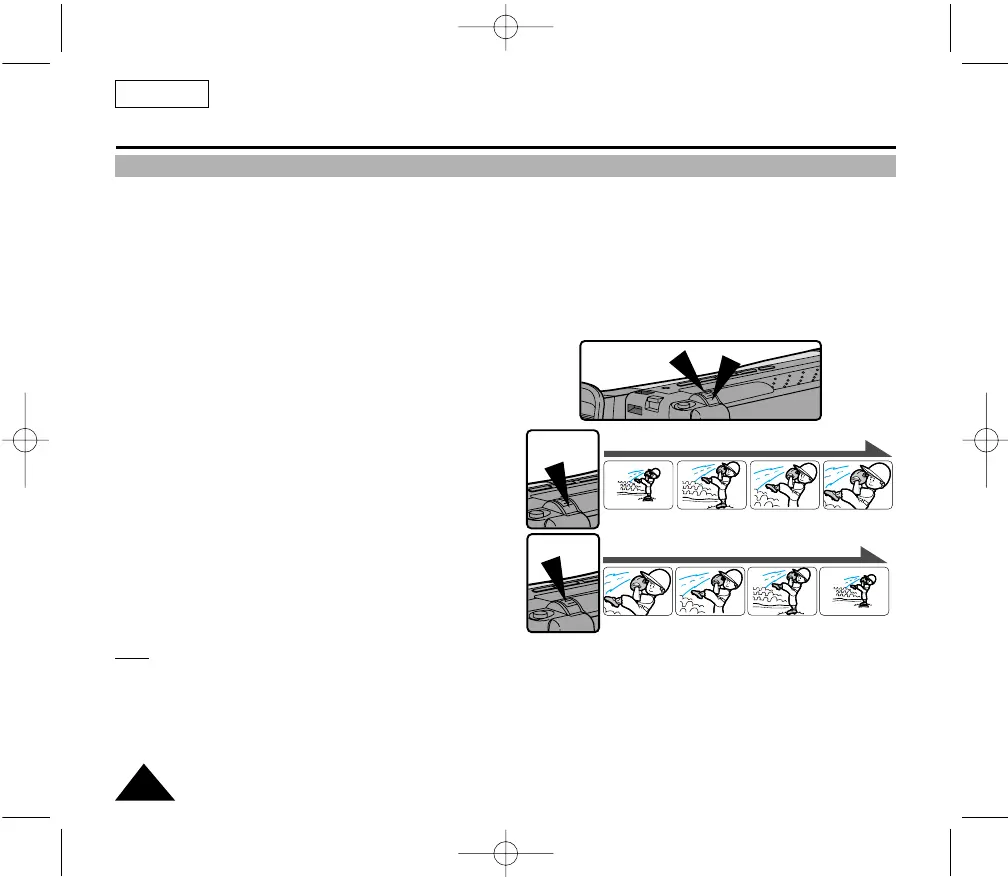
1. Move the zoom lever a little for a gradual zoom, move it further for a
high-speed zoom.
Your zooming is monitored on the OSD.
2. T (Telephoto) side:
Subject appears closer.
3. W (Wide angle) side:
Subject appears further away.
Note:
MACRO
If you cannot obtain sharp focus in telephoto zoom, move the lever to the “W” side until the focus sharpens.
You can record a subject that is at least 1 mm away from the lens surface in the wide angle position.
T
W
00732M SCL901 SEA (20-45) 12/26/03 10:45 AM Page 30



 To Next Page