Advanced Recording
DIS (Digital Image Stabilizer, SCL906/L907 only)
ENGLISH
35
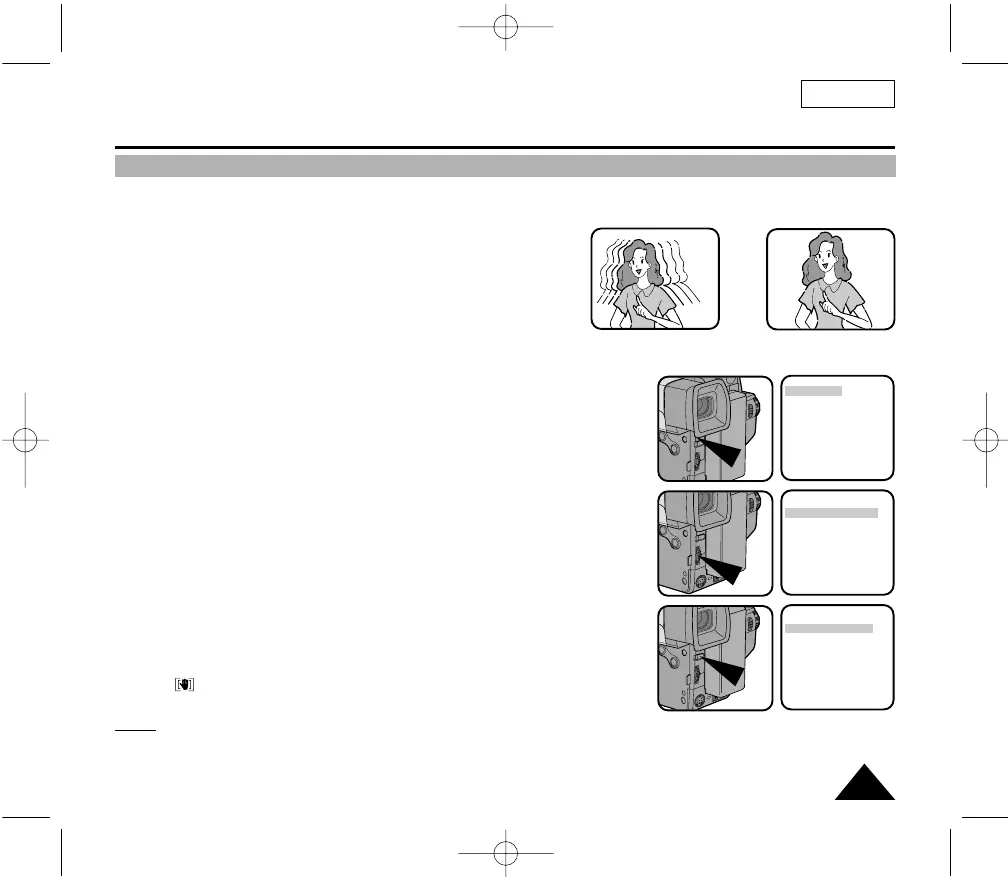
✤ The DIS function works in CAMERA mode only.
✤ DIS (Digital Image Stabilizer) is a handshake compensation function that compensates for any shaking or moving of the hand hold-
ing the camcorder (within reasonable limits).
✤ It provides more stable pictures when:
■ Recording in the Zoom In mode
■ Recording a small object close-up
■ Recording and walking at the same time
■ Recording through the window of a vehicle
1. Set the power switch to CAMERA mode. (See page 18)
■ Open the LCD Screen and adjust it to see comfortably.
2. Press the MENU ON/OFF button.
■ The MENU list will appear.
3. Turn the UP/DOWN dial to DIS.
4. Press ENTER.
■ The DIS setting will change.
5. Press the MENU ON/OFF button to end the setting.
■ When the DIS is set, the DIS mark
()
will displayed on the OSD.
Notes:
1. It is recommended you deactivate the handshake compensation function when using a tripod.
2. The DIS function will not operate in the DSE mode.
3. The MENU ON/OFF function will not operate in EASY mode.
➔
➔
LCD ADJUST
DIS........................OFF
D.ZOOM ..............OFF
WHITE BAL ..........AUTO
DISPLAY ..............ON
LANGUAGE..........
ENGLISH
WL REMOCON ....ON
NEXT: MENU
LCD ADJUST
DIS........................OFF
D.ZOOM ..............OFF
WHITE BAL ..........AUTO
DISPLAY ..............ON
LANGUAGE..........
ENGLISH
WL REMOCON ....ON
NEXT: MENU
LCD ADJUST
DIS........................ON
D.ZOOM ..............OFF
WHITE BAL ..........AUTO
DISPLAY ..............ON
LANGUAGE..........
ENGLISH
WL REMOCON ....ON
NEXT: MENU
00732M SCL901 SEA (20-45) 12/26/03 10:45 AM Page 35



 To Next Page