ENGLISH
60
USB interface (SCL907 only)
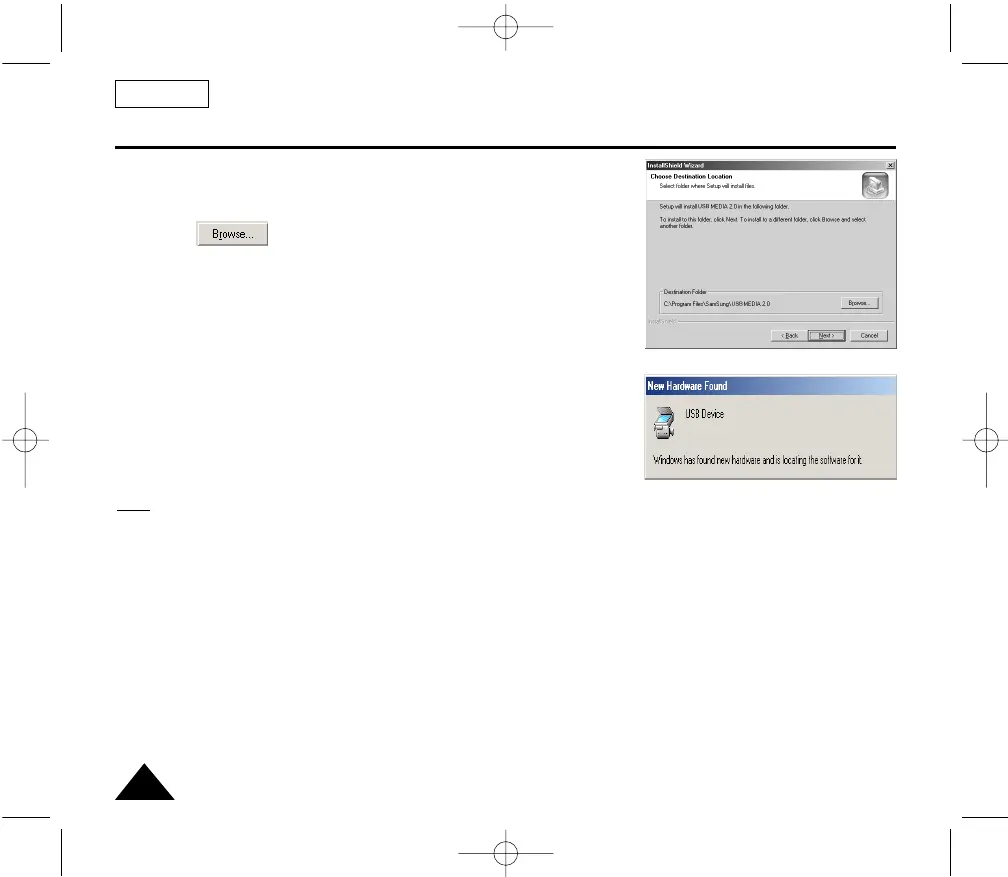
4. The window below displays the folder to install the program.
■ The program is installed in the following folder.
C:\Programfiles\Samsung\USB Media 2.0
■
Click to change the folder.
5. Connect the camcorder to PC.
6. PC finds the new hardware and installs the driver automatically.
7. If the driver is installed, the installation is completed.
8. Execute USB Media 2.0 player on the Windows wall paper.
Note:
■ USB Media 2.0 User's Manual is included on the accompanying CD in Adobe's Portable Document Format (PDF).
The user's manual can be viewed using Acrobat Reader software, which is also included on the CD.
(The Acrobat Reader is a freeware product of Adobe Systems, Inc.)
4.
6.
00732M SCL901 SEA (46-71) 12/26/03 10:46 AM Page 60



 To Next Page