49
ENGLISH
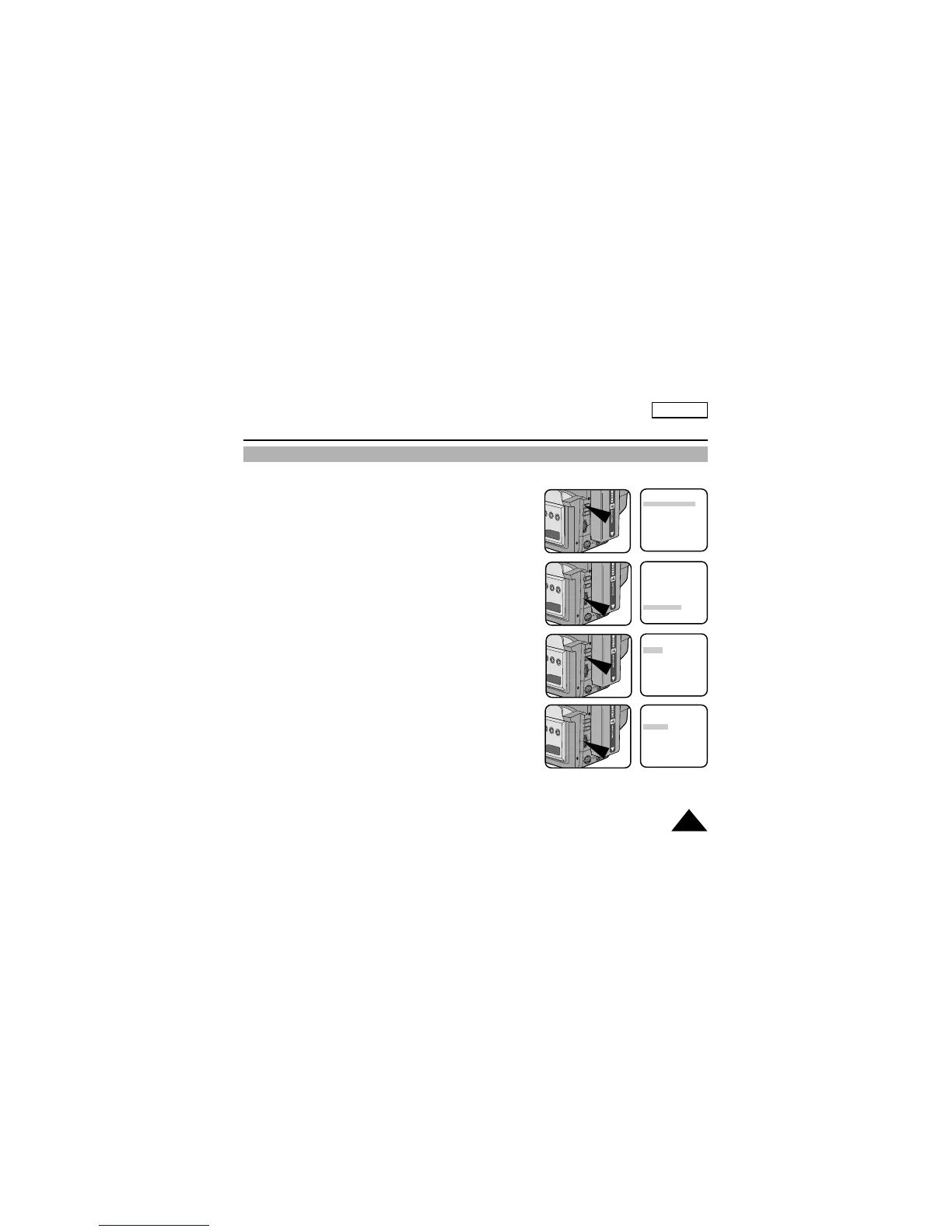
1. Set the power switch to CAMERA mode. (see page 22)
2. Press the MENU ON/OFF button.
■ The MENU list will appear.
3. Turn the UP/DOWN dial to D/TITLE COLOR.......WHITE.
4. Press ENTER.
■ A list of available colors will appear.
5. Turn the UP/DOWN dial to select the appropriate color.
6. Press ENTER.
7. Press the MENU ON/OFF button to end setting.
■ The Title and Date/Time will appear in the Color you chose .
Setting the Date/Title Color
Advanced Recording
MENU
DISPLAY ............ON
WHITE BAL. ......AUTO
CUSTOM SET
CLOCK SET
TITLE SET
TITLE ..................OFF
D/TITLE COLOR
....
WHITE
NEXT: MENU
MENU
DISPLAY ............ON
WHITE BAL. ......AUTO
CUSTOM SET
CLOCK SET
TITLE SET
TITLE ..................OFF
D/TITLE COLOR
....
WHITE
EXIT: MENU
DATE/TITLE COLOR SELECT
[WHITE]
WHITE
YELLOW
CYAN
MAGENTA
RED
GREEN
BLUE
EXIT: MENU
DATE/TITLE COLOR SELECT
[YELLOW]
WHITE
YELLOW
CYAN
MAGENTA
RED
GREEN
BLUE
EXIT: MENU


 To Next Page