40
ENGLISH
Advanced Recording
DSE (Digital Special Effects) in CAMERA mode
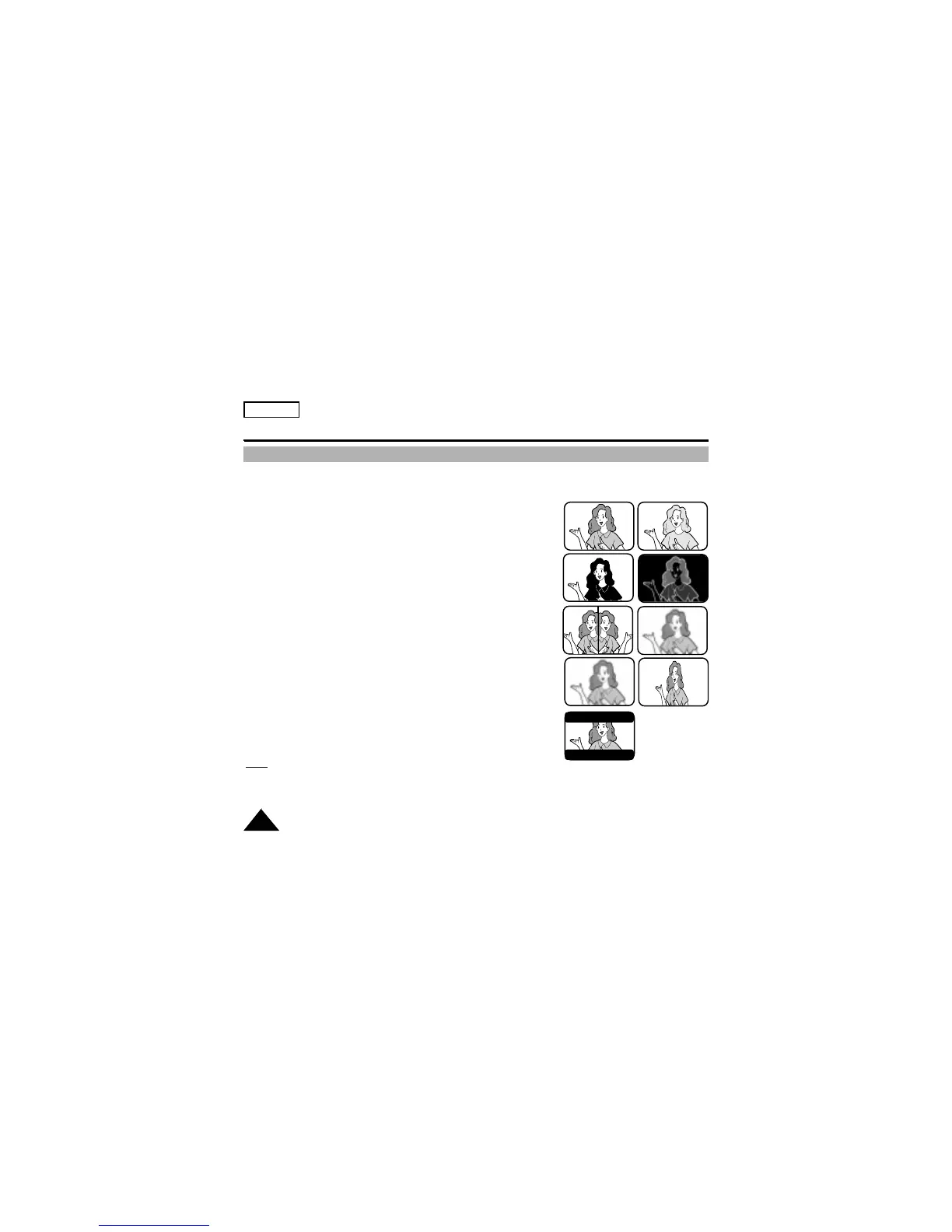
✤ The digital effects enable you to give a creative look to your recording by adding various special effects.
✤ Select the appropriate digital effect for the type of picture that you wish to record.
✤ There are 8 DSE modes.
1. Normal picture
2. SEPIA: This mode gives the image a SEPIA effect.
3. B&W(Black & White): This mode allows the image to be recorded
in black and white.
4. NEG.(Negative): This mode allows images to be recorded by reflecting
the color of the image.
5. MIRROR: This mode cuts the image in half, using the mirror effect.
6. ART: Adds a paint-like effect, called solarization, to the image.
7. MOSAIC: This mode gives the image a checkered design.
8. 16:9(WIDE): This mode provides a 16:9(WIDE) television display.
9. CINEMA: This mode covers the upper/lower portion of the screen to
give a movie-like effect.
Note:
DSE function will not operate in EASY mode.
12
3
7
4
6
8
5
9


 To Next Page