19
Smart
Door Lock
SHS-3320/3321
|
Miscellaneous Information
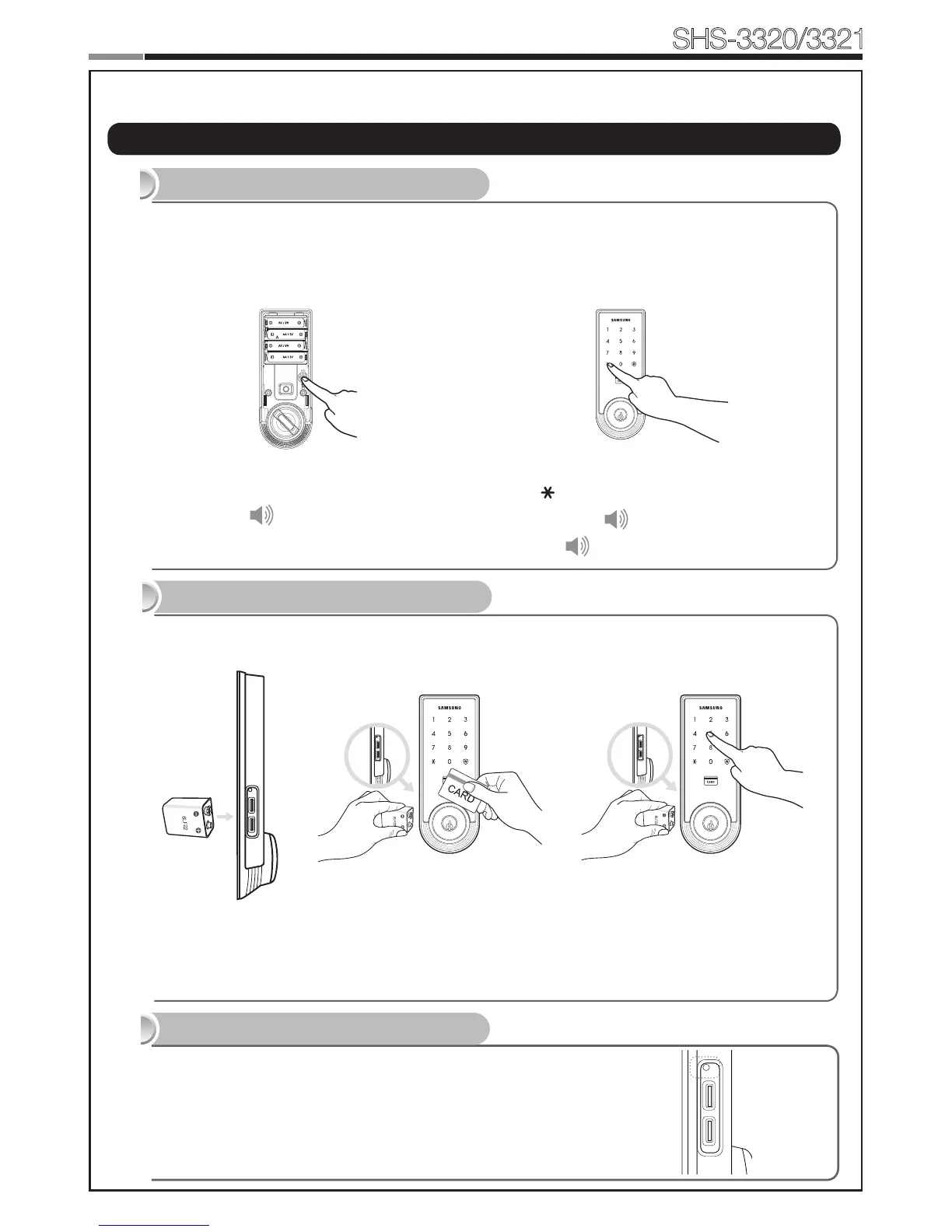
Reset to Factory Default
Resetting the lock will delete all registered information.
Note:AfterReset,letthesensordetectthemagnettosetthehandtypeagain.
All registered Master and user data will be deleted, and the lock will be reset to default
settings.(Refer to the Program section on Page 15 for default values.)
Press the [Registration] button for 10 sec-
onds.
Successful: Ding dong →Dingding
→Dingding
Enter the current Master PIN Code and press
the [ ] button.
Successful: Ding dong dang
Failed: Ding dong ding dong
Restart Function
Continuing to use the lock without replacing the batteries when required will lead to lock
malfunction. Touching a 9V DC battery to the external power contacts on the under-side of the
Exterior Unit will allow for temporary access (continue touching the battery to the contacts until
the lock is open).
9V Battery Emergency Power
19
Note:Restartingdoesnotdeleteregisteredinformation.
If there is no response after touching the [Touchscreen],
use a pin to press the [Restart] button on the left of the
external power contact of the Exterior Unit.
Note:Please,beawareofthattherehasbemorethan50mmgapbetweenthedoorframe
and the external power contact to place the 9V battery for temporary access.
Miscellaneous


 To Next Page