EasyManua.ls Logo

Samsung SNP-L5233H - User Manual

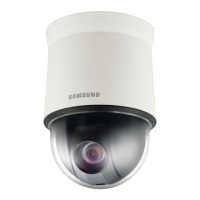
Samsung SNP-L5233H
178 pages
Print Icon
To Next Page IconTo Next Page
Loading...
NETWORK CAMERA
User Manual
SNP-L5233/SNP-L5233H

Questions and Answers

  • T
    Theodore ReedAug 16, 2025
    What to do if Samsung SNP-L5233H viewer got disconnected during monitoring?
    • S
      Suzanne SimmonsAug 16, 2025
      If the viewer disconnects during monitoring, it might be due to changes in the camera or network configurations. Check all network connections. If the camera is connected over a PPPoE network, viewer disconnection can occur under poor network conditions.
  • J
    Jessica RodriguezAug 19, 2025
    Why is my Samsung SNP-L5233H Security Camera not detected in the IP installer program?
    • N
      Nicole FrankAug 19, 2025
      If the Samsung Security Camera connected to the network is not detected in the IP installer program, turn off the firewall settings on your PC and then search for the camera again.
  • B
    Benjamin RobertsAug 21, 2025
    Why can't I record into the SD memory card of Samsung Security Camera?
    • C
      Cynthia GregoryAug 22, 2025
      If you cannot record into the SD memory card, check if the memory card is defective or if the write protection tab of the memory card is set to “Lock.”
  • B
    Brett KempAug 25, 2025
    What to do if Samsung SNP-L5233H reports that NAS setting has failed?
    • G
      Greg HammondAug 26, 2025
      If the Samsung Security Camera reports that the NAS setting has failed, make sure of the following: 1. The IP address and ID/password of the NAS are valid. 2. You can access the designated default folder using the NAS ID. 3. The NAS SMB/CIFS items are unchecked. 4. The NAS and camera IP addresses are in the same format. 5. You haven't tried accessing as another user without formatting the default folder. 6. You are using recommended NAS equipment.
  • L
    laura31Aug 27, 2025
    Why Samsung SNP-L5233H SD memory card is inserted but the camera does not operate properly?
    • R
      Ryan ChurchAug 28, 2025
      If the SD memory card is inserted but the camera does not operate properly: * Check if the memory card is inserted in the proper direction. * Note that the operation of a memory card formatted by other devices is not guaranteed. Try formatting the memory card again in the camera's Storage menu.
  • R
    Robin RossAug 31, 2025
    Why is there an image overlap on my Samsung Security Camera?
    • D
      Derek SimmonsAug 31, 2025
      If images overlap, check if multiple cameras are set to a single multicast address instead of different addresses. Using a single address for multiple cameras can cause overlapping images.
  • H
    hughesjenniferSep 3, 2025
    What to do if I cannot connect to Samsung SNP-L5233H system using a tab browser of Internet Explorer 7.0?
    • A
      Alan ComptonSep 3, 2025
      When connecting with a new window or tab in Internet Explorer 7.0, an error may occur because cookie data is shared. Instead of using a new window or tab, select “File ? New session.”
  • K
    Kenneth LindseySep 5, 2025
    Why can't I format the SD memory card in my Samsung SNP-L5233H Security Camera?
    • R
      Rebecca MooreSep 5, 2025
      If you cannot format the SD memory card, check if the write protection tab of the memory card is set to “Lock.”
  • T
    thompsonjenniferSep 9, 2025
    After the is set in , why the file is not e-mailed, even when the image analysis event is generated by the Samsung SNP-L5233H?
    • C
      Christina HernandezSep 9, 2025
      If, after setting the video analytics, the file is not emailed even when an image analysis event is generated, verify the following settings in sequence: 1. Check the Data & Time settings. 2. Ensure that Motion detection / Video analytics is set to Enable. 3. Confirm that the E-mail option of the Event action setup menu is checked.
  • J
    Jamie LamSep 12, 2025
    Why no signal is found at the Alarm Output port even when an intelligent video analysis event is generated by my Samsung SNP-L5233H Security Camera?
    • W
      Whitney WestSep 12, 2025
      If no signal is found at the Alarm Output port even when an intelligent video analysis event is generated, check the alarm output port settings.

Summary

Overview

Important Safety Instructions

Essential safety precautions to follow when using the network camera and its components.

Product Features

Detailed explanation of the network camera's capabilities and functionalities.

At a Glance (SNP-L5233)

Visual identification and description of the camera's external and internal components.

Installation & Connection

Connecting with Other Device

Instructions for connecting the camera to power adapters, PoE, and other network devices.

Installing by Surface Attachment

Step-by-step guide for mounting the camera using surface attachment methods.

Inserting;Removing a SD Memory Card

Procedures for safely inserting and removing the SD memory card for storage.

Network Connection and Setup

Connecting Directly to Local Area Network

Guide for establishing a direct network connection between the camera and a local PC.

Static IP Setup

Configuration steps for manually setting a static IP address for the camera.

Port Range Forwarding Setup

Instructions for configuring port forwarding on a broadband router for remote camera access.

Web Viewer

Connecting to the Camera

How to access the camera's interface using a web browser via IP address or URL.

Using the Live Screen

Overview of the live video monitoring screen and its control functions.

Playing Recorded Video

Steps for searching and playing back recorded video footage from storage.

Setup Screen

Basic Setup

Initial configuration of camera settings, including video profiles and system properties.

PTZ Setup

Configuration options for Pan, Tilt, and Zoom functions, including presets and tours.

Network Setup

Configuration of network-related settings like DDNS, IP filtering, and SSL.

Event Setup

Configuration for event triggers such as FTP/Email, Alarm, Tampering, and Video Analytics.

Appendix

Specification

Technical specifications of the camera models SNP-L5233 and SNP-L5233H.

Troubleshooting

Solutions for common problems encountered while using the camera.

Samsung SNP-L5233H Specifications

General IconGeneral
BrandSamsung
ModelSNP-L5233H
CategorySecurity Camera
LanguageEnglish

Related product manuals