26_ operating
USING THE VACUUM CLEANING ROBOT
Starting/Stopping Cleaning
You can run or stop all vacuum cleaning robot functions.
■
Each vacuum cleaning robot function only runs when the
Power Switch is turned on.
■
When the vacuum cleaning robot is operating, press the (
)
button to cancel the operation and select a function.
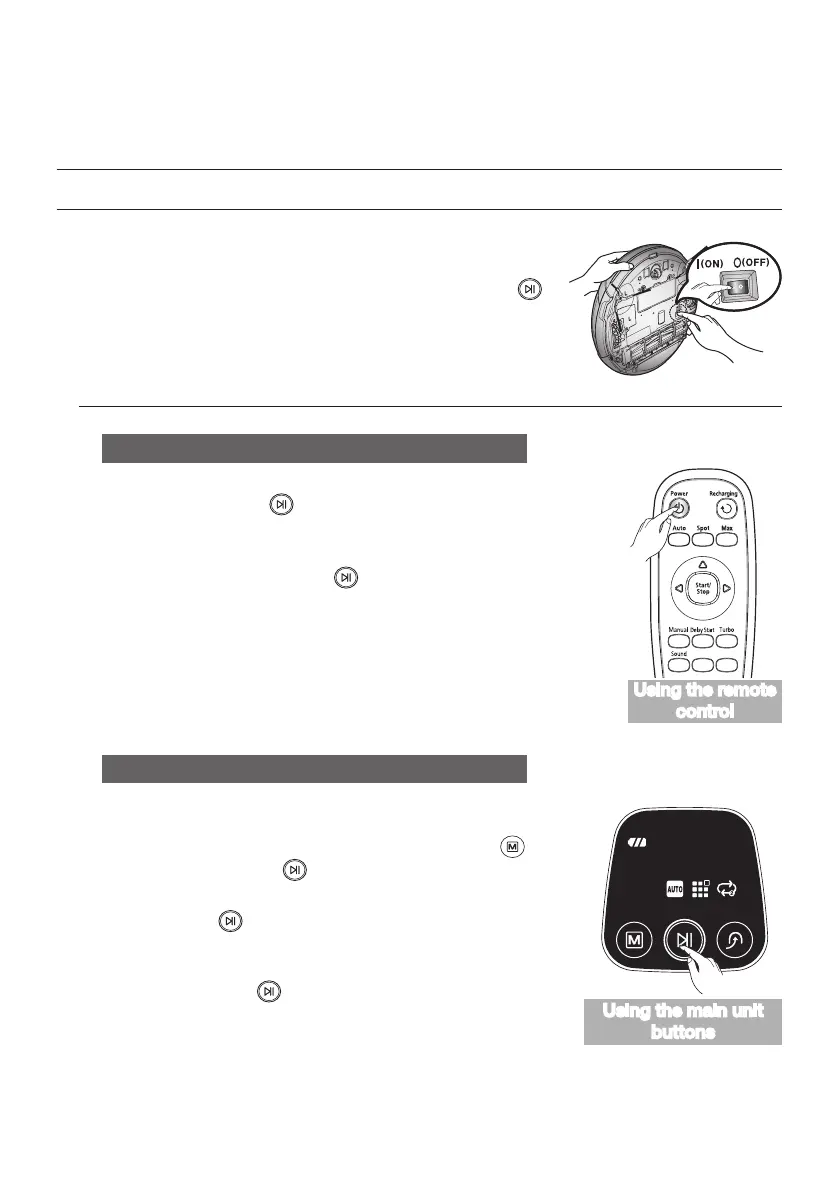
Turning the power on or off
Turning the power on
- Main unit: Press the (
) button.
Turning the power off
- Remote control: Press the [Power] button.
- Main unit: Press and hold the (
) button down for 3 seconds.
❈
If no key is pressed for approximately 1 minute after turning the power
on, the power is automatically cut to prevent the battery discharging.
To turn the power on again, press and hold the power (Start/Stop)
button on the main body.
Starting or stopping cleaning
Starting
- Remote control : Press the Auto, Spot, Max, Manual button.
- Main unit : Select Auto, Spot, Max mode by using the (
) button
and then pressing the (
) button.
- When cleaning begins, the vacuum cleaning robot starts to move.
❈
Pressing the (
) button without selecting cleaning mode starts
to perform the Auto mode cleaning.
Stopping
- To stop, press the (
) remote control or main unit button.
- When cleaning is stopped, the vacuum cleaning robot stops.
Using the remote
control
Using the main unit
buttons



 To Next Page