24_ operating
Setting the Time
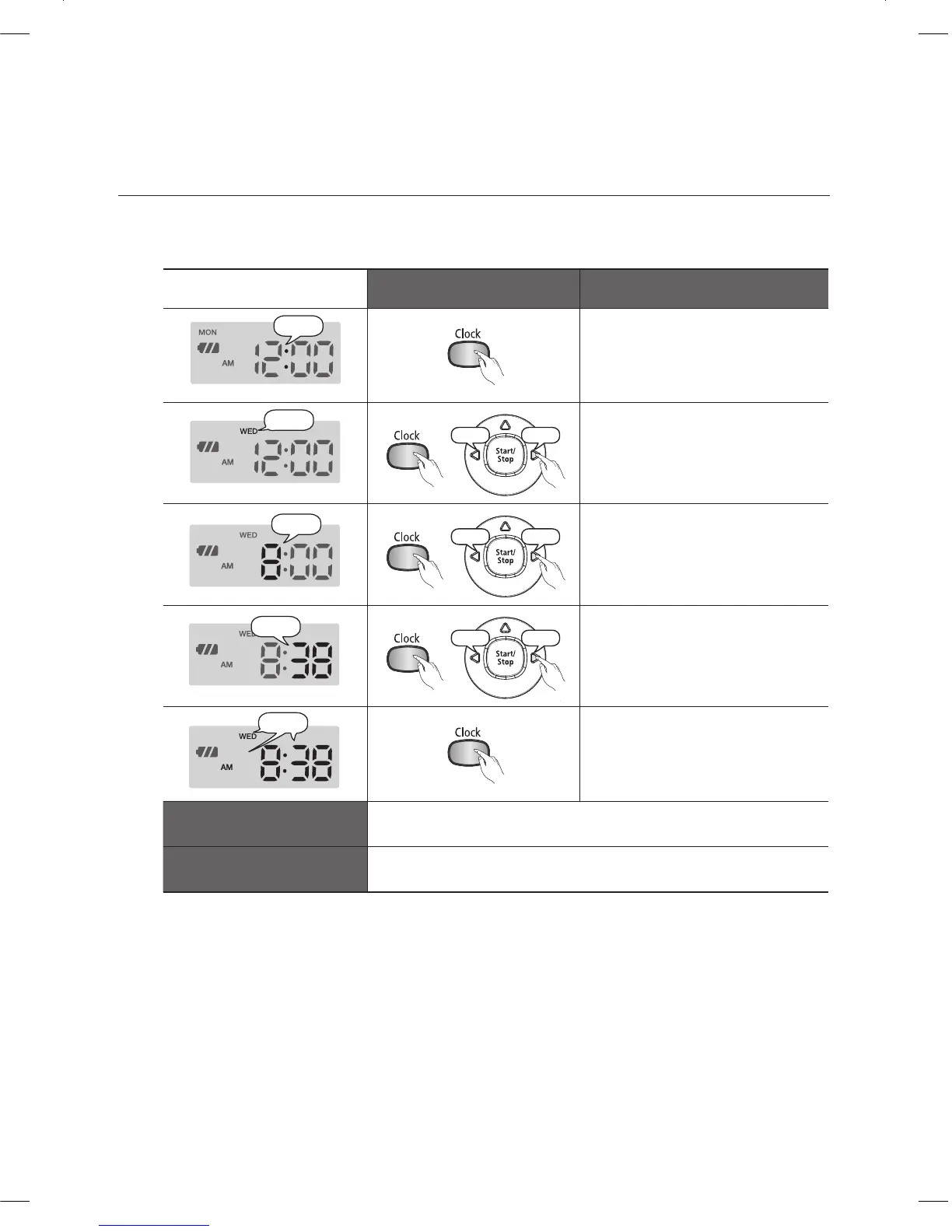
The clock displays the current time. You can change the current time with the following steps.
You can only set the time using the remote control.
■
Remote Control Confi guration Sequence
Blinks
Press the Clock button.1.
The current time is displayed. -
Increase
Press the Clock button. 2.
The day of the week will blink. -
Press the
Y
or
Z
button to
set the day of the week.
Increase
Press the Clock button. Press 3.
the
Y
or
Z
button to set the
hour.
Increase
Press the Clock button. Press 4.
the
Y
or
Z
button to set the
minutes.
Blinks
Press the Clock button.5.
The value you set will -
blink and the settings are
completed.
Canceling the Settings
Press the Start/Stop button to cancel the settings and exit -
Time Set mode.
Remote Control
If there is no input for 1 minute while you are setting the time, -
the cleaner exits Time Set mode automatically.
DJ68-00633G(EN).indd 24DJ68-00633G(EN).indd 24 2012.2.15 6:45:58 PM2012.2.15 6:45:58 PM



 To Next Page