34_ operating
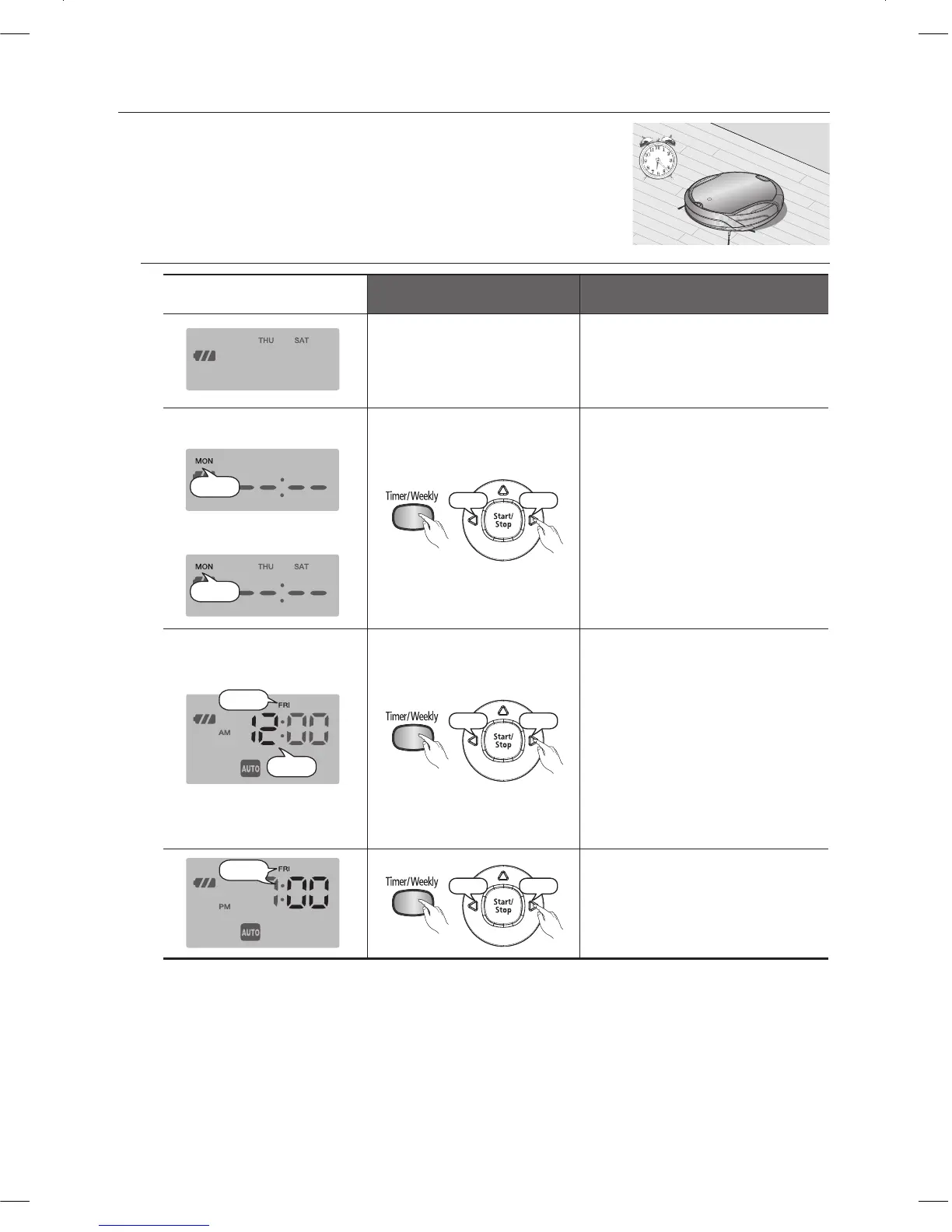
Weekly Reservation
In this mode, you can schedule the cleaner to start a once-off
cleaning run from the specifi ed time on the specifi ed days of
the week.
A scheduled cleaning run is only performed when the cleaner is
■
docked to the charging station.
Remote Control Confi guration Sequence
Standby mode
In Standby mode, the -
scheduled days of the week
are displayed.
When there is no reservation
When there is no reservation
When there is a reservation
When there is a reservation
Increase
Hold down the Timer/Weekly 1.
button for more than 3
seconds. Press the
Y
or
Z
buttons to set the day of the
week.
If there is no reservation set -
previously, the current day of
the week is displayed.
If there is no scheduled time, -
--:-- is displayed.
Increase
Press the Timer/Weekly 2.
button. Press the
Y
or
Z
buttons to set the hour.
If there is a scheduled hour, it
❈
is displayed.
Cleaning Mode
❈
If there is no reservation set -
previously, the cleaning mode
is set to Auto mode. If there
is a reservation, it is set to the
confi gured mode.
Increase
Press the Timer/Weekly 3.
button.
The time increases/decreases -
by 5 minutes. Press the
Y
or
Z
button to set the minutes.
~
DJ68-00633G(EN).indd 34DJ68-00633G(EN).indd 34 2012.2.15 6:46:3 PM2012.2.15 6:46:3 PM



 To Next Page