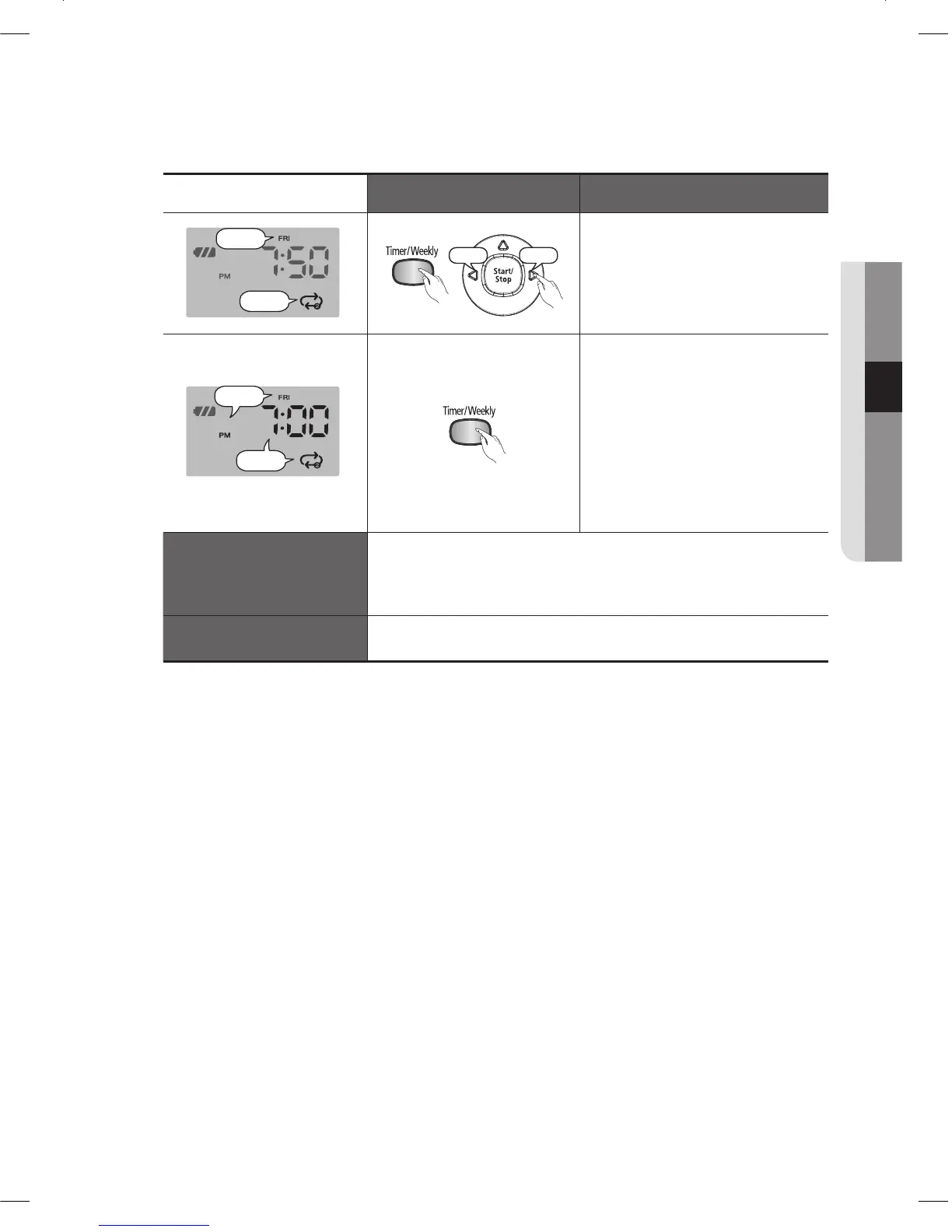
Increase
Press the Timer/Weekly 4.
button. Press the
Y
or
Z
button to set the cleaning
mode.
You can select either Auto or -
Repeat cleaning mode.
Blinks
Press the Timer/Weekly 5.
button.
The value you set blinks and -
the settings are completed.
After the settings are
❈
completed, the day of week
you have set blinks. At this
time you can move to step ( 2 )
and add another day of the
week.
Canceling the Settings
If you press the Start/Stop button while you are making a -
weekly reservation, the reservation for the currently set day of
the week is canceled. Then if you press the button again, the
cleaner exits reservation setting mode.
Timeout
If there is no input for 1 minute while setting the time, the -
cleaner exits the reservation setting mode automatically.
DJ68-00633G(EN).indd 35DJ68-00633G(EN).indd 35 2012.2.15 6:46:4 PM2012.2.15 6:46:4 PM



 To Next Page