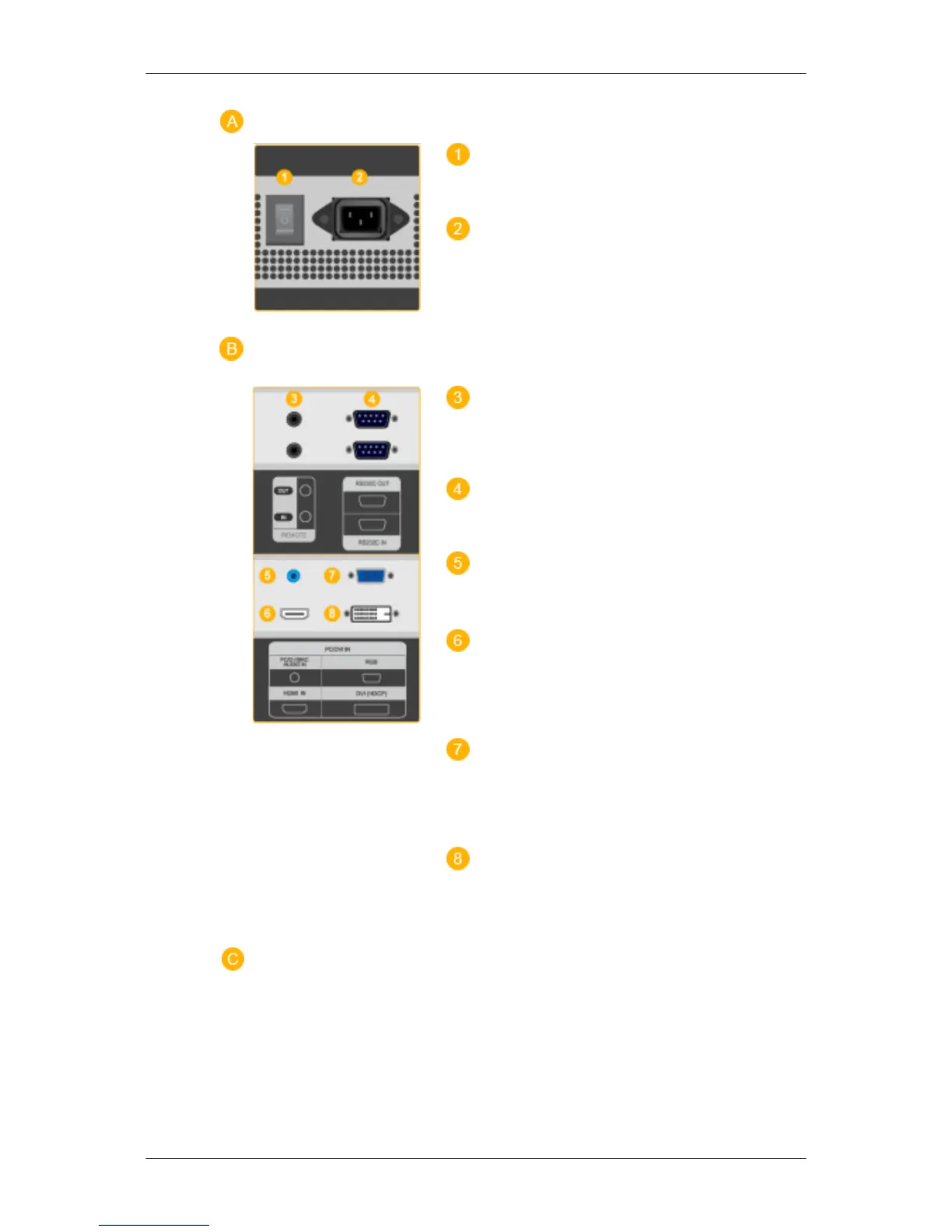
POWER S/W ON [ │ ] / OFF [O]
Switches the LCD Display On/Off.
POWER IN
The power cord plugs into the LCD Display and
the wall plug.
REMOTE OUT/IN
You can use a wired remote control by connecting
it to your LCD Display.
RS232C OUT/IN (RS232C Serial PORT)
MDC(Multiple Display Control) Program Port
DVI / PC / HDMI IN [PC/DVI/BNC AUDIO
IN] (PC/DVI/BNC/HDMI Audio Connection Ter-
minal (Input))
DVI / PC / HDMI IN [HDMI]
Connect the HDMI terminal at the back of your
LCD Display to the HDMI terminal of your dig-
ital output device using a HDMI cable.
DVI / PC / HDMI IN [RGB](PC Video Con-
nection Terminal)
Using a D-Sub Cable (15 pin D-Sub) - PC mode
(Analog PC)
DVI / PC / HDMI IN [DVI(HDCP)] (PC
Video Connection Terminal)
Using a DVI Cable (DVI-D to DVI-D) - DVI
mode (Digital PC)
Introduction







 To Next Page