4
Setting up Your Monitor
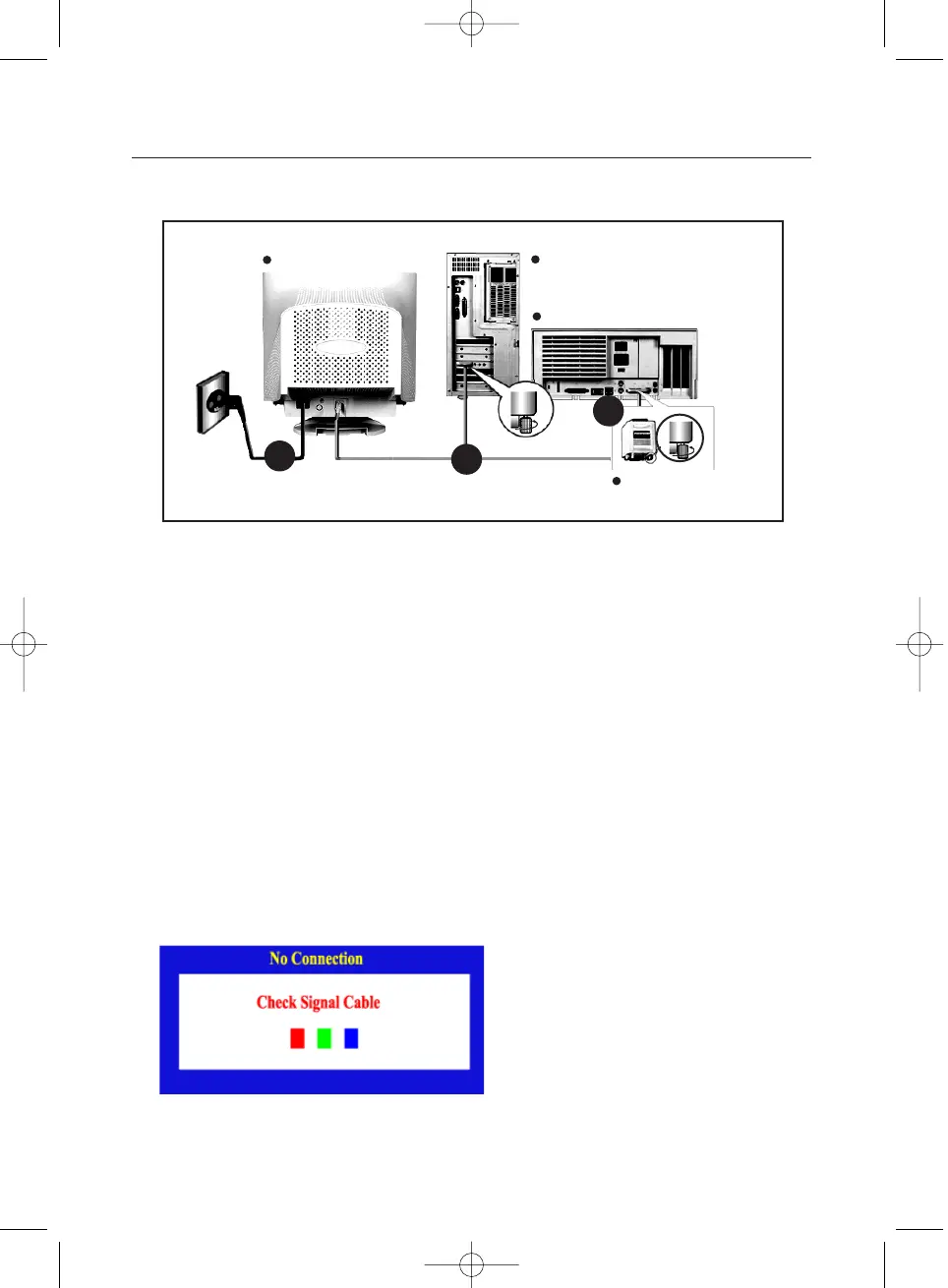
Connecting Your Monitor
1 Connect the power cord for your monitor to the power port on the back of the monitor.
Plug the power cord for the monitor into a nearby outlet.
2 Connect the end of the signal cable to your computer's video port
(video board, video card or graphics card).
3 If you are using a Macintosh computer, connect the cable to a Macintosh adapter,
and set the pins on your adapter(Adapter not included).
A PC-compatible computer does not need an adapter.
4
Turn on your computer and monitor. If your monitor displays an image, installation is complete.
3
Rear of Computer
Rear of Macintosh
Adapter for Macintosh
(Not included)
Rear of Monitor
1
2
Self-Test Feature Check
1. Turn off both your computer and the monitor.
2. Unplug the video cable from the back of the computer.
3. Turn on the monitor.
If your monitor works normally, the following screen appears.
Failure of any of the boxes to appear indicates a problem with your monitor. This box also appears during
normal operation if the video cable becomes disconnected or damaged.
Your monitor provides a self test feature that allows you to check whether your monitor is
functioning properly.












 To Next Page