Adjusting Your Monitor
8
Size
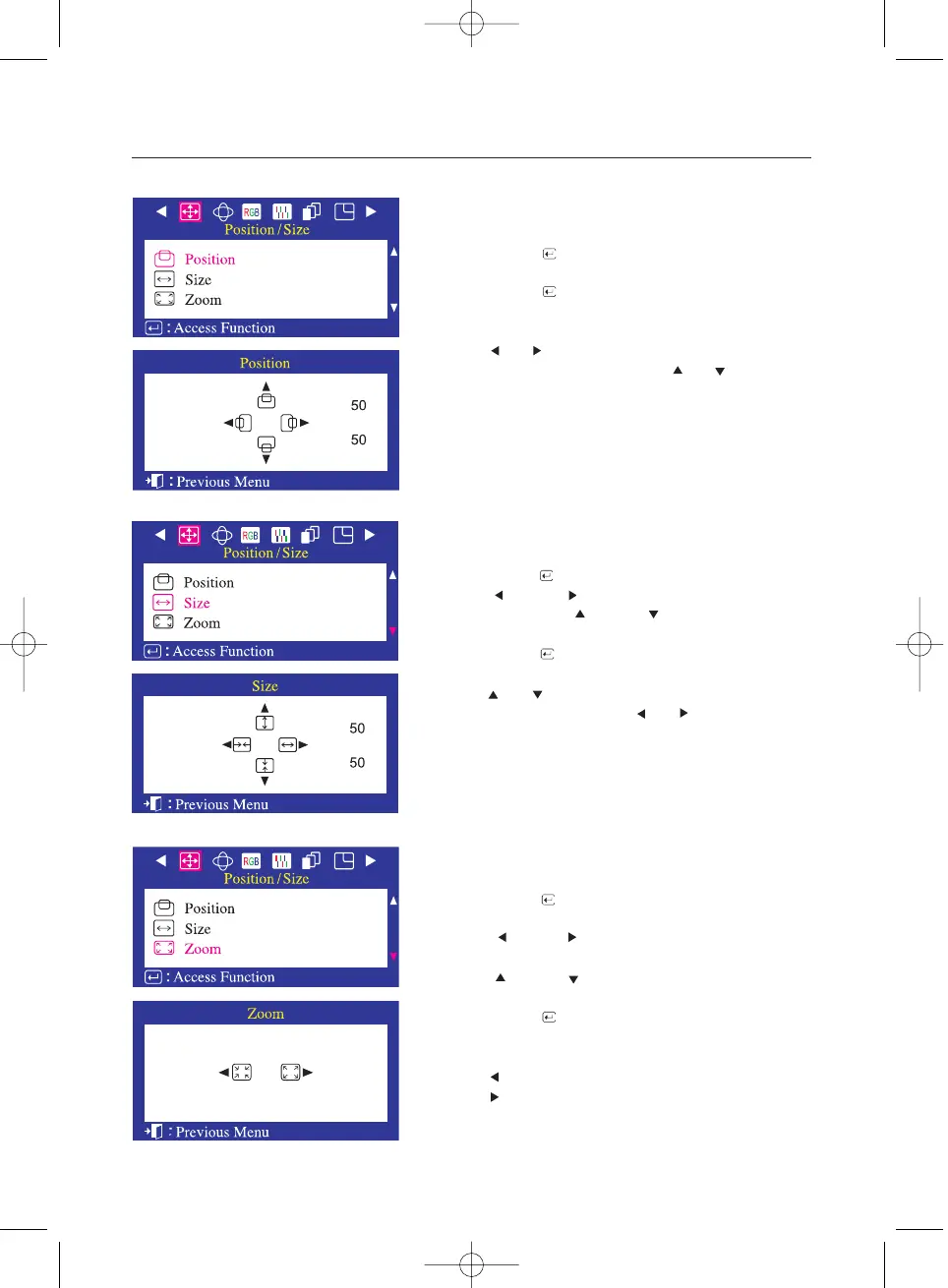
Follow these instructions to change the size of the monitor's
entire display.
1 Push the Menu ( ) button.
2 Push the button or button until the Position/Size screen
is displayed. push the button or button to select Size.
3 Push the Menu ( ) button to open the Size adjustment screen.
4 Use the and buttons to change the vertical size of the
monitor's viewing area; use the and buttons to change
the horizontal size of the monitor's viewing area.
Follow these instructions to change the Position of the
monitor's entire display.
Position
1 Push the Menu ( ) button.
2 Push the Menu ( ) button to open the Position
adjustment screen.
3 Use the and buttons to change the vertical position
of the monitor's viewing area; use the and buttons to
change the horizontal position of the monitor's viewing area.
1 Push the Menu ( ) button.
2 Push the button or button until the Position/Size screen
is displayed.
push the button or button to select zoom.
3 Push the Menu ( ) button to open the Size
adjustment screen.
4 Use the button to decrease the screen viewing area.
Use the button to enlarge the screen viewing area.
Zoom
Follow these instructions to get a close-up or a longshot
view of the monitor's viewing area.












 To Next Page