3-5 Using the Product
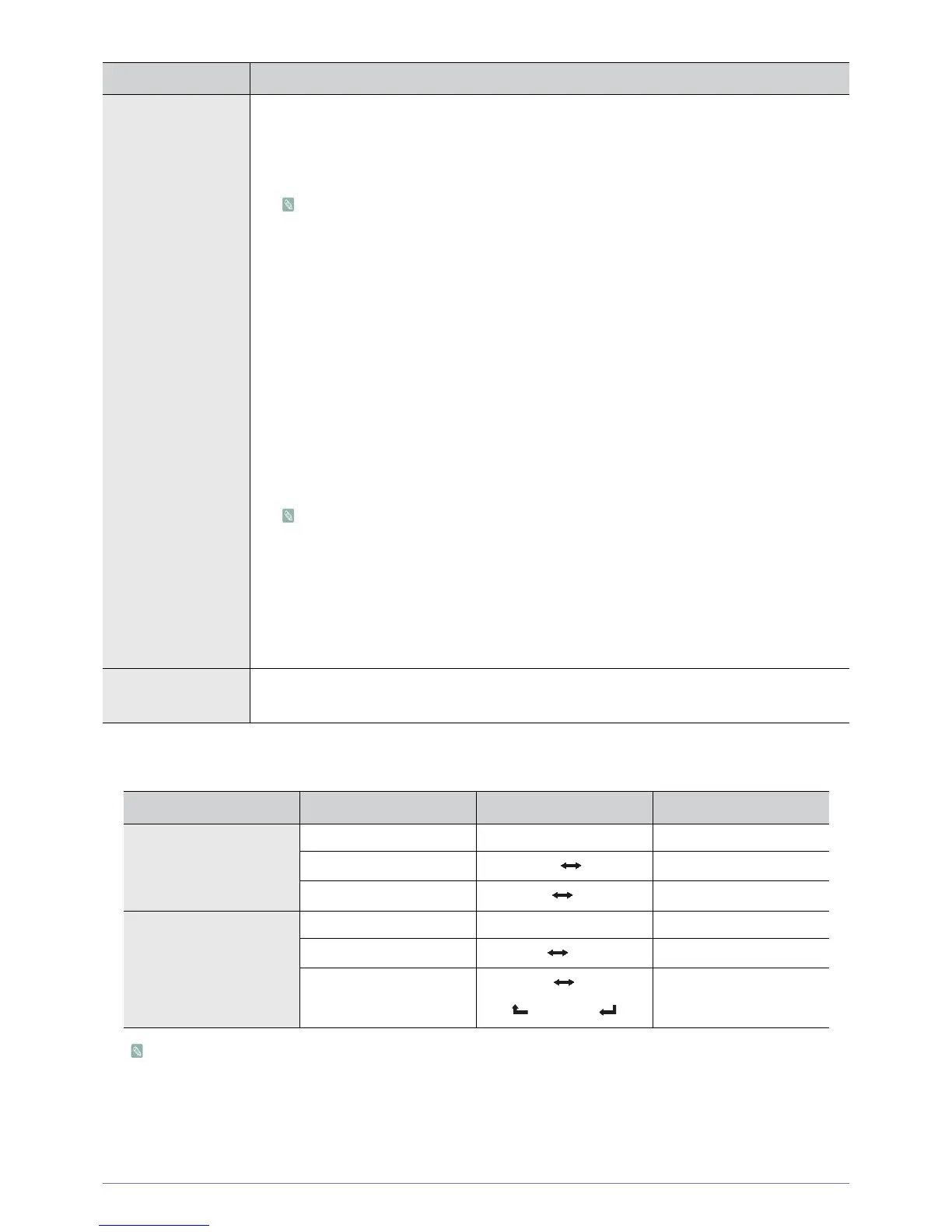
Selecting the Sound Mode
When you set to <Dual I-II> the current sound mode is displayed on the screen.
• If the stereo signal is weak and an automatic switching occurs, then switch to the mono.
• This function is only activated in stereo sound signal. It is deactivated in mono sound signal.
• This function is only available in <TV> mode.
Additional Setting
Digital channels only
• <DTV Audio Level>
This function allows you to reduce the disparity of a voice signal (which is one of the signals
received during a digital TV broadcast) to a desired level.
• According to the type of broadcast signal, MPEG / HE-AAC can be adjusted between -
10dB and 0dB.
• To increase or decrease the volume, adjust between the range 0 and -10 respectively.
• <SPDIF Output>
SPDIF (Sony Philips Digital InterFace) is used to provide digital sound, reducing interference
going to speakers and various digital devices such as a DVD player.
- <Audio Format>
During the reception of a digital TV broadcast, you can select the Digital Audio output
(SPDIF) format from the options <PCM> or <Dolby Digital>.
- <Audio Delay>
Correct audio-video sync problems, when watching TV or video, and when listening to
digital audio output using an external device such as an AV receiver (0ms ~ 250ms).
• <Dolby Digital Comp>
This function minimizes signal disparity between a dolby digital signal and a voice signal (i.e.
MPEG Audio, HE-AAC, ATV Sound).
Select Line to obtain dynamic sound, and RF to reduce the difference between loud and soft
sounds at night time.
-<Line>
Set the output level for signals greater or less than -31dB (reference) to either -20dB or -
31dB.
-<RF>
Set the output level for signals greater or less than -20dB (reference) to either -10dB or -
20dB.
Sound Reset You can restore the Sound settings to the factory defaults.
• <OK> - <Cancel>
Audio Type Dual I / II Default
A2
Stereo
Mono <MONO> Automatic change
Stereo
<STEREO> <MONO>
Automatic change
Dual
<DUAL I> <DUAL II>
<DUAL I>
NICAM
Stereo
Mono <MONO> Automatic change
Stereo
<MONO> <STEREO>
Automatic change
Dual
<MONO> <DUAL I>
<DUAL II>
<DUAL I>
MENU DESCRIPTION











 To Next Page