2-4 Installing the Product
2-4 Connecting to a Computer
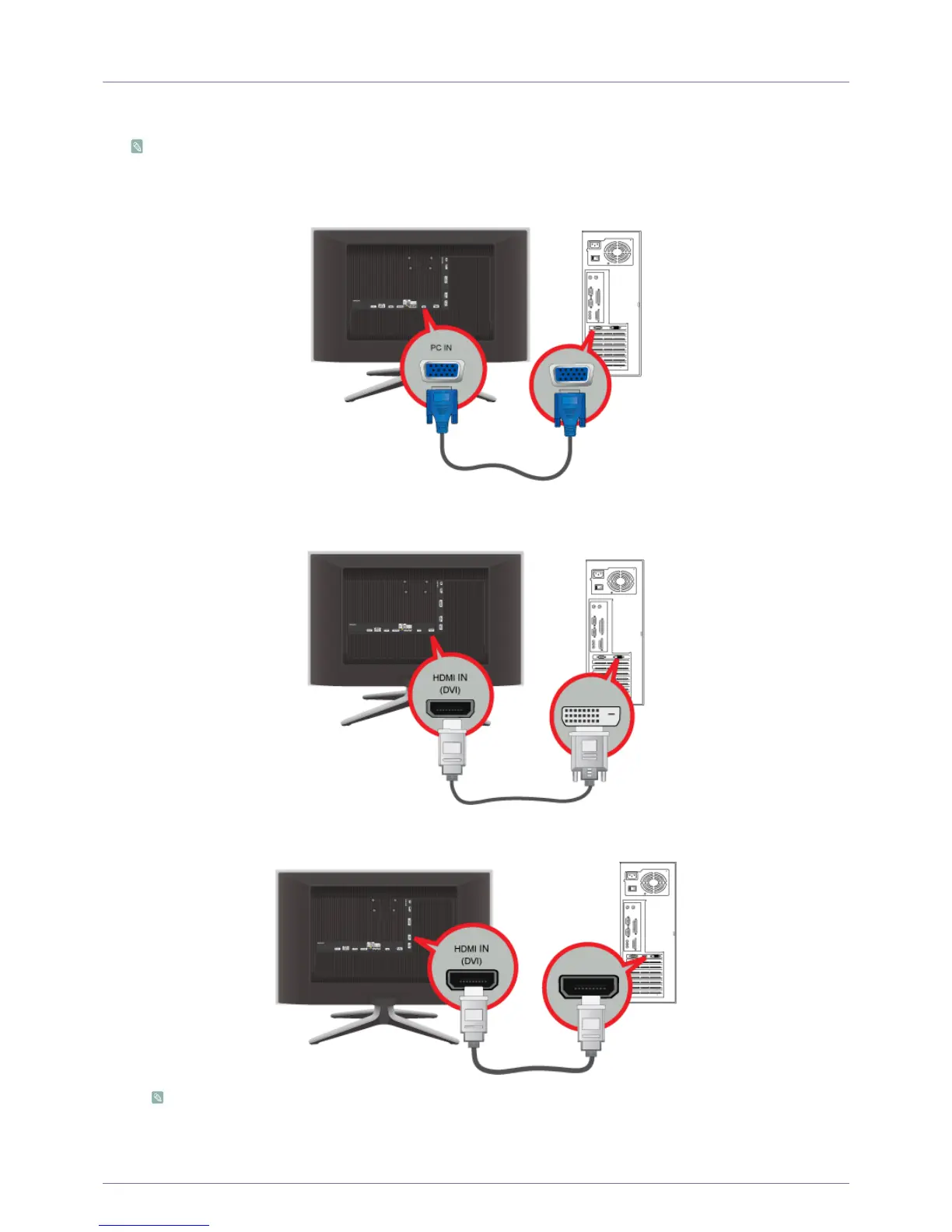
1. 1. Connect the product to a PC depending on the video output supported by the PC.
The connecting part may differ depending on the product model.
• When the graphics card provides a D-Sub <Analogue> output
- Connect the [PC IN] port of the product to the D-Sub port of the PC with the D-Sub cable.
• When the graphics card provides a DVI <Digital> output
- Connect the [HDMI IN 1, 2 (DVI)] port of the product to the DVI port of the PC with the HDMI to DVI cable.
• When the graphics card provides a HDMI output
- Connect the [HDMI IN 1, 2 (DVI)] port of the product to the HDMI port of the PC with the HDMI cable.
When a PC with a resolution of 1920 x 1080 @ 60 Hz is connected to the [HDMI IN 1, 2 (DVI)]port, you should set
the <HDMI> mode to <DVI PC> in the <Edit Name> of the <Input> mode. In this case, a separate sound connection
is required.











 To Next Page