Using the Product 3-5
Input
Application
MENU DESCRIPTION
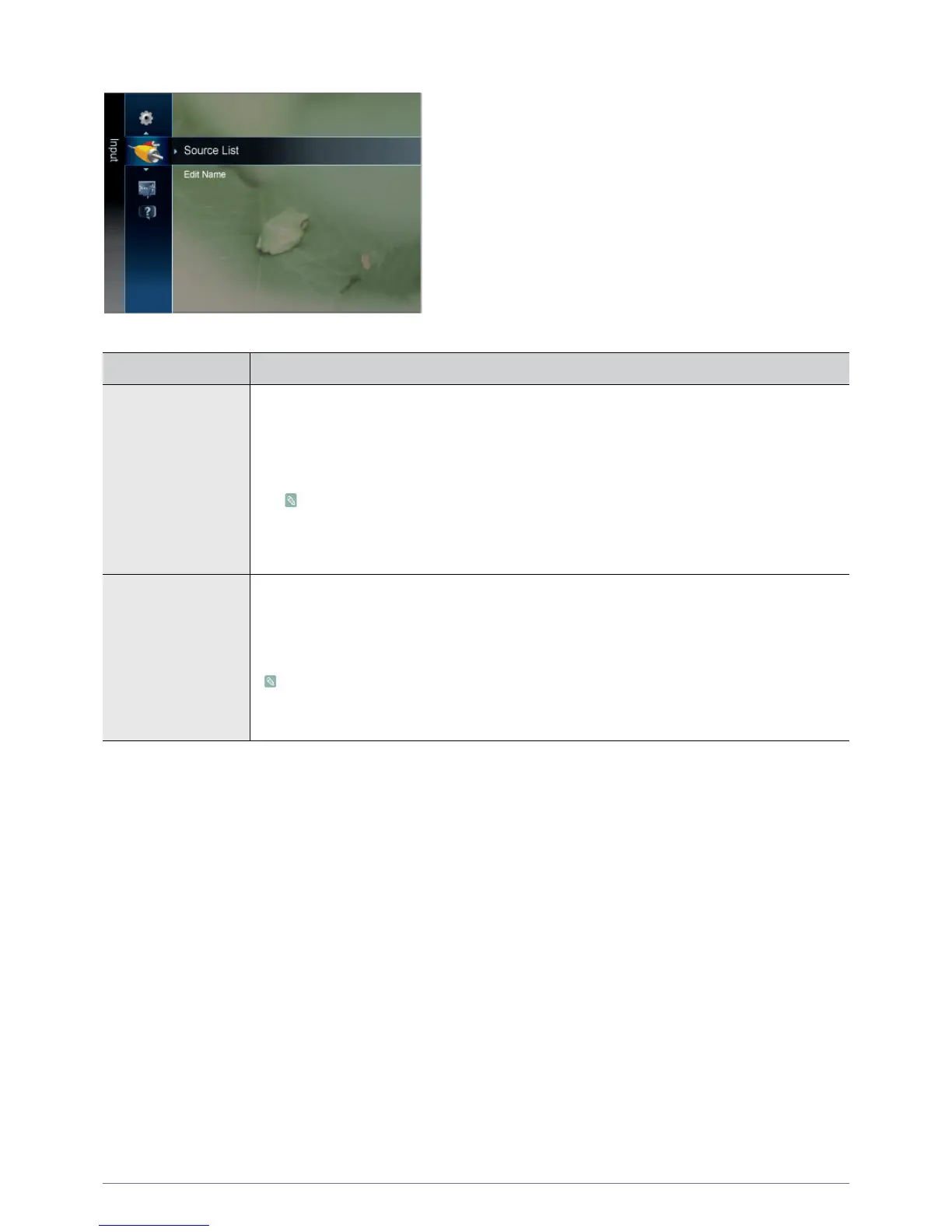
Source List Use to select <PC>, <TV> or an external input source connected to the product. Use to select the
screen of your choice.
You can use the [SOURCE] button on the remote control.
• <TV> / <Ext> / <PC> / <AV> / <Component> / <HDMI1> / <HDMI2> / <USB>
• <AV> and <Component> cannot be connected at the same time.
• In the <Source List>, connected inputs will be highlighted.
• <Ext> and <PC> always stay activated.
Edit Name Name the input device connected to the input jacks to make your input source selection easier.
• <VCR> - <DVD> - <Cable STB> - <Satellite STB> - <PVR STB> - <AV Receiver> - < Game>
- <Camcorder> - <PC> - <DVI PC> - <DVI Devices> - <TV> - <IPTV> - <Blu-ray> - <HD
DVD> - <DMA>
When a PC with a resolution of 1920 x 1080 @ 60 Hz is connected to the [HDMI IN 1, 2 (DVI)]
port, you should set the <HDMI> mode to <DVI PC> in the <Edit Name> of the <Input> mode.
In this case, a separate sound connection is required.











 To Next Page