
 Need help?
Do you have a question about the Samsung VR20T6001M Series and is the answer not in the manual?
Important warnings for safe operation, including power cord, wet hands, temperature, and flammables.
Precautions for use, such as clearing the area, avoiding water, and detecting drops.
Tips on slopes, charging, obstacles, wet mops, and protective film removal.
Warning about chemicals known to cause cancer and reproductive harm.
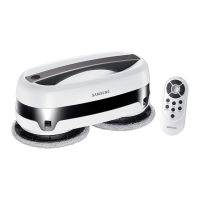
Identifies main unit, floor plate, mop kits, remote control, power adapter, and brushes.
Details on Motheryarn (Gray) and Microfiber (Green) mops for effective cleaning.
Details front, bottom, and rear views, including sensors, handle, and power jack.
Illustrates top and bottom views, showing rubber cap, water inlet, velcro, and wick.
Use only authorized adapters and do not charge non-rechargeable batteries.
Connects the power adapter to the charging port on the back of the main unit.
Explains LED colors (Yellow, Blue, Off) for battery status: low, >80%, and fully charged.
Disconnect power, wring mops, and ensure water supply kit is filled to prevent static electricity.
Instructions for wetting, attaching mop pads, filling, and connecting the water supply mop kit.
Ensures rubber cap is closed and mop kit is correctly attached for proper function.
Steps to wash mop pads using detergent and dry them, with emphasis on using the silicone brush.
Procedure to separate, empty water, and clean the water supply wick if not working.
Reminds users to dry mop pads after use and avoid leaving wet mops on floors to prevent damage.
Do not use the main unit without the water supply mop kit, as it may damage the device.
Instructions on how to start cleaning via the main unit or remote, and how to stop.
Details the range and buttons on the remote control for operating the mopping robot.
Guidance on choosing cleaning modes using the remote control.
Explains eight cleaning modes: Auto, Edge, Focus, Intensive, Pattern, Step, 50min, and Manual.
Allows manual cleaning by holding the unit, suitable for desks and glass surfaces.
Steps to activate, stop, and precautions for using the Handy Cleaning mode.
Instructions on cleaning obstacle and cliff detection sensors with a cotton swab or dry cloth.
Do not use benzene or alcohol to clean the sensors.
Details LED indications (Blue, Yellow, Red) during charging and operation for various statuses.
Explains LED blinking patterns and alarm sounds indicating errors or low water levels.
Clarifies normal behaviors like LED turning off after inactivity or turning on when ready.
Troubleshooting steps for power issues, including checking the charger and battery.
Resolving issues with remote control functionality and unit responsiveness.
Addresses abnormal movement, weak cleaning force, and excessive noise.
Diagnosing and resolving issues related to reduced battery operating time.
Provides dimensions, weight, power consumption, battery type, and operating time for the main unit.
Details size, weight, signal transmission distance, and battery type for the remote control.
 General
| Brand | Samsung |
|---|---|
| Model | VR20T6001M Series |
| Category | Vacuum Cleaner |
| Language | English |







 To Next Page
