EasyManua.ls Logo

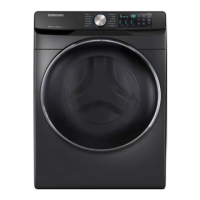
Samsung WF45K6500A series - User Manual

Samsung WF45K6500A series
76 pages
Print Icon
To Next Page IconTo Next Page
Loading...
Washer
User manual
WF45K6500A*/WF45K6200A*
WF45K6500AV_DC68-03665A-01_EN.indd 1 2016/4/1 13:37:05

Other manuals for Samsung WF45K6500A series

Questions and Answers

  • D
    Daniel RobinsonAug 21, 2025
    Why my Samsung WF45K6500A does not start?
    • B
      Brenda LopezAug 21, 2025
      If your Samsung Washer doesn't start, there are several things to check: * Ensure the washer is properly plugged into a working outlet. * Verify that the door is completely closed. * Make sure the water faucets connected to the washer are fully open. * Press or tap the Start/Pause button to initiate the wash cycle. * Confirm that the Child Lock feature is not enabled. * Inspect the fuse or reset the circuit breaker.
  • B
    bishopjonathanSep 3, 2025
    Why is my laundry load still wet after Samsung Washer cycle?
    • B
      brianwatsonSep 3, 2025
      If your laundry load is still wet after a cycle in your Samsung Washer, try these solutions: * Use the High or Extra High spin speed setting. * Use high efficiency (HE) detergent to reduce excessive suds. * Ensure the drain hose is not kinked or clogged.
  • C
    Christopher ChenSep 1, 2025
    Why detergent remains in the detergent drawer of my Samsung Washer?
    • C
      Christopher BakerSep 1, 2025
      If detergent remains in the drawer of your Samsung Washer after a cycle, try these steps: * Ensure the washer is running with sufficient water pressure. * If using powdered detergent, use only the recommended amount. * If using liquid detergent, avoid overfilling the liquid detergent compartment. * Remove the liquid detergent and softener containers, and then clean the detergent drawer.
  • J
    Jennifer CarterAug 30, 2025
    Why does my Samsung WF45K6500A Washer keep stopping?
    • J
      John HarringtonAug 31, 2025
      If your Samsung Washer stops unexpectedly, consider these solutions: * Ensure the power cord is plugged into a working electrical outlet. * Check the fuse or reset the circuit breaker. * Close the door and press the Start/Pause button to restart the washer. * Be aware that some cycles include pause or soak periods. * Check the mesh filter of the water supply hose at the faucets for clogs. * Insufficient power supply may cause the washer to temporarily stop draining or spinning.
  • J
    John LopezAug 29, 2025
    How to fix excessive vibrations or noise in Samsung Washer?
    • I
      Isaac GarzaAug 29, 2025
      If your Samsung Washer is vibrating excessively or making unusual noises, here's what you can do: * Ensure the washer is installed on a level, solid, and non-slippery floor. * If the floor is uneven, adjust the height using the leveling feet. * Confirm that the shipping bolts have been removed. * Make sure the washer isn't touching any other objects. * Ensure the laundry load is balanced inside the drum.
  • V
    Valerie CrossAug 27, 2025
    Why Samsung WF45K6500A water supply is insufficient?
    • T
      tvillarrealAug 27, 2025
      If your Samsung Washer isn't getting enough water, or no water at all, try these solutions: * Fully open the faucet connected to the washer. * Ensure that the washer door is properly closed. * Check if the water supply hose is frozen. * Make sure the water supply hose is not kinked or clogged. * Verify that there is sufficient water pressure.
  • D
    Daniel CopelandAug 26, 2025
    How to fix Samsung WF45K6500A Washer that leaks water?
    • M
      Matthew MendozaAug 27, 2025
      If your Samsung Washer is leaking water, try the following: * Ensure the door is properly closed. * Make sure all hose connections are tight. * Verify that the end of the drain hose is correctly inserted and secured to the drain system. * Avoid overloading the washer.
  • A
    Amy DayAug 25, 2025
    What to do if Samsung Washer door does not open?
    • N
      nicholasstewartAug 25, 2025
      If the door of your Samsung Washer won't open, try the following: * Press or tap the Start/Pause button to stop the washer. * Allow a few moments for the door lock mechanism to disengage. * Note that the door will not open until 3 minutes after the washer has stopped or the power has been turned off. * Ensure all the water in the drum has been drained. * Check if the door lock light is off.
  • J
    John MoralesAug 23, 2025
    What to do if Samsung Washer does not drain and/or spin?
    • P
      Philip HesterAug 23, 2025
      If your Samsung Washer isn't draining or spinning, consider the following: * Check the drain hose to ensure it is free from kinks or obstructions. * Inspect the debris filter for any clogs. * Close the door properly and press the Start/Pause button. * Make sure the drain hose isn't frozen or clogged. * Ensure the drain hose is connected to a drain system that is clear of clogs. * Insufficient power supply may temporarily prevent draining or spinning.

Summary

Safety Information

What you need to know about the safety instructions

Guidelines for safe and efficient operation. Store manual for future reference.

Important safety symbols

Explains the meaning of warning icons used throughout the manual.

Important safety precautions

Basic precautions to reduce the risk of fire, electric shock, or injury.

Critical installation warnings

Crucial warnings related to product installation to prevent hazards.

Installation cautions

Precautions to take during the installation process to avoid risks.

Critical usage warnings

Essential warnings for operating the washer to ensure safety and prevent damage.

Usage cautions

Cautions for using the washer correctly to prevent damage or injury.

Critical cleaning warnings

Important warnings regarding cleaning the appliance to avoid hazards.

Installation

Whats included

Lists all parts included in the product package for proper setup.

Installation requirements

Specifies electrical and grounding requirements for safe installation.

Water supply

Details water pressure and connection requirements for the washer.

Drain

Instructions for positioning the drain hose for proper water removal.

Flooring

Recommendations for floor type and stability for optimal washer performance.

Alcove or closet installation

Minimum clearances required for installing the washer in an alcove or closet.

Undercounter installation

Diagram and dimensions for installing the washer under a counter.

Installation on a pedestal

Diagram and dimensions for installing the washer on a pedestal.

Side by side installation

Diagram and clearances for installing the washer next to another appliance.

Stacked installation (Model: SKK-7 A)

Guidelines and dimensions for stacking a dryer on top of the washer.

Step-by-step installation

A guide outlining the sequential steps for installing the washing machine.

Adjust the levelling feet

Instructions for leveling the washer using its adjustable feet.

Connect the water hose

Steps for properly connecting the water supply hoses to the washer.

Position the drain hose

Explains three methods for positioning the drain hose for effective water drainage.

Power on

Instructions for connecting the power cord and turning on the washer.

Wi-Fi connection using the Smart Home Adapter

Guide to connecting the washer to a network using the optional Smart Home Adapter.

Before you start

Initial settings

Steps for initial setup and calibration of the washing machine.

Laundry guidelines

Recommendations for sorting, loading, and preparing laundry for washing.

Prewash (if necessary)

Instructions for using the prewash option for heavily soiled laundry.

Determine the load capacity

Guidance on how to load the correct amount of laundry to ensure proper washing.

Add the correct detergent type

Information on selecting and using the appropriate HE detergent.

Detergent drawer guidelines

Explains the function of each compartment in the detergent dispenser.

Operations

Feature panel

Overview of the control panel buttons and their functions for operating the washer.

Simple steps to start

A quick guide to starting a wash cycle on the appliance.

Cycle overview

Detailed descriptions of the available wash cycles and their purposes.

Options

Explains the additional options that can be selected for wash cycles.

Samsung Smart Home

Instructions for connecting and using the washer with the Samsung Smart Home app.

Key features

Highlights of the Smart Home app's remote control and monitoring capabilities.

Add wash alarm function

Notifies users when to add laundry or softener during a cycle.

Delay End

Allows setting a delayed start time for wash cycles.

Steam

Explains the use of the steam function for enhanced washing performance.

Add Wash

Feature to stop the washer and add laundry or softener mid-cycle.

Child Lock

Locks control panel buttons to prevent accidental operation by children.

My Cycle

Allows users to save and recall custom wash cycle settings.

Sound

How to mute or unmute audible alerts and button feedback.

ATC (Auto Temperature Control)

Explains the automatic temperature adjustment feature for optimal washing.

Maintenance

Self Clean+

Instructions for running the self-cleaning cycle to maintain drum hygiene.

Self Clean+ reminder

Information about the reminder to perform the Self Clean+ cycle.

Smart Care

Guides on using the app to diagnose and troubleshoot washer issues.

Emergency drain

Steps to drain water from the drum in case of power failure or other issues.

Surface of the washer

How to clean the exterior surfaces of the washing machine.

Mesh filter

Instructions for cleaning the water inlet mesh filter.

Pump filter

Procedure for cleaning the pump filter to prevent clogs and ensure performance.

Detergent drawer

Steps for removing and cleaning the detergent dispenser drawer.

Add Door

Cleaning instructions for the Add Door feature and its components.

Door diaphragm

Cleaning the door seal (diaphragm) for hygiene and performance.

Recovery from freezing

Steps to take if the washer freezes due to low temperatures.

Care against an extended time of disuse

Guidance on preparing the washer for long periods of non-use.

Cleaning the exterior

How to clean the external parts of the washer, including the control panel and cabinet.

Cleaning the interior

Recommended methods to clean the inside of the washer to remove odors and residue.

Troubleshooting

Checkpoints

A checklist of common issues and their potential solutions before seeking service.

Does not drain and;or spin.

Solutions for when the washer fails to drain or spin laundry correctly.

The door does not open.

Troubleshooting steps if the washer door fails to unlock after a cycle.

Excessive suds.

Reasons for and solutions to excessive foam during the wash cycle.

Cannot add additional detergent.

Troubleshooting for issues with adding detergent to the dispenser.

The washer stops.

Steps to resolve issues when the washer stops unexpectedly during operation.

The washer fills with the wrong water temperature.

Solutions for incorrect water temperature during filling or washing.

The load is wet at the end of a cycle.

Reasons why laundry might remain wet after the cycle finishes.

Leaks water.

Checks to perform if the washer is leaking water from connections or seals.

Has odours.

Methods to eliminate or prevent unpleasant odors in the washer or laundry.

No bubbles are seen (Bubbleshot models only).

Explains why bubbles might not be visible in certain models or conditions.

Can I open the Add Door at any time?

Conditions under which the Add Door can or cannot be opened.

Samsung Smart Home

Troubleshooting common problems related to the Smart Home app and connectivity.

Information codes

Explains error codes displayed on the washer and their corresponding solutions.

Specifications

Fabric care chart

Symbols and guidelines for garment care during washing and drying.

Wash cycle

Standard wash cycles available and their recommended uses.

Water temperature

Details on temperature settings and their ranges for effective washing.

Bleach

Information on bleach types and usage for different cycles.

Normal

Specifics for the Normal wash cycle, including temperature and spin.

Special instructions

Symbols for special drying and handling instructions.

Heat setting

Explains heat settings for drying cycles.

Iron dry or steam temperatures

Symbols indicating ironing and steam care instructions for garments.

Warning symbols for laundering

Standard symbols used on clothing labels for washing and care.

Protecting the environment

Guidelines for responsible disposal and eco-friendly usage of the appliance.

Declaration of conformity

Statement of compliance with safety standards like UL2157.

Specification sheet

Technical specifications including dimensions, weight, power, and water pressure.

Cycle chart

A comprehensive chart detailing cycle settings, temperatures, spin speeds, and soil levels.

Warranty (U.S.A)

LIMITED WARRANTY TO ORIGINAL PURCHASER

Details the terms and conditions of the limited warranty for US purchasers.

Warranty (CANADA)

LIMITED WARRANTY TO ORIGINAL PURCHASER

Outlines the terms and conditions of the limited warranty for Canadian purchasers.

Samsung WF45K6500A series Specifications

General IconGeneral
TypeFront Load Washer
Capacity4.5 cu. ft.
Spin Speed1300 RPM
Steam WashYes
AddWash DoorYes
Energy Star CertifiedYes
VRT TechnologyYes
Smart CareYes
Self CleanYes
ColorWhite, Black Stainless Steel
Wash Cycles12
Voltage120V
Noise LevelNot found in official specs

Related product manuals