10
Product Overview
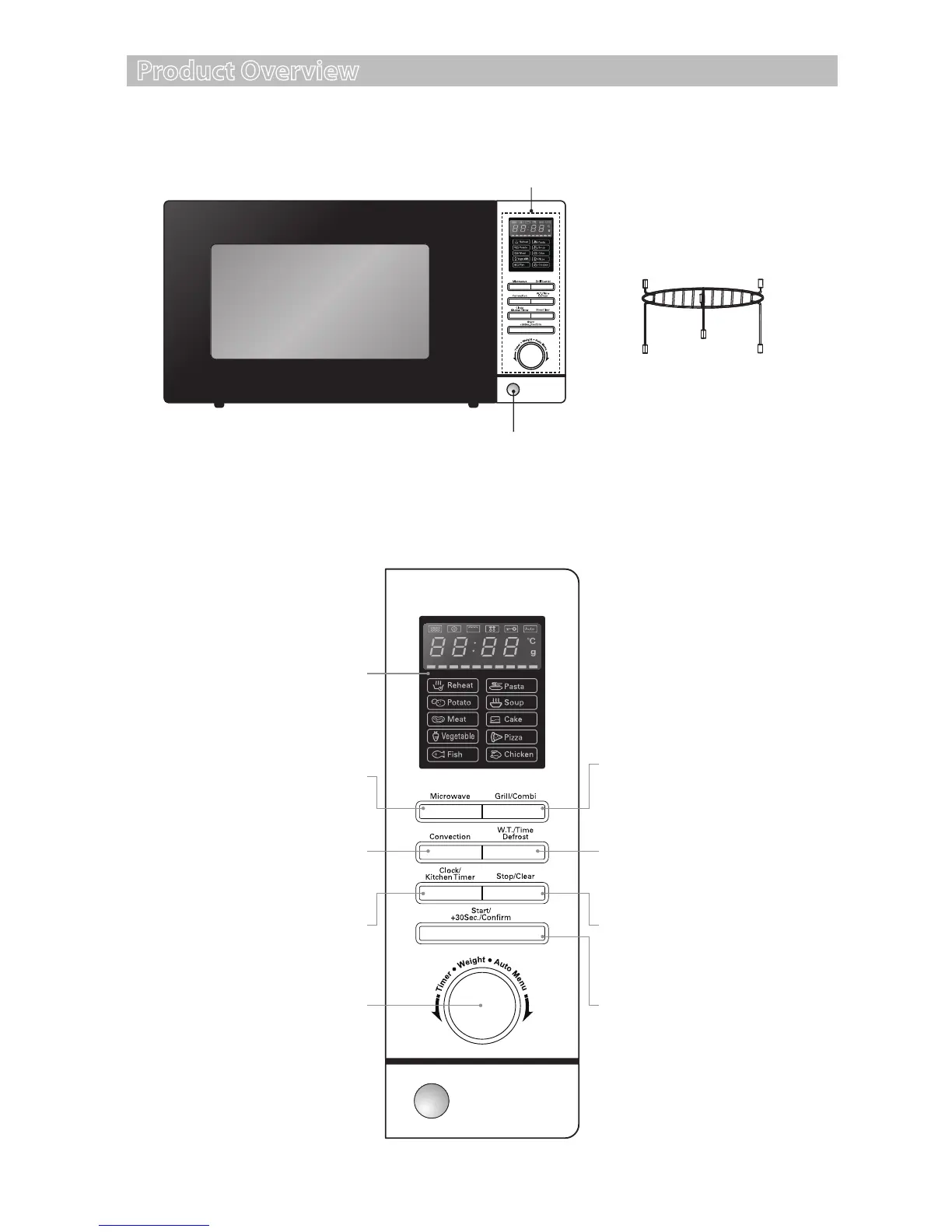
The Main Unit
The Control Panel
Control Panel
Door Open Button
LED Display
Shows the clock, cooking
time and setting.
Microwave Button
Use this button to select the
microwave power level.
Grill/Combi. Button
Use this button to select the
function of grill, microwave and
grill combination.
Weight/Time Defrost Button
Use this button to defrost the
food by weight or by time.
Stop/Clear Button
Use this button to stop cooking
and cancel cooking settings.
Start/+30Sec./Conrm Button
Use this button to do quick start
cooking of 30 seconds, increase
cooking time by 30 seconds (by
each press), or conrm cooking
settings.
Convection Button
Use this button to select the
convection function.
Timer/Weight/
Auto Menu Dial
Use this dial to set time and
food weight and to choose the
auto menu programmes.
Clock/Kitchen Timer Button
Use this button to set the clock
and cooking timer.
Grill Rack
For use when grilling,
convection, combination or
auto cooking.
S25CSS11_IB_final111018.indd 10 18/10/2011 12:35 PM


 To Next Page