20
Two-Stage Cooking
For Two-Stage Cooking, please follow the steps below.
For instance: If you want to defrost your food for 5 minutes and then to cook it with 80% microwave power
for 7 minutes.
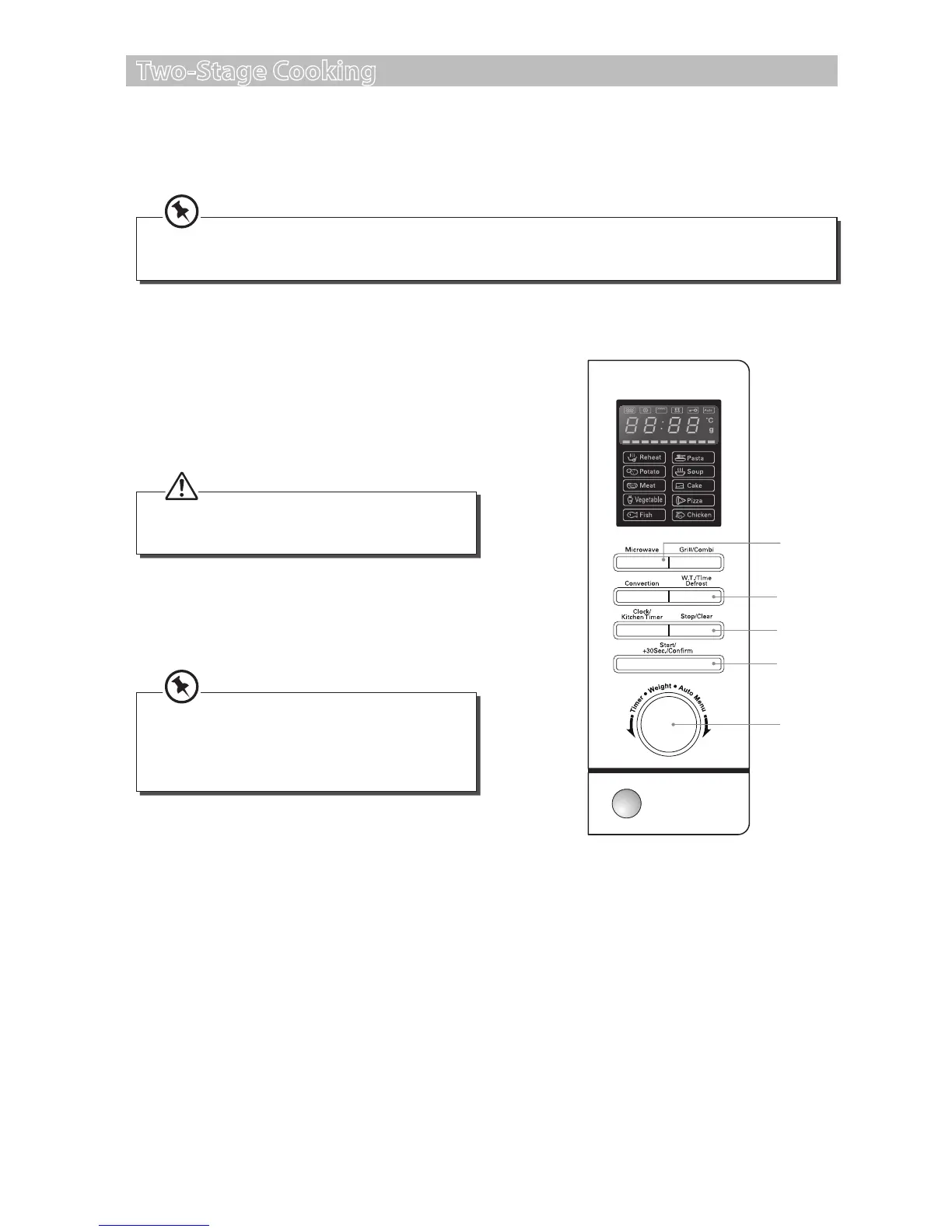
1. Press the Weight/Time Defrost button twice
to initiate the two-stage cooking with time
defrost as the rst stage. The LED display will
show “d-2”.
2. Turn the Time/Weight/Auto Menu dial
to adjust the defrosting time until the LED
display shows “5:00”.
Alternatively, after you press the Microwave
button once, you can turn the Time/Weight/
Auto Menu dial until the LED display shows
“P80”.
You can set a maximum of 2 stages for Two-Stage Cooking. If defrosting is among one of the stages,
then it will be set as the rst stage. Auto Cooking is not available in Two-Stage Cooking.
3. Press the Microwave button once and the
LED display will show “P100”. Press the
Microwave button repeatedly until the LED
display shows “P80”.
2, 5
3
4, 6
1
7
Do not press the Start/+30Sec./Conrm
button at this stage.
4. Press the Start/+30Sec./Conrm button to
conrm the microwave power level.
5. Turn the Time/Weight/Auto Menu dial to
adjust the cooking time until the LED display
shows “7:00”.
6. Press the Start/+30Sec./Conrm button
to conrm. The microwave will sound once
to indicate it has started the defrosting. The
microwave will sound again as it starts the
microwave cooking (the second cooking
stage). Upon completion, the microwave will
sound ve times.
7. Press the Stop/Clear button once to stop the
cooking. Press the Stop/Clear button again to
cancel the setting.
S25CSS11_IB_final111018.indd 20 18/10/2011 12:35 PM


 To Next Page