15
Microwave Cooking
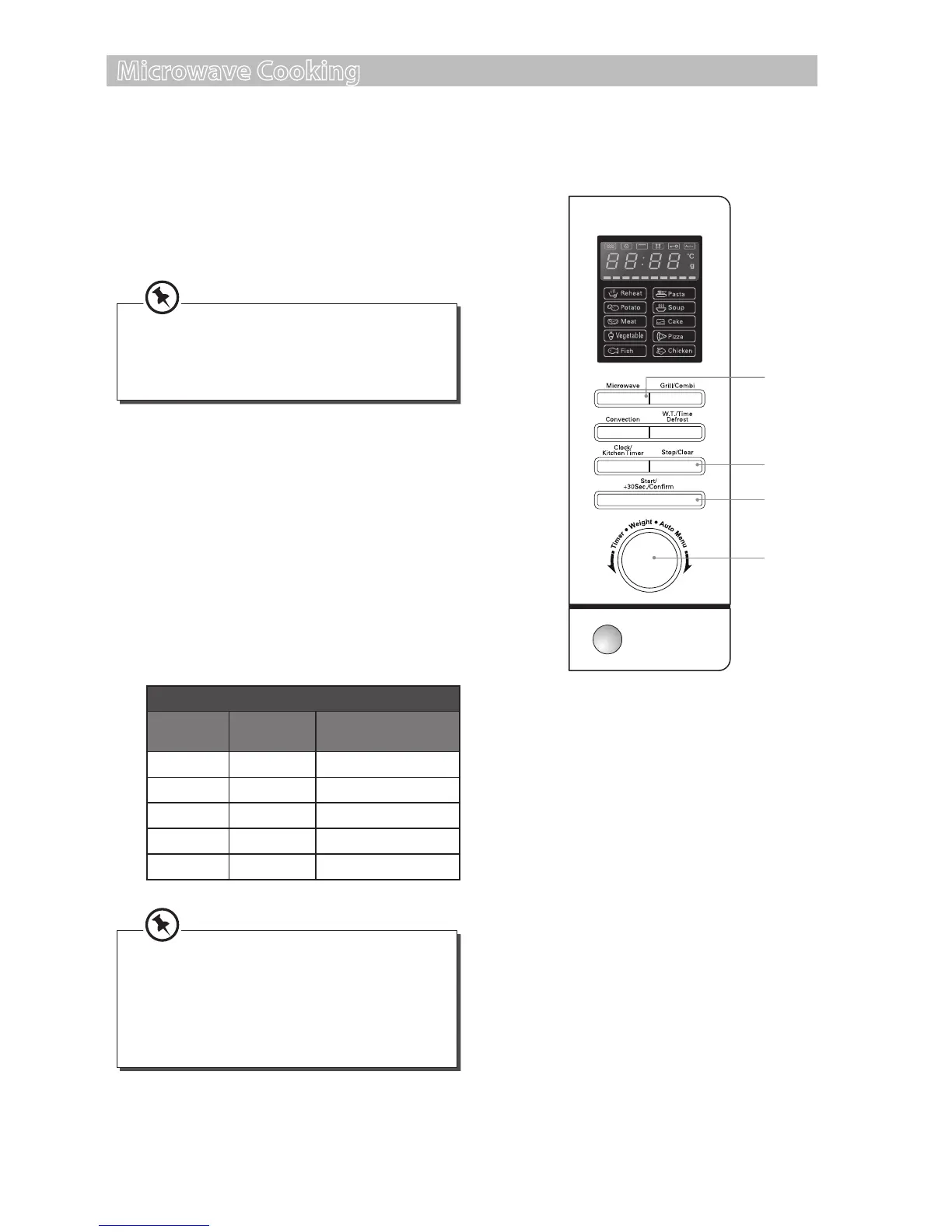
For simple Microwave Cooking, follow the steps below.
For instance: If you want to use 80% microwave power to cook for 20 minutes.
1. Press the Microwave button once and the
LED display will show “P100”. Press the
Microwave button repeatedly until the LED
display shows “P80”.
2. Press the Start/+30Sec./Conrm button to
conrm the microwave power level.
3. Turn the Time/Weight/Auto Menu dial to
adjust the cooking time until the LED display
shows ”20:00”.
4. Press the Start/+30Sec./Conrm button to
conrm and start cooking.
5. Press the Stop/Clear button once to stop the
cooking. Press the Stop/Clear button again to
cancel the setting.
Microwave Button Control
Press
Order
LED
Display
Microwave Power
1 P100 100%
2 P80 80%
3 P50 50%
4 P30 30%
5 P10 10%
Alternatively, after you press the Microwave
button once, you can turn the Time/Weight/
Auto Menu dial until the LED display shows
“P80”.
• When removing food from the
microwave, please ensure that the
microwave has stopped.
• Operating the microwave without food in
it can result in overheating and damage
the magnetron.
3
2, 4
1
5
S25CSS11_IB_final111018.indd 15 18/10/2011 12:35 PM


 To Next Page