EasyManua.ls Logo

Sandstrom SDABTIP12 - Connections; Connecting External Devices and Power

Sandstrom SDABTIP12
36 pages
Print Icon
To Next Page IconTo Next Page
To Previous Page IconTo Previous Page
Loading...
R
DAB
L
AC ~
ON
OFF
R
L
SPEAKER OUT
AUX
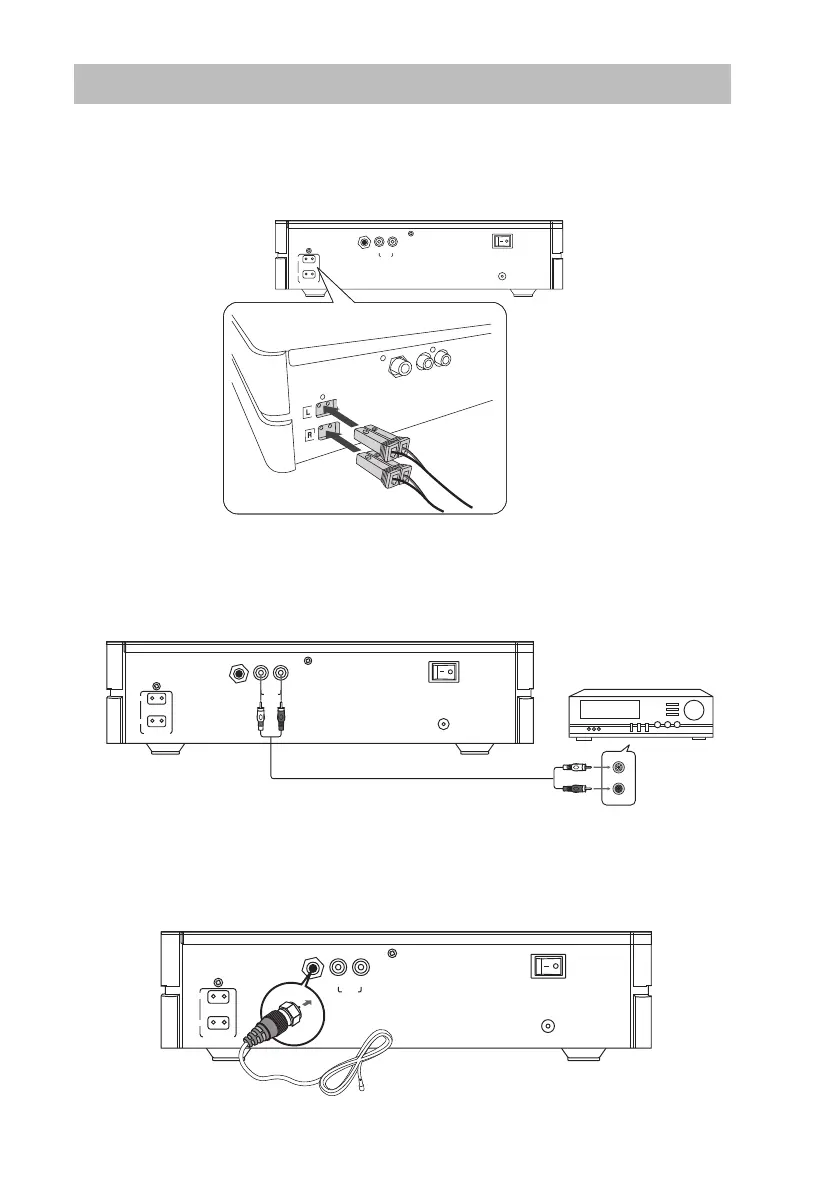
Connections
Speaker Connections
Connect the speaker cables at the back of the speakers to the SPEAKER OUT (L/R) Sockets
at the rear of the unit.
Using the AUX Connection
Use a RCA stereo audio cable (not included) to connect an auxiliary equipment to the main
unit’s AUX IN sockets.
Connecting the Aerial
Connect one end of the aerial cable (included) to the DAB socket at the rear of the unit.
Then position the aerial to obtain optimum reception.
Auxiliary Equipment
RCA stereo audio cables
(Not included)
R
DAB
L
AC ~
ON
OFF
R
L
SPEAKER OUT
AUX
R
DAB
L
AC ~
ON
OFF
R
L
SPEAKER OUT
AUX
13
SDABTIP12_IB_130624_candice.indd 13 24/06/2013 2:43 PM

Table of Contents

Related product manuals