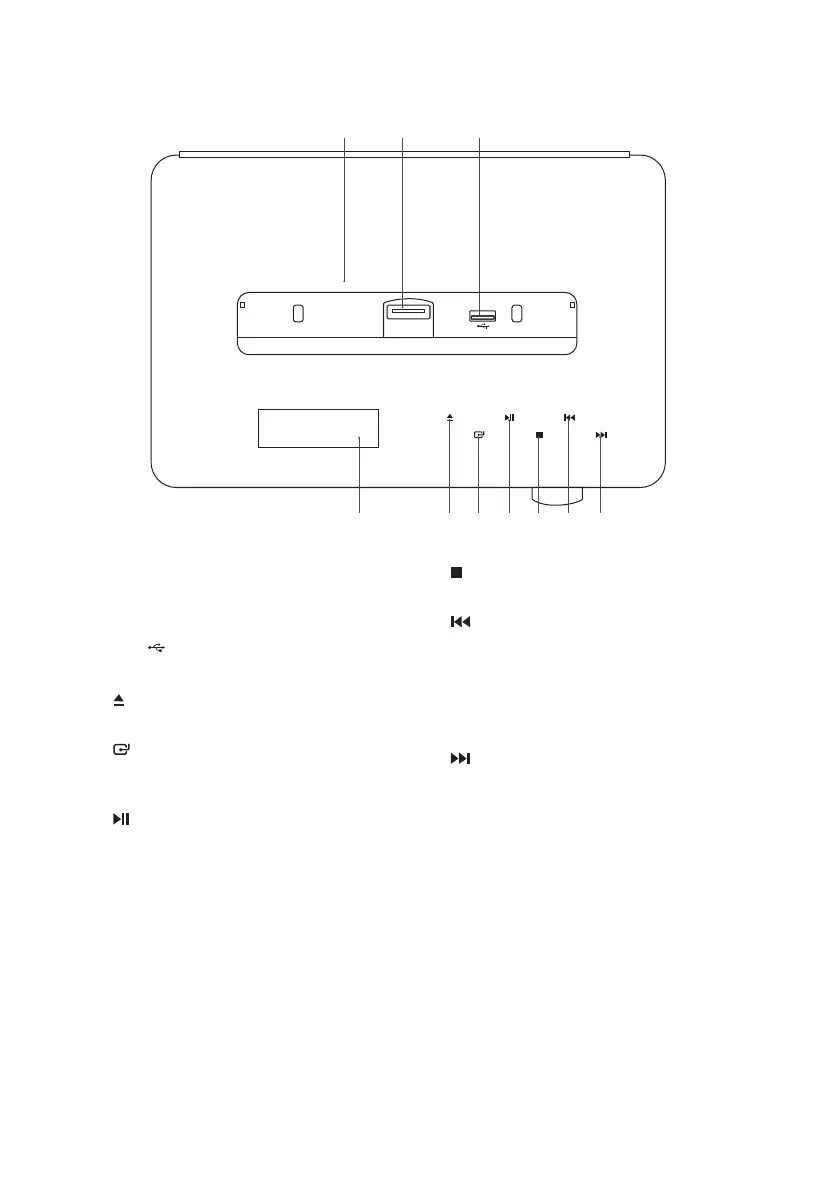
Top View
1. Docking Cover
Flips open the docking cover.
2. iPod/iPhone/iPad Docking
3. USB
Socket
4. LED Display
5.
Icon
Ejects a disc from CD compartment.
6.
Icon
Switches between USB, TUNER, DAB,
DOCK, BT, AUX and DISC modes.
7.
Icon
• Plays/pauses/resumes playback.
• Searches for a radio station going
backwards / forwards through
accessible radio frequencies.
8.
Icon
Stops playback.
9.
Icon
• Skips backwards to the beginning of
the track or to the previous track.
• Allows fast reversing of the current
track.
• Selects next preset station.
10.
Icon
• Skips forwards to the next track.
• Allows fast forwarding of the current
track.
• Selects previous preset station.
54 6 8 107 9
21 3
9
SDABTIP12_IB_130624_candice.indd 9 24/06/2013 2:43 PM



 To Next Page