R
DAB
L
AC ~
ON
OFF
R
L
SPEAKER OUT
AUX
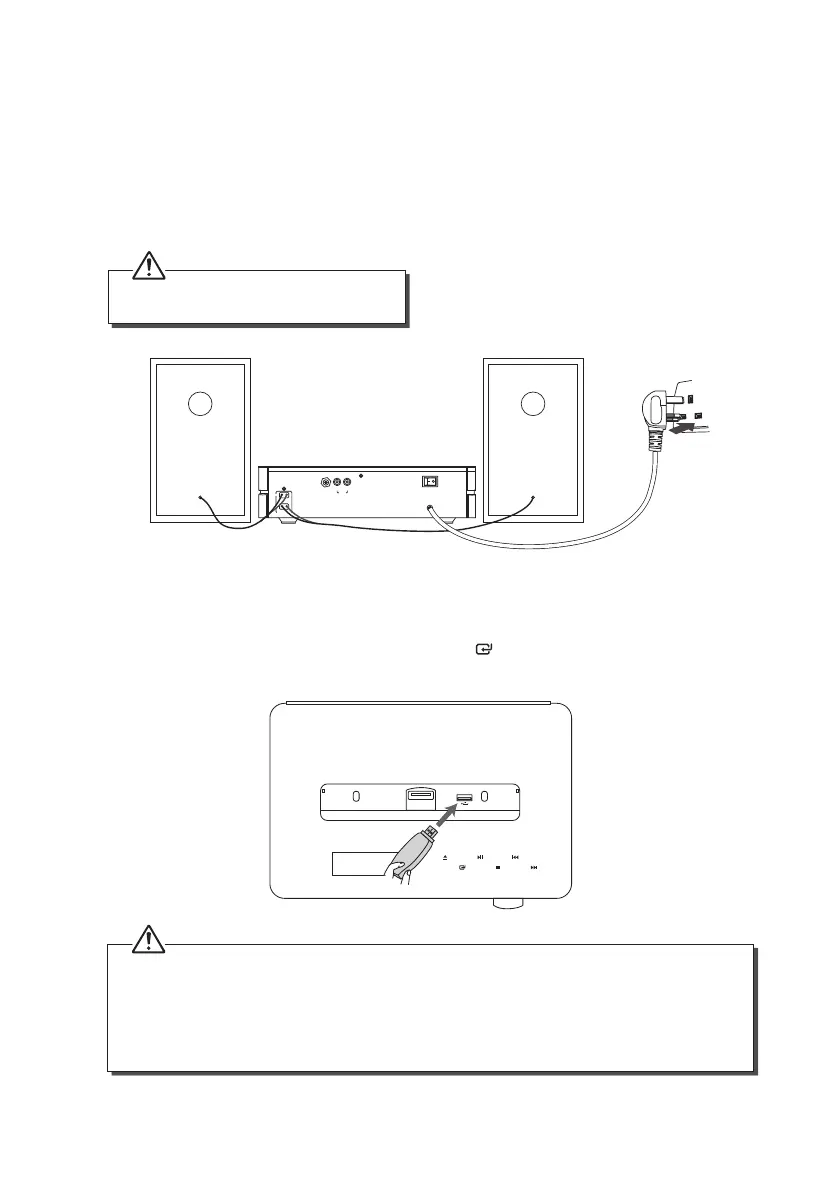
Connecting to the Mains Supply
• This unit is designed to operate with an AC 230V ~50Hz power supply.
• Connecting the unit to any other power source may cause damage to the unit. Unwind
the mains cable to its full length. Connect the mains plug to a mains socket. Make sure
the mains plug is fully inserted into the mains socket. The unit is now connected and
ready to use.
• To switch the unit o completely, unplug the mains plug from the mains socket.
To the mains
socket
Playing MP3’s from a USB Device
When a USB device is connected to the unit, tap the icon repeatedly on the unit or press
the USB button on the remote control to select the USB mode.
• The unit can only play MP3 and WMA le formats in USB mode.
• If your USB device is loaded with MP3’s but the display keeps showing ‘NO DATA”, the format of your
USB device might not be compatible with the unit.
• The unit can support USB devices with up to 32GB of memory.
• The unit may not be compatible with all USB devices, this is not an indication of a problem with the
unit.
Ensure all connections are connected before
connecting to the mains power socket.
14
SDABTIP12_IB_130624_candice.indd 14 24/06/2013 2:43 PM



 To Next Page