EasyManua.ls Logo

Sansui CA-2000 - Troubleshooting No Sound; Connection and Operation Checks; CONNECTION; Turntable Connection

Sansui CA-2000
18 pages
Print Icon
To Next Page IconTo Next Page
To Previous Page IconTo Previous Page
Loading...
26
we
u
Beara
donc
reams
eens
eb
ues
aes
Some
of
the
symptoms
which
seem
to
indicate
a
breakdown
of
the
unit
are
caused
by
misoperation
of
the
unit
or
other
connected
components.
Confirm
the
connections
and
your
operating
procedure
once
more.
Be
sure
to
turn
the
power
off
or
reduce
the
volume
beforehand.
@
Check
connections
to
confirm
that:
1.
No
cable
has
become
disconnected
from
input
or
output
terminals.
2.
No
speaker
cable
has
become
disconnected
from
your
power
amplifier.
3.
The
power
plug
is
securely
inserted
into
the
AC
outlet.
@
Check
operation
procedure
to
confirm
that:
1.
The
POWER
switch
on
the
unit
is
at
ON,
and
that
the
power
switch
on
your
power
amplifier
is
also
turned
on.
2.
The
VOLUME
control
is
set
to
a
moderate
level.
3.
The
INPUT
SELECTOR
switch
is
set
in
the
correct
position
for
the
source
you
wish
to
hear;
also
check
the
TUNER
switch
position.
.
The
TAPE
PLAY
switch
is
set
properly.
.
The
OUTPUT
SELECTOR
switch
is
set
properly.
ooh
your
power
amplifier
are
operating
properly.
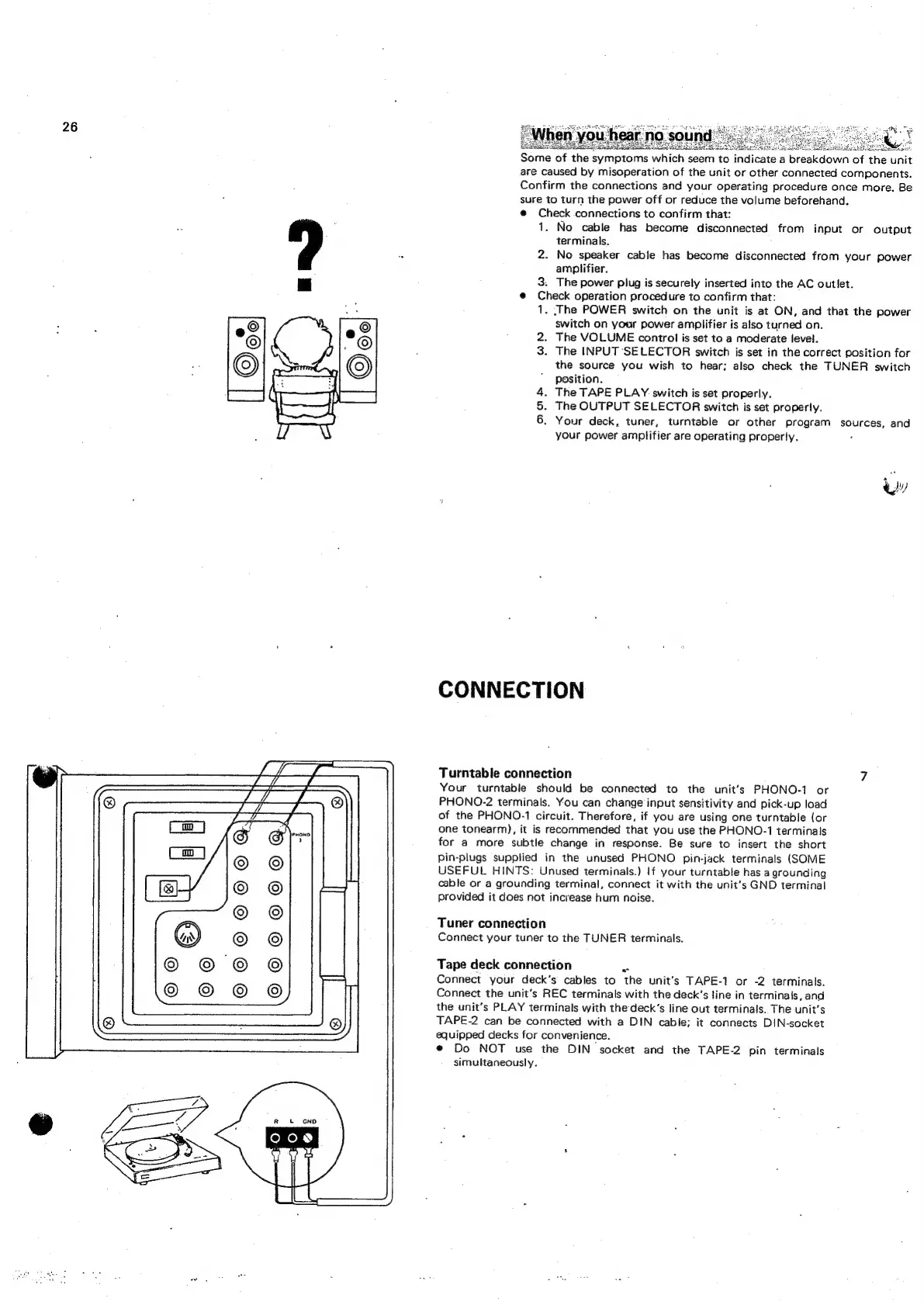
CONNECTION
Turntable
connection
Your
turntable
should
be
connected
to
the
unit’s
PHONO-1
or
PHONO-2
terminals.
You
can
change
input
sensitivity
and
pick-up
load
of
the
PHONO-1
circuit.
Therefore,
if
you
are
using
one
turntable
(or
one
tonearm),
it
is
recommended
that
you
use
the
PHONO-1
terminals
for
a
more
subtle
change
in
response.
Be
sure
to
insert
the
short
Pin-plugs
supplied
in
the
unused
PHONO
pin-jack
terminals
(SOME
USEFUL
HINTS:
Unused
terminals.)
If
your
turntable
has
a
grounding
cable
or
a
grounding
terminal,
connect
it
with
the
unit’s
GND
terminal
provided
it
does
not
increase
hum
noise.
Tuner
connection
Connect
your
tuner
to
the
TUNER
terminals.
Tape
deck
connection
~~
Connect
your
deck’s
cables
to
the
unit’s
TAPE-1
or
-2
terminals.
Connect
the
unit's
REC
terminals
with
the
deck’s
line
in
terminals,
and
the
unit’s
PLAY
terminals
with
thedeck’s
line
out
terminals.
The
unit's
TAPE-2
can
be
connected
with
a
DIN
cabie;
it
connects
DIN-socket
equipped
decks
for
convenience.
e
Do
NOT
use
the
DIN
socket
and
the
TAPE-2
pin
terminals
simultaneously.
Your
deck,
tuner,
turntable
or
other
program
sources,
and

Related product manuals