16
Memorizing channels (continued)
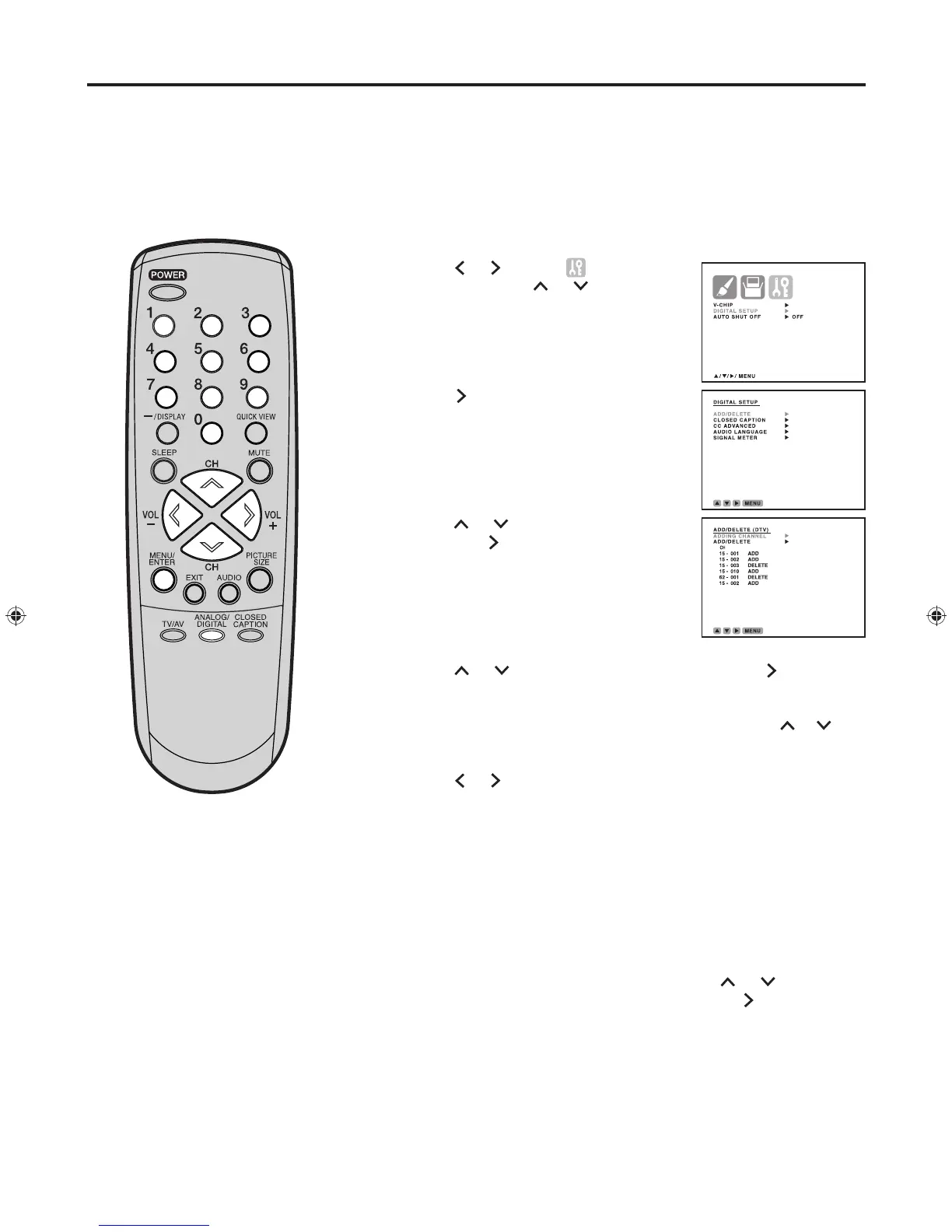
To add or delete channels (DIGITAL MODE)
To add
a digital channel you are watching
Select the digital channel you want to add. Press or to select
“ADDING CHANNEL” as in step 6 above, then press .
Press ANALOG/DIGITAL to select the digital mode.
Press MENU/ENTER. The menu screen appears.
Press
or
to select (OPTION)
menu, then press or to select
“DIGITAL SETUP”.
Press . The DIGITAL SETUP menu
appears.
Press or to select “ADD/DELETE”,
then press
.
The ADD/DELETE (DTV)
menu appears.
Press or to select “ADD/DELETE”, then press .
Select the desired channel to be memorized or deleted using
or .
Press
or
to select “ADD” or “DELETE”.
Repeat steps 7-8 for other channels you want to add or delete.
Press MENU/ENTER repeatedly until the menu screen is cleared.
1
2
3
4
5
6
7
8
9
10


 To Next Page