EasyManua.ls Logo

Sansui DTV2750A - Picture Control Adjustment; Adjusting Picture Quality Settings; Resetting Your Picture Adjustment; Restore Default Picture Settings

Sansui DTV2750A
36 pages
Print Icon
To Next Page IconTo Next Page
To Previous Page IconTo Previous Page
Loading...
25
Picture control adjustment
Resetting your picture adjustment
The RESET function returns your picture quality adjustments to the
following factory settings:
BRIGHTNESS .......... CENTER (0) TINT ..................... CENTER (0)
CONTRAST ................... MAX (32) SHARPNESS ...... CENTER (0)
COLOR ..................... CENTER (0)
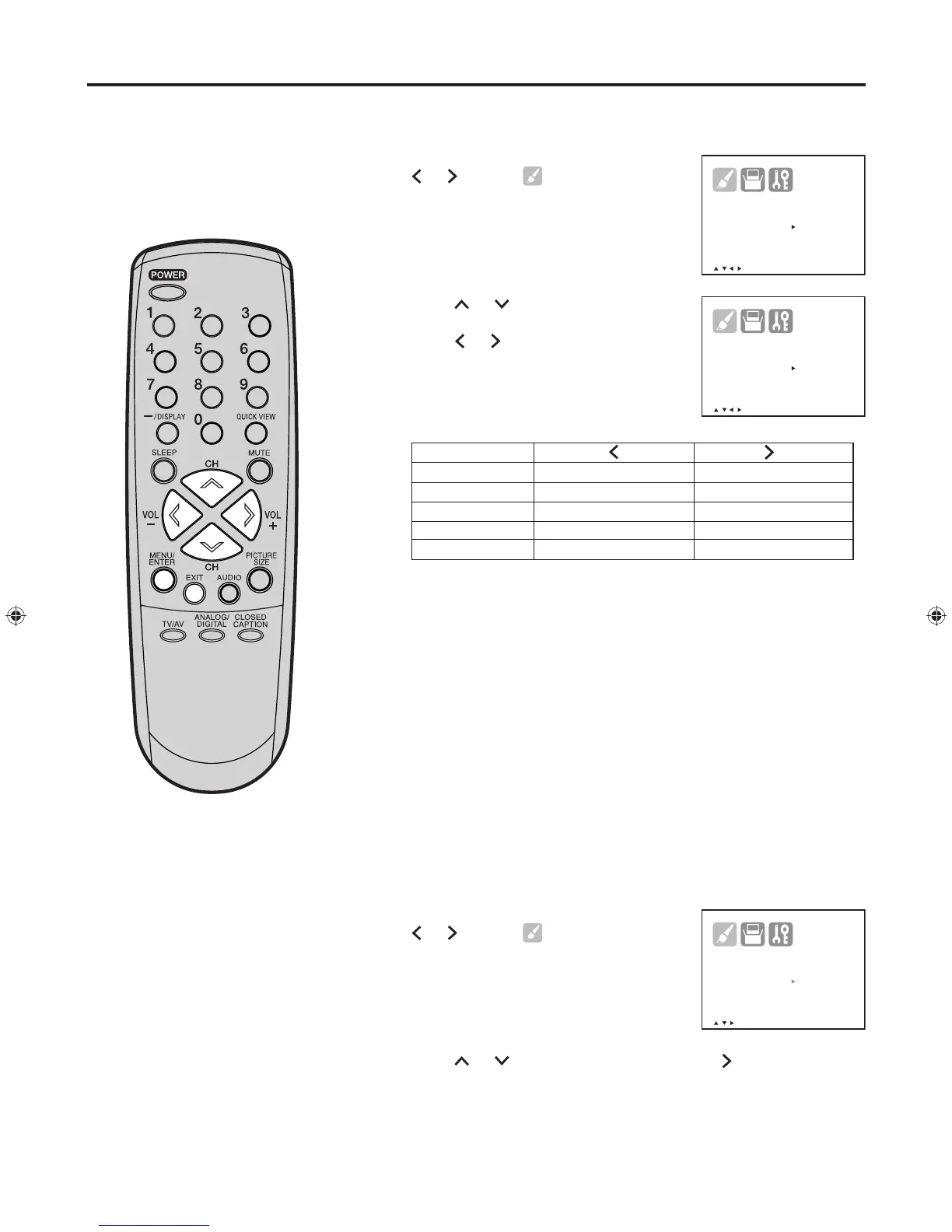
Press MENU/ENTER, then press
or
to select (PICTURE)
menu.
Press or to select the item
you want to adjust.
Press
or
to adjust the setting.
After you have made your selection, press EXIT to return to the
normal screen.
NOTE:
The CONTRAST default setting is set to maximum at the factory.
Press MENU/ENTER, then press
or
to select (PICTURE) menu.
Press or to select “RESET”, then press
.
1
2
3
1
2

B R IGHTNESS 0
C O NTRAST + 3 2
C O LOR
0
T I NT 0
S H ARPNESS
0
R E SET
/ / / / M E N U
Picture control adjustment/Resetting your picture adjustment
/ / / / M E N U
B R IGHTNESS 0
C O NTRAST + 3 2
C O LOR 0
T I NT
0
S H ARPNESS
0
R E SET
/ / / M E N U
B R IGHTNESS 0
C O NTRAST + 3 2
C O LOR
0
T I NT
0
S H ARPNESS
0
R E SET
SHARPNESS
BRIGHTNESS
CONTRAST
COLOR
TINT
decrease brightness
decrease contrast
paler color
reddish color tint
makes picture softer
increase brightness
increase contrast
brilliant color
greenish color tint
makes picture clearer
J30K0901B_EN.indb 25 8/23/07 3:58:08 PM

Related product manuals