Tune the television to the desired program in the digital mode.
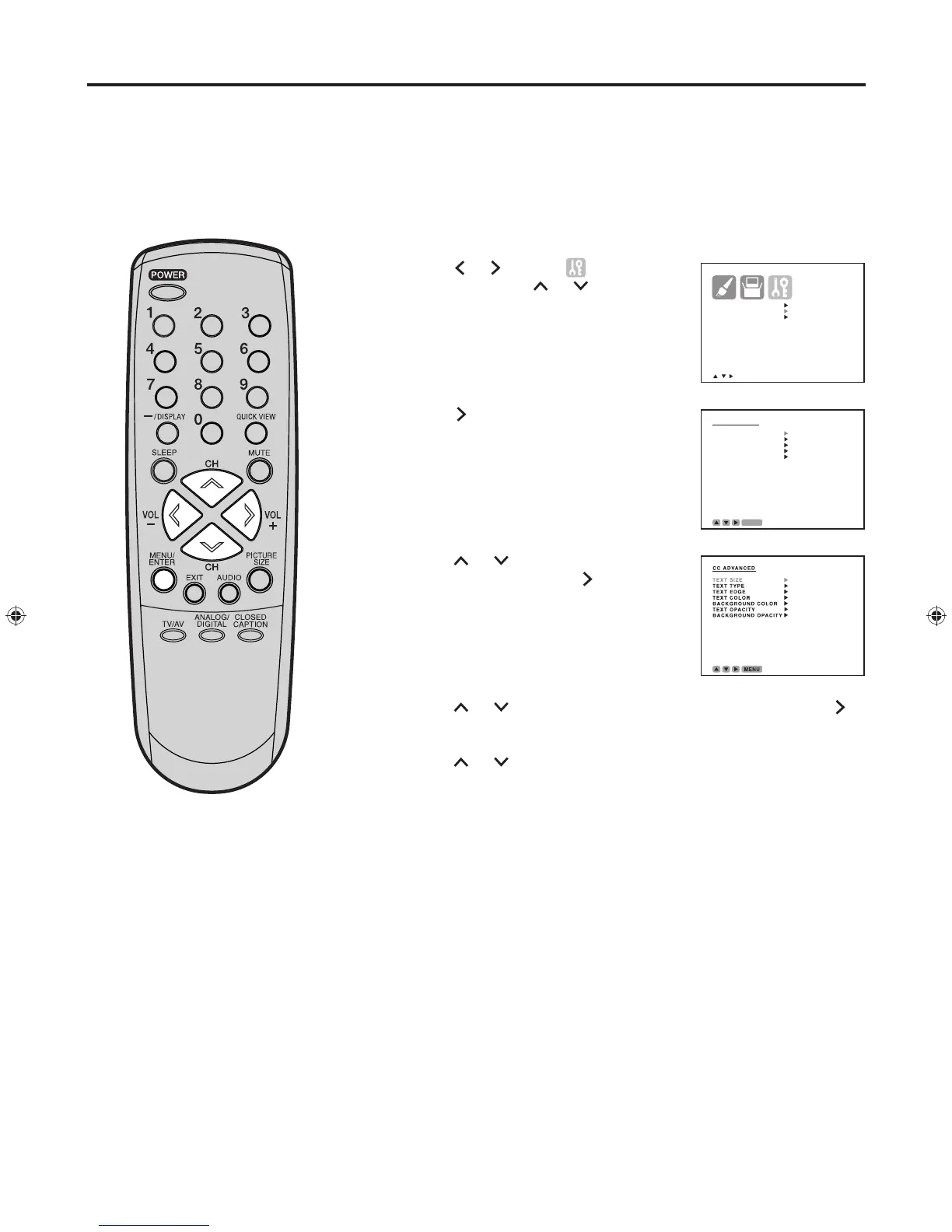
Press MENU/ENTER. The menu screen appears.
Press
or
to select (OPTION)
menu, then press or to select
“DIGITAL SETUP”.
Press . The DIGITAL SETUP menu
appears.
Pres
s or t
o select “CC
ADVANCED”, then press
.
The CC ADVANCED menu appears.
Pres
s or t
o select the item you want to adjust, then press
.
Pres
s or t
o select the setting, then press MENU/ENTER.
You can select from among the following items and parameters.
TEXT SIZE : AUTO, SMALL, STANDARD, LARGE
TEXT TYPE : AUTO, DEFAULT, MONO W. SERIF, PROP W.
SERIF, MONO W/O. SERIF, PROP W/O. SERIF,
CASUAL, CURSIVE, SMALL CAPITALS
TEXT EDGE :
AUTO, NONE, RAISED, DEPRESSED, UNIFORM,
LEFT DROP SHADOW, RIGHT DROP SH
ADOW
TEXT COLOR
: AUTO, BLACK, WHITE, RED, GREEN, BLUE,
YELLOW, MAGENTA, CYAN
BACKGROUND COLOR : AUTO, BLACK, WHITE, RED, GREEN,
BLUE, YELLOW, MAGENTA, CYAN
TEXT OPACITY
: AUTO, TRANSPARENT, TRANSLUCENT, SOLID,
FLASHING
BACKGROUND OPACITY
: AUTO, TRANSPARENT,
TRANSLUCENT, SOLID, FLASHING
Press MENU/ENTER repeatedly until the menu screen is cleared.
Closed Captions are factory preset
however you can adjust them
individually as follows:
NOTES:
• Do not set the Closed Caption
“TEXT COLOR” and “BACKGROUND
COLOR” as the same color or you
will not be able to see the text.
• Do not set both the “TEXT OPACITY”
and the “BACKGROUND OPACITY”
to “TRANSPARENT” or you will not
be able to see the text.
CC advanced


 To Next Page