NOTE:
To turn the closed caption feature off,
select OFF in step 7, above.
To turn on closed captions (DIGITAL MODE)
Adjusting closed captioning
Closed captions are factory preset. However you can adjust them
individually. This feature is designed to customize digital captions only.
NOTE:
Do not set the closed caption TEXT COLOR and BACKGROUND COLOR
the same, or you will not be able to see the text.
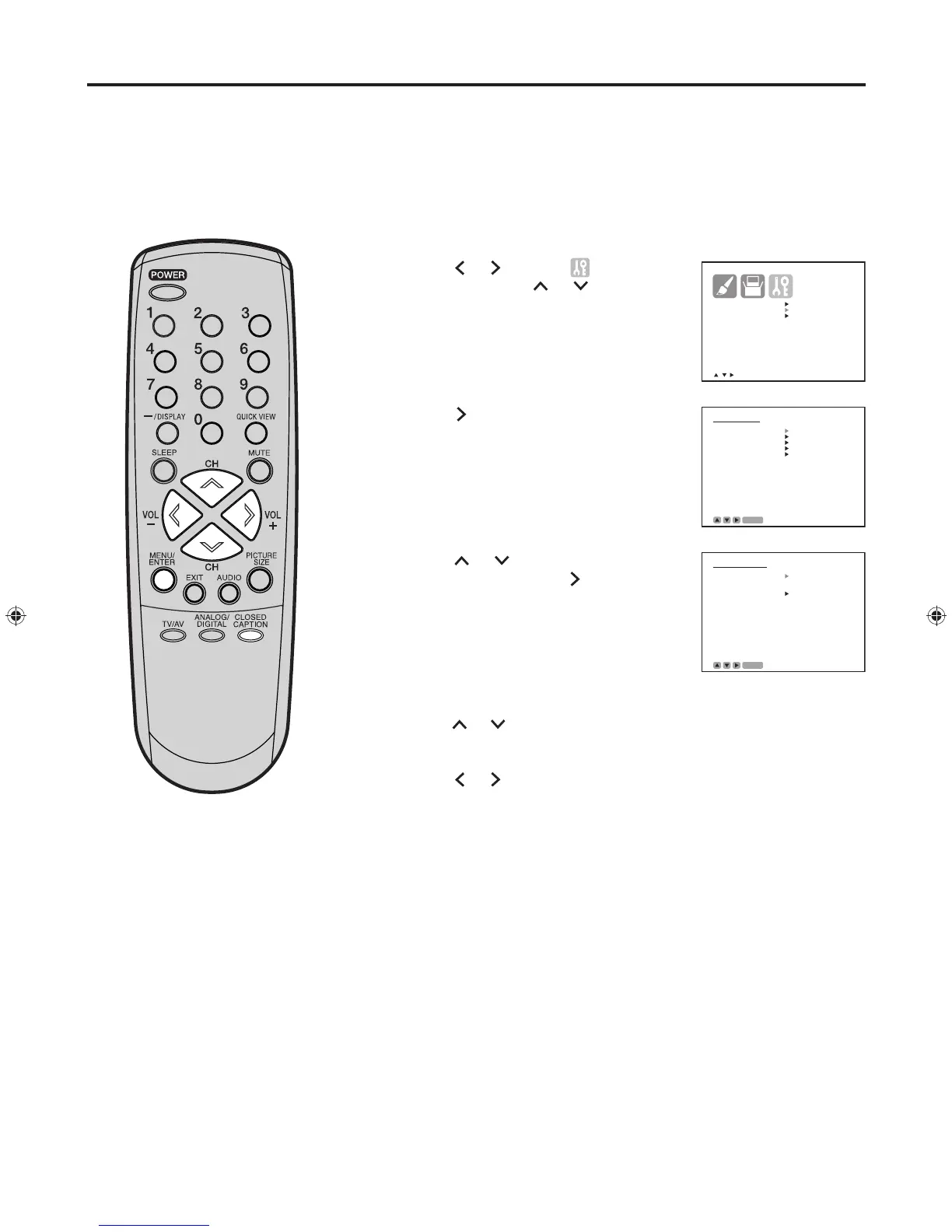
Tune the television to the desired program in the digital mode.
Press MENU/ENTER. The menu screen appears.
Press
or
to select (OPTION)
menu, then press or to select
“DIGITAL SETUP”.
Press . The DIGITAL SETUP menu
appears.
Press or to select “CLOSED
CAPTION”, then press .
The CLOSED
CAPTION menu
appears.
• This screen can be displayed by
pressing CLOSED CAPTION.
Press or to select “ANALOG CAPTION” or “DIGITAL CAPTION”.
Press
or
to select the desired closed caption mode.
Press MENU/ENTER repeatedly until the menu screen is cleared.
1
2
3
4
5
6
7
8
Closed Caption (continued)


 To Next Page