17
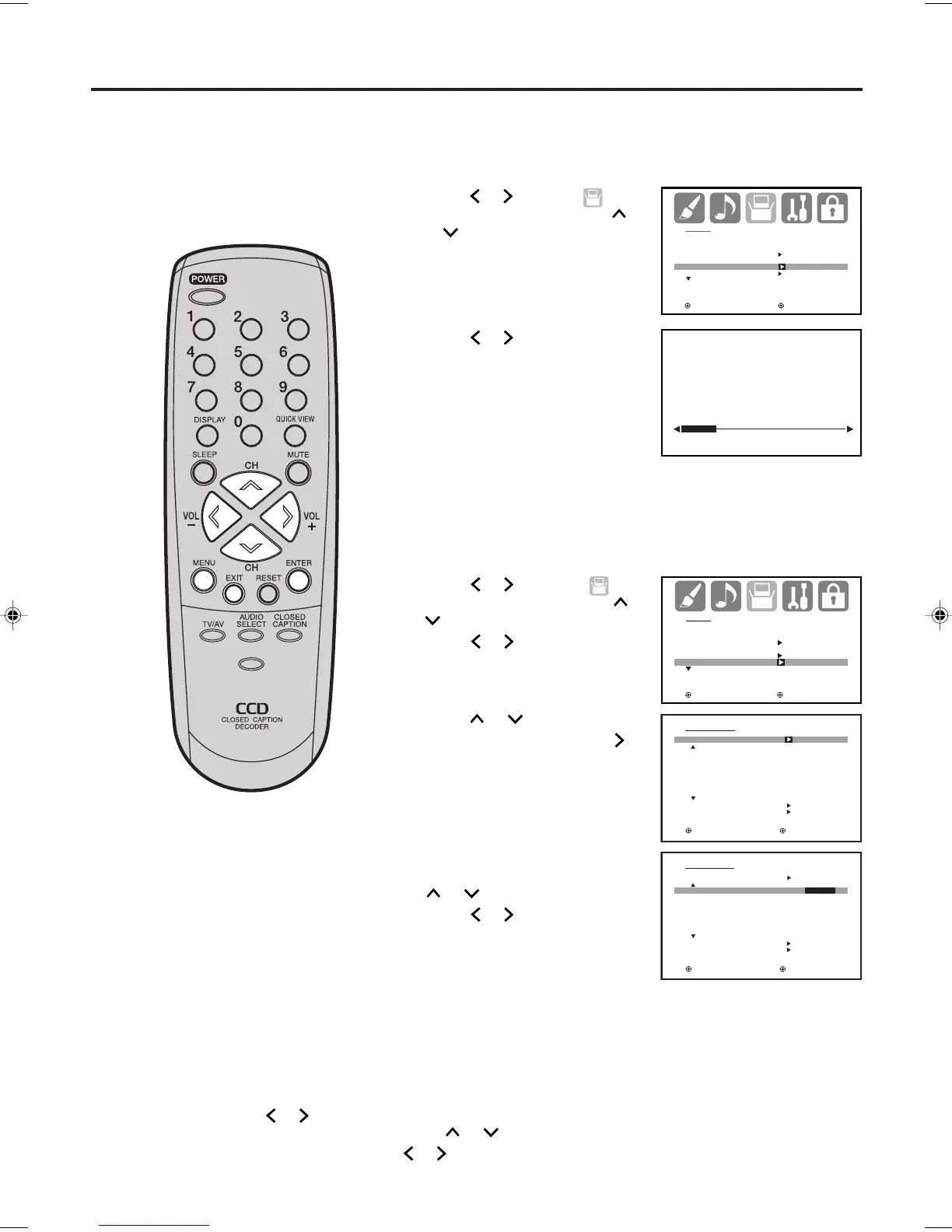
Press MENU. The menu screen will appear.
Press
or to select
(SETUP) menu, then press
or
to select “AUTO CH
MEMORY”.
Automatic memory tuning
1
2
3
To add/delete channels
SETUP
LANGUAGE ENGLISH
CLOCK SET
TV/CABLE CABLE
AUTO CH MEMORY
ADD/DELETE
:SELECT :ADJUST
AUTO CH MEMORY
EXIT : CANCEL
PROGRAMMING NOW
PLEASE WAIT
Press or to select
(SETUP) menu, then press
or
to select “ADD/DELETE”.
Press or . The ADD/
DELETE menu will appear.
2
SETUP
LANGUAGE ENGLISH
CLOCK SET
TV/CABLE CABLE
AUTO CH MEMORY
ADD/DELETE
:SELECT :ADJUST
ADD/ DELETE
ADD / DELETE
CH SIGNAL
1 ANALOG DELETE
2 ANALOG ADD
3 ANALOG DELETE
4 ANALOG DELETE
5 ANALOG ADD
5-001 DIGITAL ADD
5-002 DIGITAL ADD
CLEAR ALL
SETUP MENU
:SELECT :ADJUST
3
Press
or
to select
“ADD/DELETE”, then press
.
ADD/DELETE
ADD/DELETE
CH SIGNAL
1 ANALOG ADD/DELETE
2 ANALOG ADD
3 ANALOG DELETE
4 ANALOG DELETE
5 ANALOG ADD
5-001 DIGITAL ADD
5-002 DIGITAL ADD
CLEAR ALL
SETUP MENU
:SELECT :ADJUST
4
Select the desired channel to
be memorized or deleted using
or
.
Press
or to select “ADD”
or “DELETE”, whichever
function you want to perform.
5
Repeat step 4 for other channels you want to add or delete, then
press ENTER.
CLEAR ALL
All channels are deleted from the channel memory.
Press
or
to select “CLEAR ALL” in step 2 above, then press
or .
Memorizing channels (continued)
Press MENU. The menu screen will appear.
1
6
Press EXIT to return to the normal screen.
NOTES:
●
Some new channels may be
appeared. So, it is recommended
to do the “AUTO CH MEMORY”
procedure periodically.
●
To return from ADD/DELETE menu
to SETUP menu, select “SETUP
MENU”, then press
or .
Press or . The TV will begin
memorizing all the channels
available in your area.
• It may take up to 30 minutes
to complete memorizing
digital cable channels, please
be patient.
PICTURE
SIZE
-/
J3W50101A_En_p14-17 16/11/05, 8:44 AM17



 To Next Page