34
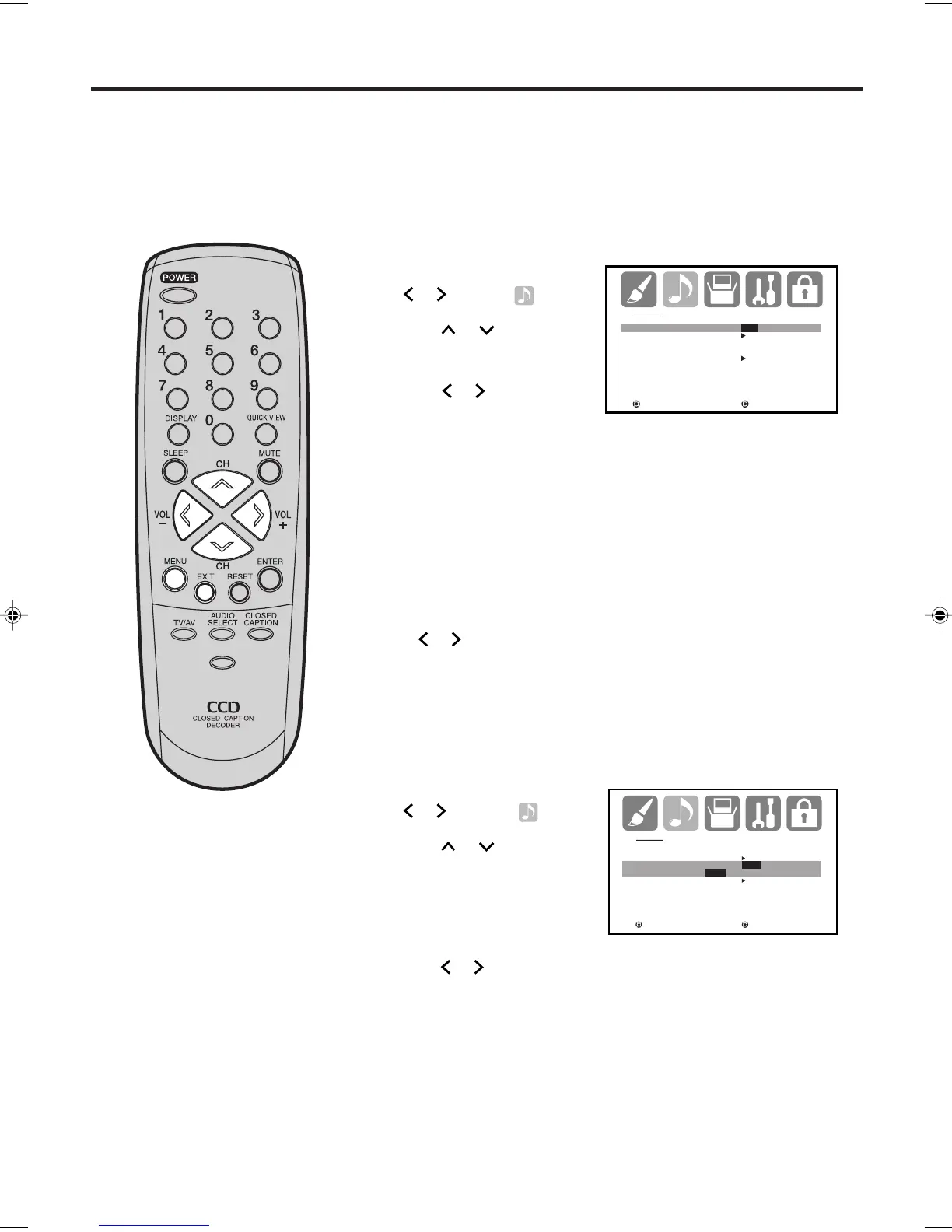
Press or to select “STR
(Stereo)”.
Selecting Stereo/Second Audio Program (SAP)/
Selecting the digital output
The multi-channel TV sound (MTS) feature provides high-fidelity
stereo sound. MTS also can transmit a second audio program
(SAP) containing a second language or other audio information.
When the TV receives a stereo or SAP broadcast, the word
“STEREO” or “SAP” displays on-screen every time you turn the
TV on, change the channel, or press -/DISPLAY.
1
2
Selecting Stereo/Second Audio Program (SAP)
To listen to a second audio program (SAP)
Press or to select “SAP” in step 2 above. The TV speakers will
output the second audio program instead of normal audio.
AUDIO
MTS STR/SAP/MONO
AUDIO LANGUAGE
DIGITAL OUTPUT PCM
RESET
: SELECT : ADJUST
Press MENU, then press
or
to select
(AUDIO) menu.
Press
or
to select
“MTS”.
NOTES:
• Generally, you can leave your TV in stereo mode because the TV
automatically outputs the type of sound being broadcast (stereo or
mono).
• If the stereo sound is noisy, select MONO to reduce the noise.
PICTURE
SIZE
-/
AUDIO
MTS STEREO
AUDIO LANGUAGE
DIGITAL OUTPUT PCM
PCM / DOLBY DIGITAL
RESET
: SELECT : ADJUST
Selecting the digital output
You can choose the format of the digital audio output signal.
1
Press MENU, then press
or to select
(AUDIO).
Press
or
to select
“DIGITAL OUTPUT”.
2
Press
or
to select “PCM” or “DOLBY DIGITAL”.
3
Press
EXIT to return to the normal screen.
3
Press
EXIT to return to the normal screen.
J3W50101A_En_p31-34 16/11/05, 8:47 AM34



 To Next Page