EasyManua.ls Logo

Sansui G-9000 - Operating Procedures; Initial Setup and Operation

Sansui G-9000
58 pages
Print Icon
To Next Page IconTo Next Page
To Previous Page IconTo Previous Page
Loading...
Operating
procedures
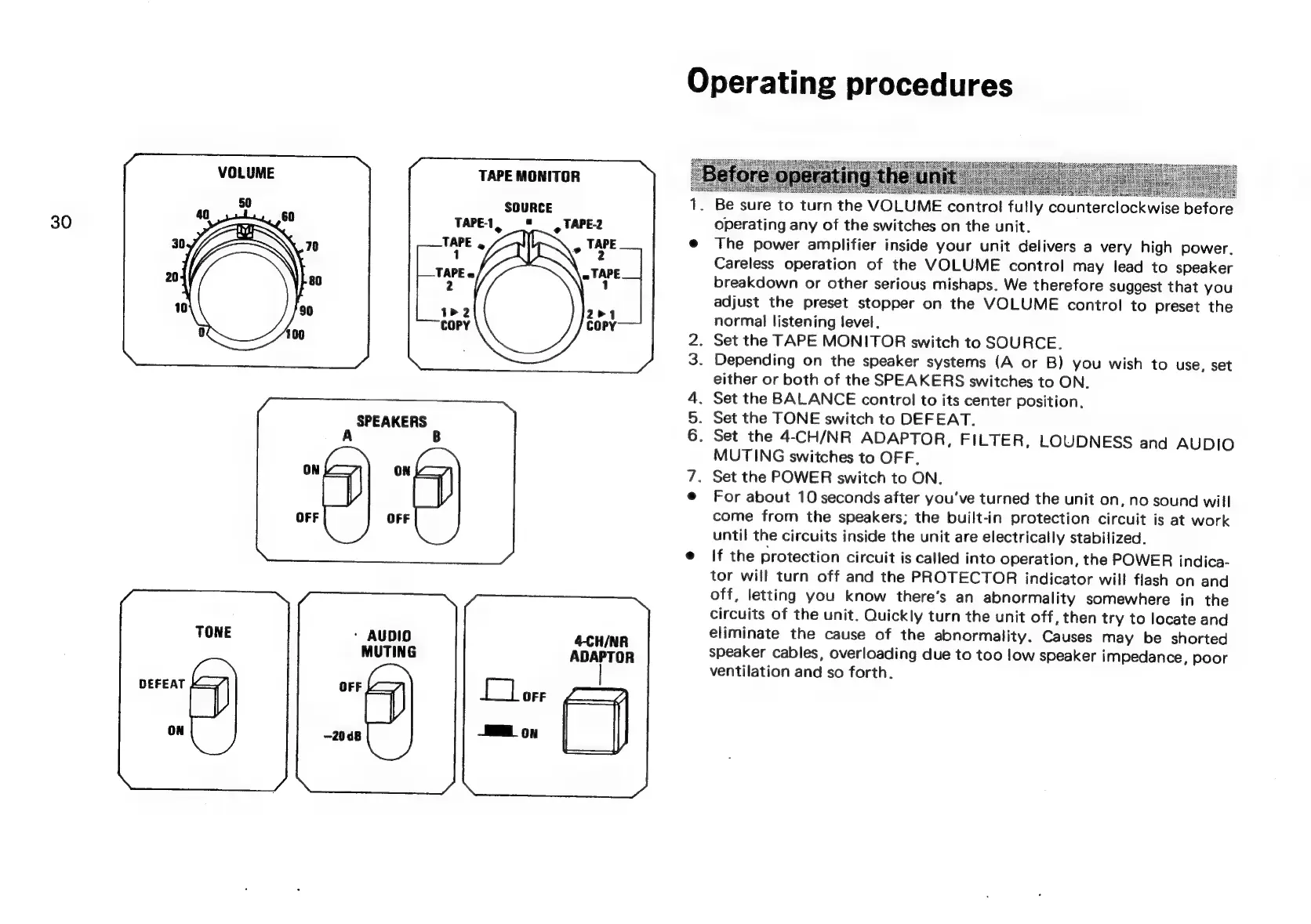
VOLUME
TAPE
MONITOR
:
SOURCE
1.
Be
sure
to
turn
the
VOLUME
control
fully
counterclockwise
before
30
TAPE-1,
8
=,
TAPE-2
operating
any
of
the
switches
on
the
unit.
TAPE
,
@
The
power
amplifier
inside
your
unit
delivers
a
very
high
power.
,
id
Careless
operation
of
the
VOLUME
control
may
lead
to
speaker
breakdown
or
other
serious
mishaps.
We
therefore
suggest
that
you
adjust
the
preset
stopper
on
the
VOLUME
contro!
to
preset
the
normal
listening
level.
2.
Set
the
TAPE
MONITOR
switch
to
SOURCE.
3.
Depending
on
the
speaker
systems
(A
or
B)
you
wish
to
use,
set
either
or
both
of
the
SPEAKERS
switches
to
ON.
4.
Set
the
BALANCE
control
to
its
center
position.
SPEAKERS
Set
the
TONE
switch
to
DEFEAT.
A
B
.
Set
the
4-CH/NR
ADAPTOR,
FILTER,
LOUDNESS
and
AUDIO
MUTING
switches
to
OFF,
ON
7.
Set
the
POWER
switch
to
ON.
@
For
about
10
seconds
after
you've
turned
the
unit
on,
no
sound
will
come
from
the
speakers;
the
built-in
protection
circuit
is
at
work
until
the
circuits
inside
the
unit
are
electrically
stabilized.
@
If
the
protection
circuit
is
called
into
operation,
the
POWER
indica-
tor
will
turn
off
and
the
PROTECTOR
indicator
will
flash
on
and
off,
letting
you
know
there’s
an
abnormality
somewhere
in
the
circuits
of
the
unit.
Quickly
turn
the
unit
off,
then
try
to
locate
and
TONE
-
AUDIO
4-CH/NR
eliminate
the
cause
of
the
abnormality.
Causes
may
be
shorted
MUTING
speaker
cables,
overloading
due
to
too
low
speaker
impedance,
poor
ventilation
and
so
forth.
DEFEAT
OFF

Related product manuals