EasyManua.ls Logo

Sansui G-9000 - Panel Controls Overview; Power, Indicators, and Speaker Switches

Sansui G-9000
58 pages
Print Icon
To Next Page IconTo Next Page
To Previous Page IconTo Previous Page
Loading...
16
OFF
OFF
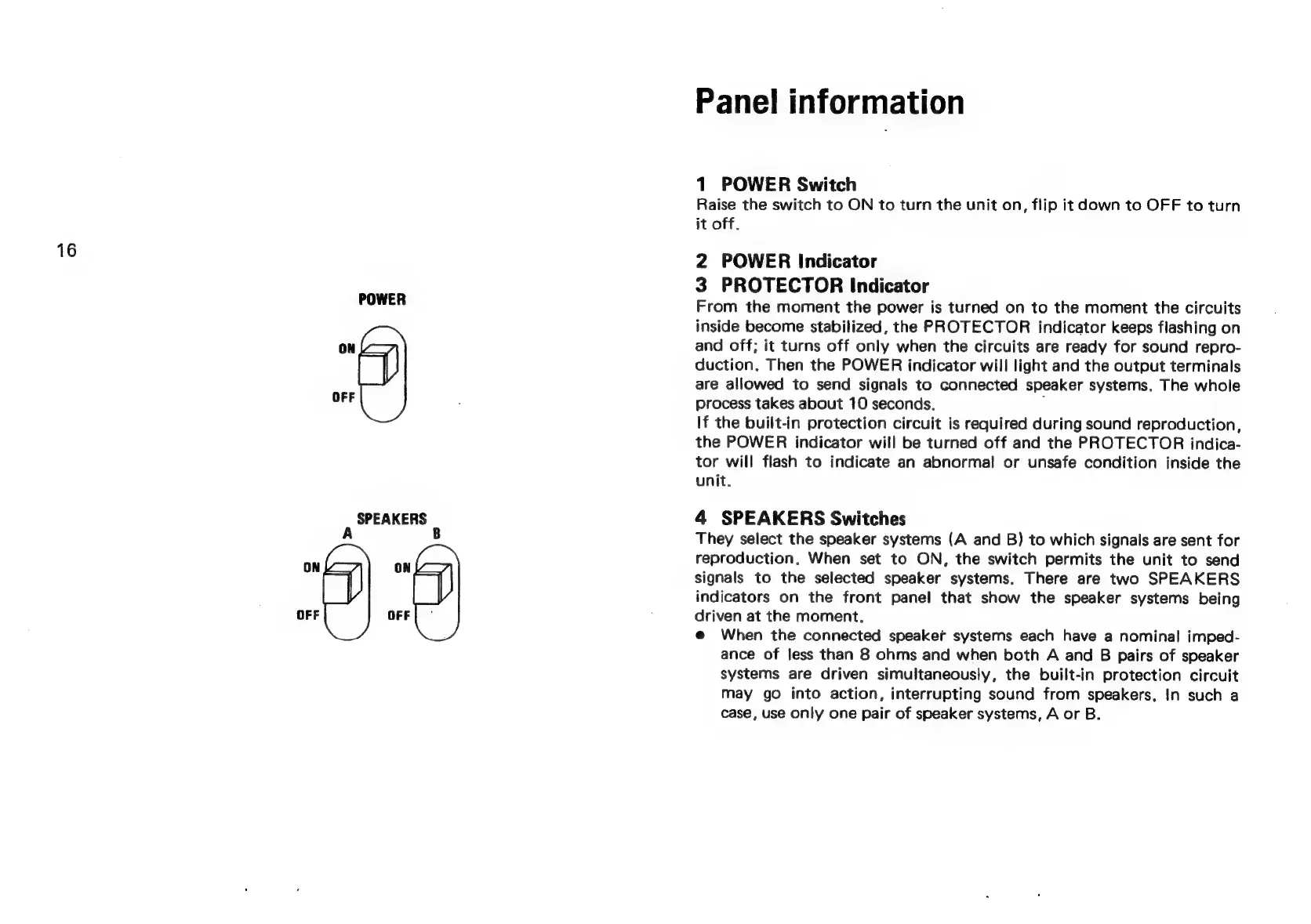
SPEAKERS
A
B
OFF
Panel
information
1
POWER
Switch
Raise
the
switch
to
ON
to
turn
the
unit
on,
flip
it
down
to
OFF
to
turn
it
off.
2
POWER
Indicator
3
PROTECTOR
Indicator
From
the
moment
the
power
is
turned
on
to
the
moment
the
circuits
inside
become
stabilized,
the
PROTECTOR
indicator
keeps
flashing
on
and
off;
it
turns
off
only
when
the
circuits
are
ready
for
sound
repro-
duction.
Then
the
POWER
indicator
will
light
and
the
output
terminals
are
allowed
to
send
signals
to
connected
speaker
systems.
The
whole
process
takes
about
10
seconds.
,
If
the
built-in
protection
circuit
is
required
during
sound
reproduction,
the
POWER
indicator
will
be
turned
off
and
the
PROTECTOR
indica-
tor
will
flash
to
indicate
an
abnormal
or
unsafe
condition
inside
the
unit.
4
SPEAKERS
Switches
They
select
the
speaker
systems
(A
and
B)
to
which
signals
are
sent
for
reproduction.
When
set
to
ON,
the
switch
permits
the
unit
to
send
signals
to
the
selected
speaker
systems.
There
are
two
SPEAKERS
indicators
on
the
front
panel
that
show
the
speaker
systems
being
driven
at
the
moment.
@
When
the
connected
speaker
systems
each
have
a
nominal
imped-
ance
of
less
than
8
ohms
and
when
both
A
and
B
pairs
of
speaker
systems
are
driven
simultaneously,
the
built-in
protection
circuit
may
go
into
action,
interrupting
sound
from
speakers,
In
such
a
case,
use
only
one
pair
of
speaker
systems,
A
or
B.