EasyManua.ls Logo

Sansui G-9000 - Input Selection and Tape Controls

Sansui G-9000
58 pages
Print Icon
To Next Page IconTo Next Page
To Previous Page IconTo Previous Page
Loading...
18
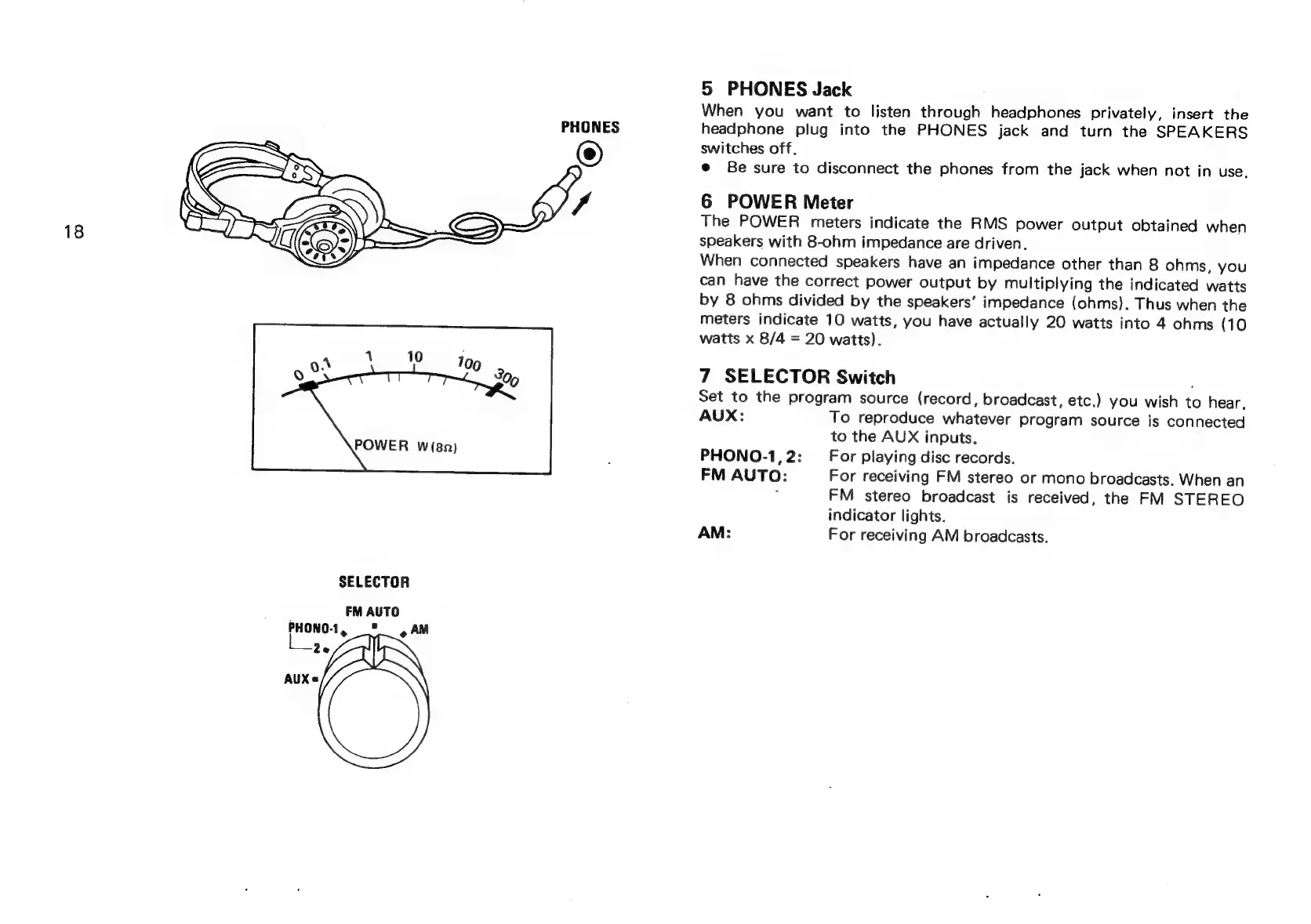
SELECTOR
FM
AUTO
PHONO-1,
"4
AM
Ze
AUX=
PHONES
5
PHONES
Jack
When
you
want
to
listen
through
headphones
privately,
insert
the
headphone
plug
into
the
PHONES
jack
and
turn
the
SPEAKERS
switches
off.
e
Be
sure
to
disconnect
the
phones
from
the
jack
when
not
in
use.
6
POWER
Meter
The
POWER
meters
indicate
the
RMS
power
output
obtained
when
speakers
with
8-ohm
impedance
are
driven.
When
connected
speakers
have
an
impedance
other
than
8
ohms,
you
can
have
the
correct
power
output
by
multiplying
the
indicated
watts
by
8
ohms
divided
by
the
speakers’
impedance
(ohms).
Thus
when
the
meters
indicate
10
watts,
you
have
actually
20
watts
into
4
ohms
(10
watts
x
8/4
=
20
watts).
7
SELECTOR
Switch
;
Set
to
the
program
source
(record,
broadcast,
etc.)
you
wish
to
hear.
AUX:
To
reproduce
whatever
program
source
is
connected
to
the
AUX
inputs.
PHONO-1,2:
For
playing
disc
records.
FM
AUTO:
For
receiving
FM
stereo
or
mono
broadcasts.
When
an
y
FM
stereo
broadcast
is
received,
the
FM
STEREO
indicator
lights.
AM:
For
receiving
AM
broadcasts.