EasyManua.ls Logo

Sansui G-9000 - Tone, Filter, and Microphone Controls

Sansui G-9000
58 pages
Print Icon
To Next Page IconTo Next Page
To Previous Page IconTo Previous Page
Loading...
LOUDNESS
26
BALANCE
2
9
2.
4
4
6
6
3
8
LEFT
RIGHT
TURNOVER
TONE
400
Hz
DEFEAT
200
Hz
ON
BASS
MIDRANGE
-2
©
492
-2
%
42
-4
+4
-4
+4
-6
+6
-
+6
&
8
S
8
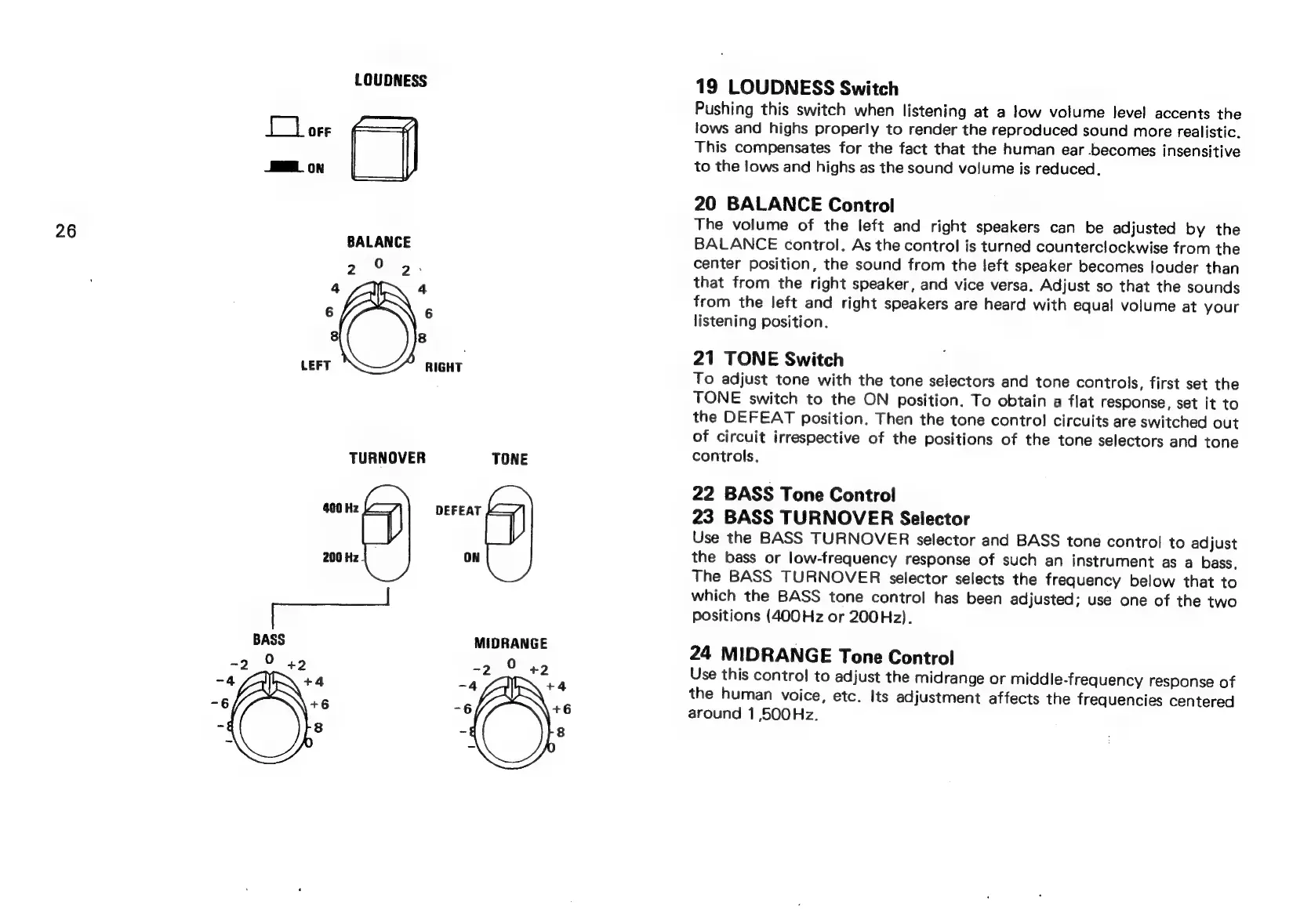
19
LOUDNESS
Switch
Pushing
this
switch
when
listening
at
a
low
volume
level
accents
the
lows
and
highs
properly
to
render
the
reproduced
sound
more
realistic.
This
compensates
for
the
fact
that
the
human
ear
becomes
insensitive
to
the
lows
and
highs
as
the
sound
volume
is
reduced.
20
BALANCE
Control
The
volume
of
the
left
and
right
speakers
can
be
adjusted
by
the
BALANCE
control.
As
the
control
is
turned
counterclockwise
from
the
center
position,
the
sound
from
the
left
speaker
becomes
louder
than
that
from
the
right
speaker,
and
vice
versa.
Adjust
so
that
the
sounds
from
the
left
and
right
speakers
are
heard
with
equal
volume
at
your
listening
position.
21
TONE
Switch
To
adjust
tone
with
the
tone
selectors
and
tone
controls,
first
set
the
TONE
switch
to
the
ON
position.
To
obtain
a
flat
response,
set
it
to
the
DEFEAT
position.
Then
the
tone
control
circuits
are
switched
out
of
circuit
irrespective
of
the
positions
of
the
tone
selectors
and
tone
controls,
22
BASS
Tone
Control
23
BASS
TURNOVER
Selector
Use
the
BASS
TURNOVER
selector
and
BASS
tone
control
to
adjust
the
bass
or
low-frequency
response
of
such
an
instrument
as
a
bass,
The
BASS
TURNOVER
selector
selects
the
frequency
below
that
to
which
the
BASS
tone
control
has
been
adjusted;
use
one
of
the
two
positions
(400Hz
or
200Hz).
24
MIDRANGE
Tone
Control
Use
this
contro!
to
adjust
the
midrange
or
middle-frequency
response
of
the
human
voice,
etc.
Its
adjustment
affects
the
frequencies
centered
around
1
,500Hz.