14
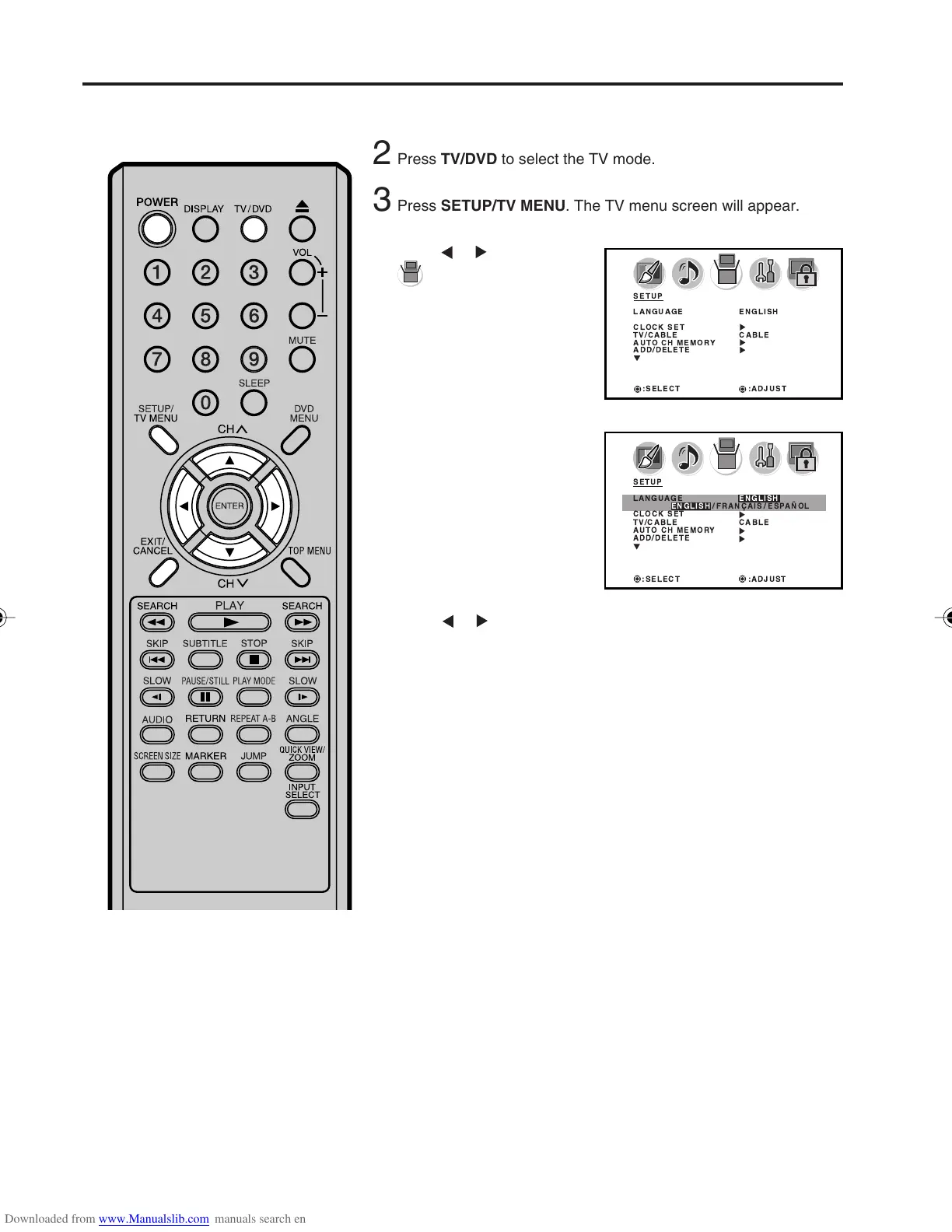
Setting the on-screen display language
5
Press or to select
(SETUP) menu.
Press
or to select the desired language: English (ENGLISH),
French (FRANÇAIS) or Spanish (ESPAÑOL).
1
4
Press ▲ or ▼ to select
“LANGUAGE”.
6
Press EXIT to return to the normal screen.
Press POWER to turn on the unit.
7
You can choose from three different
languages (English, French and
Spanish) for the on-screen displays.
NOTES:
• If the unit does not operate properly (by
the buttons on the unit and/or the
remote control) disconnect the AC
cord, wait a few minutes and plug it
back in. Static electricity, etc., may have
affected the player's operation.
• If no buttons are pressed for more than
60 seconds, the MENU screen will return
to normal TV-operation automatically.
SETUP
LANGUAGE ENGLISH
CLOCK SET
TV/CABLE CABLE
AUTO CH MEMORY
ADD/DELETE
:SELECT :ADJUST
SETUP
LANGUAGE ENGLISH
ENGLISH / FRANAIS / ESPAOL
CLOCK SET
TV/CABLE CABLE
AUTO CH MEMORY
ADD/DELETE
:SELECT :ADJUST
3
Press SETUP/TV MENU. The TV menu screen will appear.
2
Press TV/DVD to select the TV mode.
5X10101A[EN] P13-18 3/2/06, 4:01 PM14



 To Next Page