23
Selecting the video input source/
Labeling the video input source
Press SETUP/TV MENU in
the TV mode. Then press
or to select
(OPTION) menu.
Press ▲ or ▼ to select
“VIDEO LABEL”.
1
Press or . The VIDEO
LABEL menu will appear.
2
Press ▲ or ▼ to select the
video source you want to
label.
3
Press
or
to select the
desired
label for that input
source.
4
– : Uses the default
label name
VCR : Video cassette
recorder
DVD : DVD video
DTV :
Digital TV set-top box
SAT : Satellite box
CBL : Cable box
HD : HDMI device
Press EXIT to return to the normal screen.
5
OPTION
ON TIMER OFF
CH LABEL
VIDEO LABEL
:SELECT :ADJUST
VIDEO LABEL
1. VIDEO1 - / VCR / DVD / DTV
2. VIDEO2 - SAT / CBL
3. COMPONENT -
4. HDMI -
:SELECT :ADJUST
VIDEO LABEL
1. VIDEO1 -
2. VIDEO2 -
3. COMPONENT -
4. HDMI - / VCR / DVD / DTV
SAT / CBL/HD
:SELECT :ADJUST
VIDEO LABEL
1. VIDEO1 -
2. VIDEO2 -
3. COMPONENT -
4. HDMI - / VCR / DVD / DTV
SAT / CBL/HD
:SELECT :ADJUST
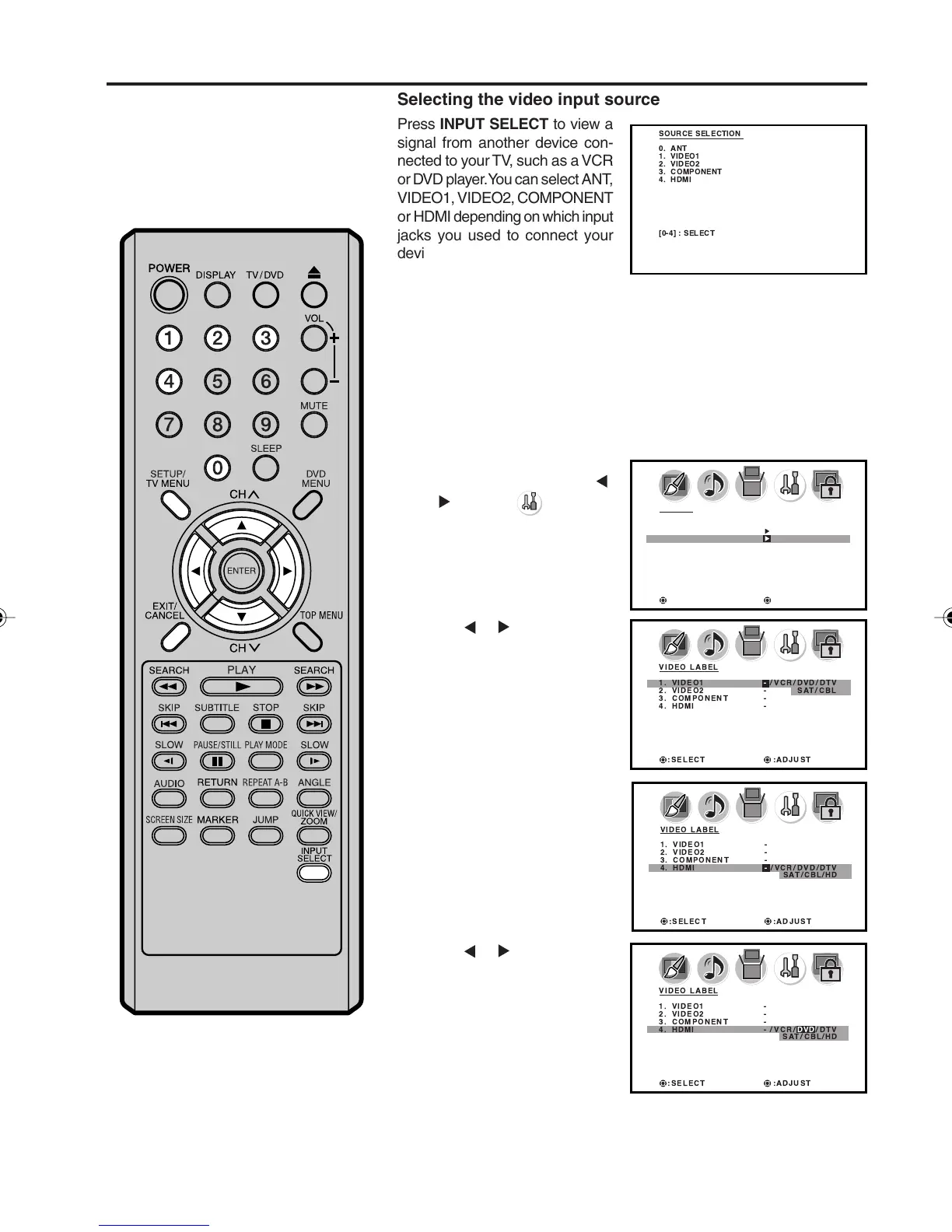
Selecting the video input source
Press INPUT SELECT to view a
signal from another device con-
nected to your TV, such as a VCR
or DVD player. You can select ANT,
VIDEO1, VIDEO2, COMPONENT
or HDMI depending on which input
jacks you used to connect your
devices.
Pressing INPUT SELECT on the remote control displays the current
signal source. To change the video input source, press INPUT
SELECT again or 0-4.
Labeling the video input source
The video label feature allows you to label each input source for
your unit.
SOURCE SELECTION
0. ANT
1. VIDEO1
2. VIDEO2
3. COMPONENT
4. HDMI
[0-4] : SELECT
5X10101A[EN] P22-29 3/2/06, 4:02 PM23



 To Next Page