25
ON TIMER
ON TIMER
12:00AM CH002
CLEAR
RETURN
:SELECT :ADJUST
4
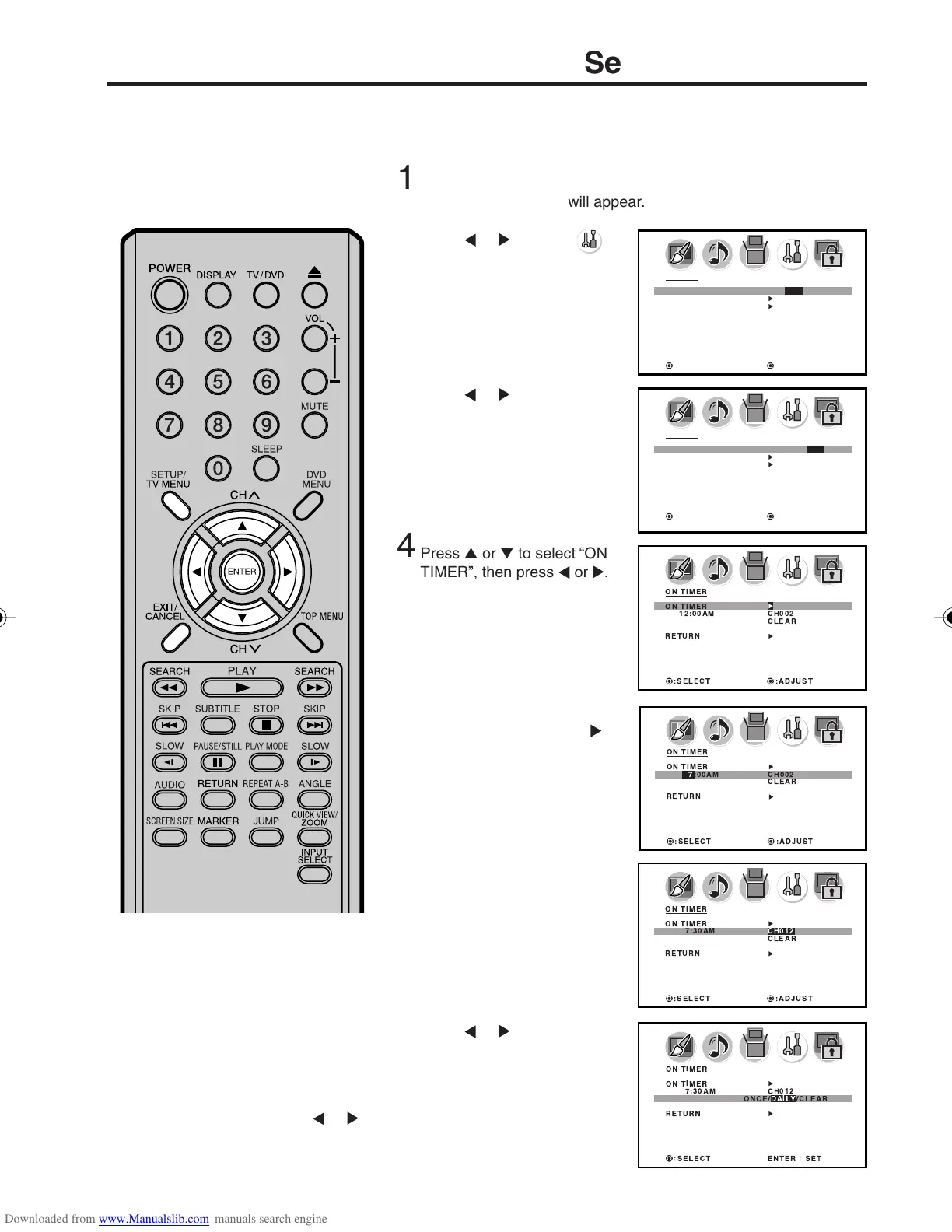
Press ▲ or ▼ to select “ON
TIMER”, then press
or .
Setting the on timer
EXAMPLE: Turning on the TV to channel 12 at 7:30 AM, daily.
Preparation:
Set the clock, if you have not already done so (see page 24).
This feature allows you to have the
TV automatically turn on at a
predetermined time. If you program
the ON TIMER to daily once, the TV
will turn on everyday at the same
time to the same channel.
Press
or to select
(OPTION) menu.
Press ▲ or ▼ to select “ON
TIMER”.
Set the desired minutes and
start up channel, as in step 5.
NOTES:
• The TV will automatically turn off
approximately 1 hour later after the
ON TIMER turns on. To continue
watching the TV, press any button to
cancel the one hour automatic shut
off.
• After a power failure or disconnec-
tion of the power, the timer settings
will be lost.
• Select “RETURN” and press
or
to return from ON TIMER menu to
OPTION menu.
2
5
6
7
8
Press ▲ or ▼ to set the
desired hour, then press
.
Please note if the hour is AM
or PM, and choose desired
setting.
Press
or to select
“DAILY”, then press ENTER.
Press EXIT to return to the normal screen.
Press
or to select “SET”,
then press ENTER.
The “ON TIMER” menu
appears.
3
OPTION
ON TIMER ON / OFF / SET
CH LABEL
VIDEO LABEL
:SELECT :ADJUST
OPTION
ON TIMER ON / OFF / SET
CH LABEL
VIDEO LABEL
:SELECT :ADJUST
ENTER:SET
ON TIMER
ON TIMER
7:00AM CH002
CLEAR
RETURN
:SELECT :ADJUST
ON TIMER
ON TIMER
7:30AM CH012
CLEAR
RETURN
:SELECT :ADJUST
:SELECT ENTER : SET
ON TIMER
ON TIMER
7:30AM CH012
ONCE/DAILY/CLEAR
RETURN
Press SETUP/TV MENU in the TV mode.
The TV menu screen will appear.
1
5X10101A[EN] P22-29 3/2/06, 4:02 PM25



 To Next Page