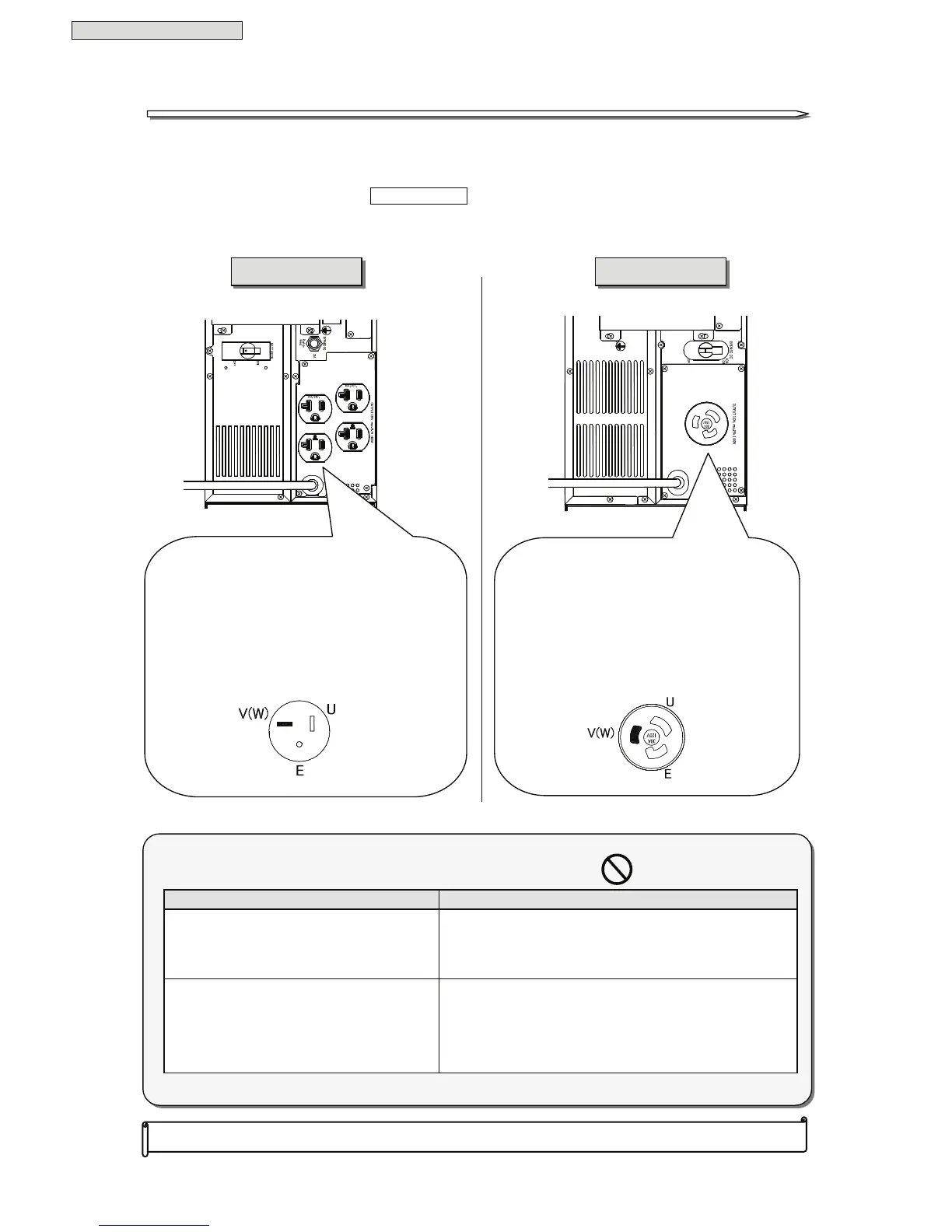
Load Devices Connection
25
§
§
9
9
.
.
L
L
o
o
a
a
d
d
D
D
e
e
v
v
i
i
c
c
e
e
s
s
C
C
o
o
n
n
n
n
e
e
c
c
t
t
i
i
o
o
n
n
Connect the load devices.
① Check that the input breaker MAIN MCCB is set to “OFF”.
② Connect the input power plugs of the load devices to the output terminals as follows.
This completes the load devices connection.
Outlet Capacity
125V 20A outlet (NEMA 5-20R)×4
The total load connected to the outlets
must not exceed 2.0kVA(1.4 kW).
If the load devices are a single-wire grounded
connection, always connect the ground phase to the
W terminal (V phase) side.
Outlet Capacity
125V 30A outlet (NEMA L5-30R)× 1
The total load connected to the outlet
must not exceed 3.0 kVA(2.1 kW).
If the load devices are a single-wire grounded
connection, always connect the ground phase to
the W terminal (V phase) side.
Never connect the following types of load devices to the UPS.
Load devices Details
Copy machines, Laser printers,
Plain paper fax machines,
Overhead projectors, Cleaner
and so on
Since such devices are subject to high transient current
surges, the UPS will detect the excess current and
backup will not be possible when there is a power
outage. There is also the risk of the UPS malfunctioning.
Medical equipment, control equipment for
elevators and the like, computer systems
of public importance
Special considerations such as system redundancy,
installation of emergency power generation facilities,
need to be given to operation, maintenance, and
management.
A
A
1
1
1
1
H
H
2
2
0
0
2
2
U
U
A
A
1
1
1
1
H
H
3
3
0
0
2
2
U
U



 To Next Page