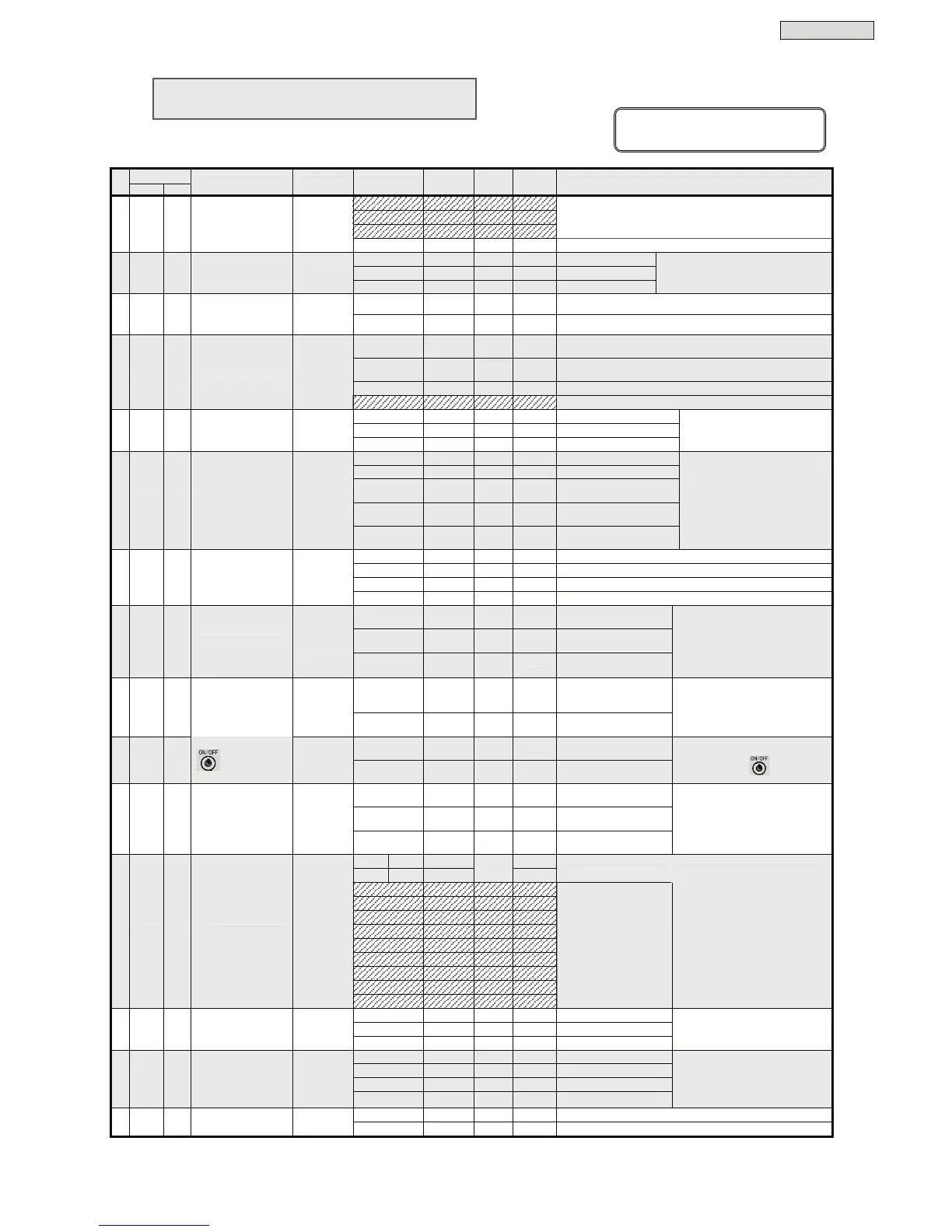
User Settings
34
§
§
1
1
2
2
.
.
2
2
S
S
e
e
t
t
u
u
p
p
M
M
e
e
n
n
u
u
L
L
i
i
s
s
t
t
User Settings Guide
No.
Ref. page
Item
Menu Menu LED Setting
Setting
LED
Default
Setting
Current
Setting
Remarks
- ●○○○
- ○●○○
- ●●○○
Do not use these settings.
1 4 3.1 Output voltage
○
●○○○
120 V ○○●○
*
120 V
1% ●○○○
±1%
3% ○●○○
±3%
2 5 3.2
Frequency sync
range (RESTART)
○
○●○○
5% ●●○○
*
±5%
Output frequency variation range (%)
50Hz ●○○○
50Hz
3 6 3.3
Output frequency
(RESTART)
○
●●○○
60Hz ○●○○
*
60Hz
Standalone ●○○○
Set when using UPS remote ON/OFF or Standard OS UPS
Services
Workstation ○●○○
*
Set when using a power management software, LAN card or
UPS remote ON and One-touch system shutdown.
Serial Login ●●○○
Shutdown by serial login.
4 7 3.4 PC interface
○
○○●○
- ○○●○
Do not use this setting.
9600 ●○○○
*
9600 bps.
4800 ○●○○
4800 bps.
5 8 3.5 Serial baud rate
○
●○●○
2400 ●●○○
2400 bps.
Set the serial baud rate when a
workstation, PC, or optional LAN
card is connected.
Auto ●○○○
*
Auto restart
OFF ○●○○
The UPS stays off.
30% ●●○○
Auto restart when battery
charge reaches 30%.
50% ○○●○
Auto restart when battery
charge reaches 50%.
6 9 3.6
UPS operation upon
power recovery
○
○●●○
80% ●○●○
Auto restart when battery
charge reaches 80%.
Specify when to restart the UPS
after a power outage and
shutdown of the UPS due to final
discharge of the batteries.
All patterns ●○○○
*
All sounds
Pattern 1 ○●○○
Emit sounds on serious failure and battery trouble.
Pattern 2 ●●○○
Emit alarm and key click sounds.
7 10 3.7 Buzzer sound
○
●●●○
OFF ○○●○
Emit key click sounds only.
1 second ●○○○
*
Turn the UPS off when
pressed for 1 second.
3 seconds ○●○○
Turn the UPS off when
pressed for 3 second.
8 11 3.8 Shutdown operation
○
○○○●
Special
operation
●●○○
Turn the UPS off on
special operation.
Set the operation for switch to stop
the UPS power supply.
Auto return ●○○○
Auto recovery when a
certain period of time has
elapsed.
9 12 3.9
Overload recovery
operation
○
●○○●
Bypass ○●○○
*
Fixed as bypass power
supply on overload.
Set the UPS operation after
switching to the bypass power
supply because of overload.
OFF ●○○○
*
The UPS stays off.
10 13 3.10
UPS operation at
OFF
(RESTART)
○
○●○●
Bypass ○●○○
Bypass power supply
Specify the UPS power supply
conditions when is off.
Battery voltage ●○○○
*
When low battery voltage
level is detected.
2 minutes ○●○○
When remaining battery
duration is 2 minutes.
11 14 3.11
Low battery voltage
warning timing
○
●●○●
3 minutes ●●○○
When remaining battery
duration is 3 minutes.
Set the timing of emitting the low
battery voltage warning alarm
(beep, Red BATT. LOW lit).
12
min.
10
min.
●○○○
20
min
.
18
min.
○●○○
See
remarks
Set the UPS backup time on power outage.
-
○●●○
-
●●●○
-
○○○●
-
○●●○
-
●●●○
-
○○○●
-
●○○●
-
○●○●
12 15 3.12 Battery backup time
○
○○●●
-
●●○●
Do not use these settings.
Default setting varies depending
on UPS Model.
Default setting of each Model is as
follows.
A11H202U011TW : 12 minutes
A11H202U111TW : 20 minutes
A11H302U011TW : 10 minutes
A11H302U111TW : 18 minutes
5 years ●○○○
*
5 years lifetime type
10 years ○●○○
10 years lifetime type
13 16 3.13 Battery type
○
●○●●
3 years ●●○○
3 years lifetime type
Set the battery type. Set this when
you replace the battery or connect an
external battery.
180 days ●○○○
*
Test batteries every 180 days.
90 days ○●○○
Test batteries every 90 days.
30 days ●●○○
Test batteries every 30 days.
14 17 3.14 Battery test schedule
○
○●●●
None ○○●○
No battery check.
Set the interval (number of days)
for the automatic battery check.
The check is carried out
automatically when the specified
number of days has elapsed.
Do not reset ●○○○
*
Do not reset.
15 18 3.15
Reset battery
information
○
●●●●
Reset ○●○○
Reset the battery information when you replace the battery.
●: indicates that LED is blinking.
○: indicates that LED is off.



 To Next Page