Operating Procedures
32
§
§
1
1
1
1
.
.
3
3
U
U
P
P
S
S
S
S
h
h
u
u
t
t
d
d
o
o
w
w
n
n
(
(
I
I
f
f
N
N
o
o
t
t
t
t
o
o
B
B
e
e
U
U
s
s
e
e
d
d
f
f
o
o
r
r
M
M
o
o
r
r
e
e
t
t
h
h
a
a
n
n
a
a
W
W
e
e
e
e
k
k
)
)
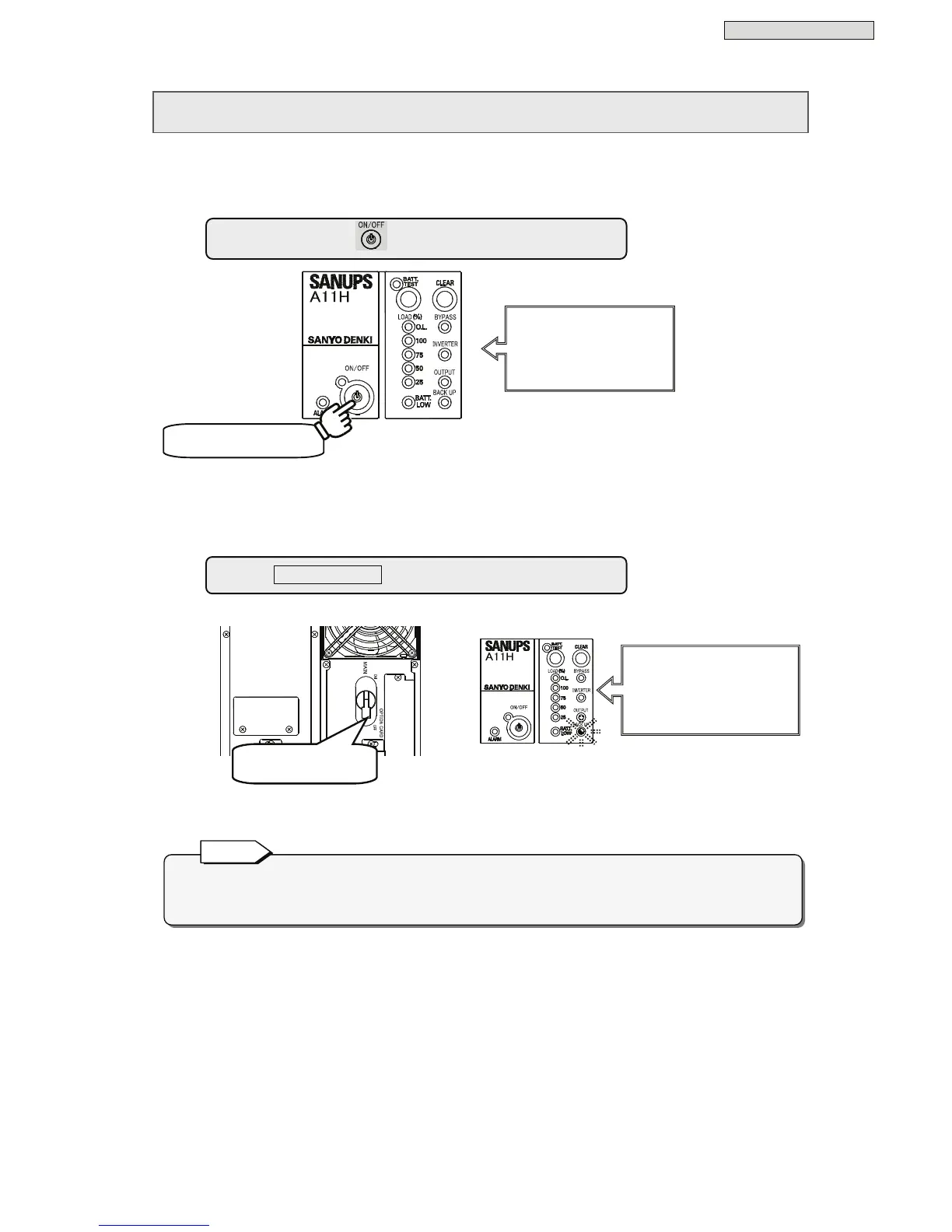
Perform the following operation if the UPS is not to be used for at least a week. Be sure to shut down the
load devices prior to shutting down the UPS.
* Operation varies depending on the user setting of “Shutdown operation”. See §3.8 “Setting UPS
Shutdown Operation” in the
User Settings Guide
for details.
MCCB
Hold for 1 second.*
If input power is shut off while the UPS is operating, the batteries are discharged as if a power
outage occurred. Be aware that when the input supply is restored, the full capacity of the backup
function will not be available until the batteries have had time to recharge.
Note
② Set to “OFF”.
② Set MAIN MCCB to “OFF.”
① Press and hold
for at least 1 second.
Buzzer
Musical trill
LEDs
All of the LEDs go off.
LEDs
Orange BACK UP Blinking
↓ after 5 seconds
All of the LEDs go off



 To Next Page