Optional Equipment
53
§
§
1
1
8
8
.
.
2
2
.
.
1
1
W
W
i
i
r
r
i
i
n
n
g
g
a
a
n
n
d
d
S
S
e
e
t
t
t
t
i
i
n
n
g
g
s
s
f
f
o
o
r
r
L
L
i
i
n
n
k
k
e
e
d
d
O
O
p
p
e
e
r
r
a
a
t
t
i
i
o
o
n
n
CAUTION
!
Before wiring, set
MAIN MCCB on the back panel of each UPS to “OFF”, disconnect their
input power plugs from the utility power outlets, and make sure that each UPS is completely
stopped. Failure to do so can result in electric shock.
① Set MAIN MCCB on all of the UPS units to “OFF”, and check to make sure that their input power
plugs are not connected to utility power outlets.
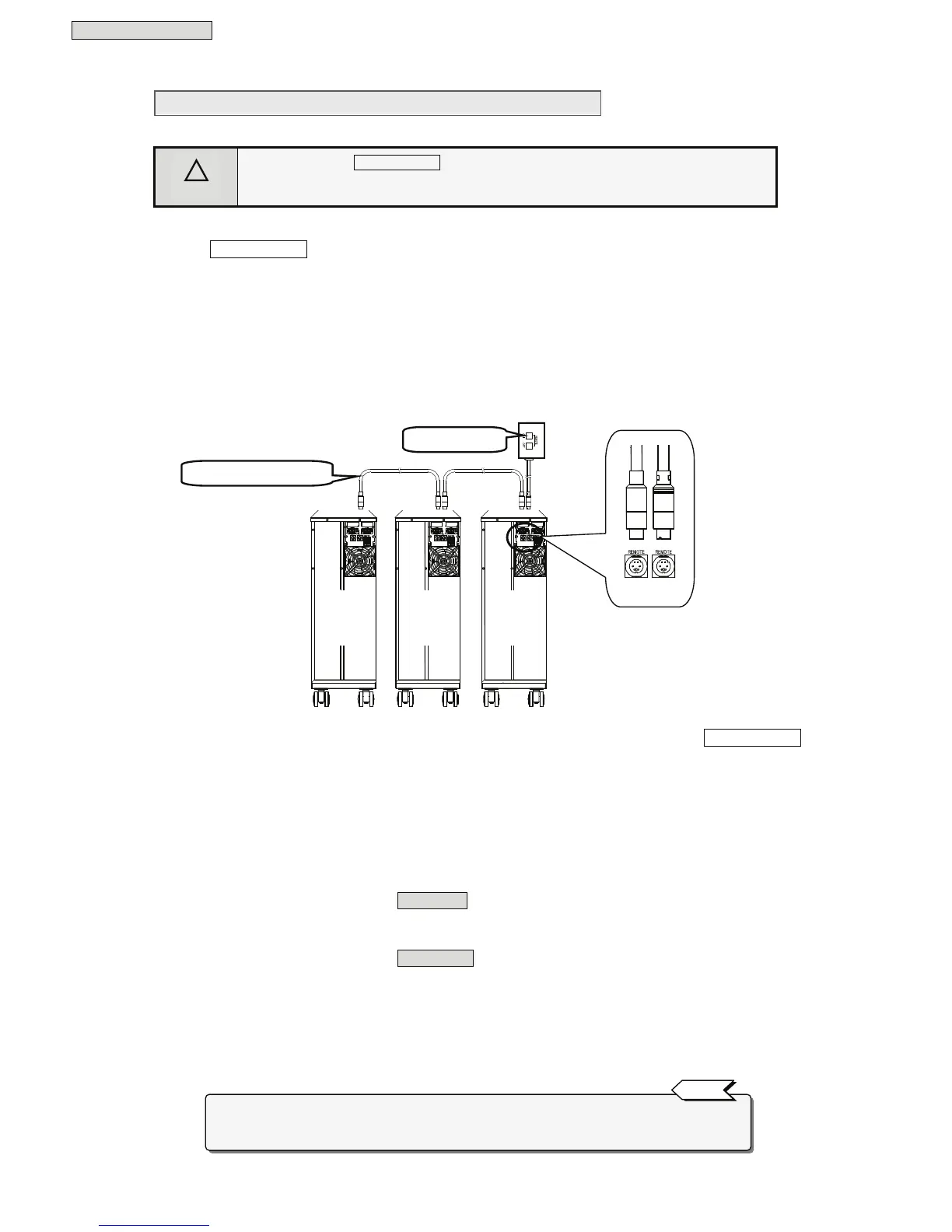
② Connect the remote switch to one of the REMOTE connectors on UPS No. 1.
③ Connect a linked operation cable to the other REMOTE connector.
④ Connect this linked operation cable to one of the REMOTE connectors on UPS No. 2.
⑤ Continue in the same way to connect all UPS units with linked operation cables.
The following figure shows connections for a system with 3 linked UPS units.
⑥ Connect the input power plugs of all UPS units to utility power outlets, and then set MAIN MCCB
on the back panels to “ON”.
⑦ Set the Interface item in the user setting menu, according to the procedure in §3.4 “Setting PC
Interface” in the
User Settings Guide
.
The following two functions are available, depending on the Interface setting. Select the setting for the
function you want to use. Set the Interface setting for all connected UPS units. See §3.4 “Setting PC
Interface” in the
User Settings Guide
for details on the setting procedure.
1.To perform UPS remote ON/OFF
Set the Interface to Standalone.
2.To perform UPS remote ON and one-touch system shutdown
Set the Interface to Workstation.
⑧ Set user setting menu item §3.16 “Enabling and Disabling Linked Operation Delay” to “Delay”. See the
User Settings Guide
for details on the setting procedure.
⑨ Set user setting menu items §3.17 “Setting Linked Operation ON Delay Times” and §3.18 “Setting
Linked Operation OFF Delay Times” on each of the 3 UPS units. See the
User Settings Guide
for
details on the setting procedure.
The above user settings are not required if you want to turn UPS output ON and OFF at the same time
for all UPS units. Set item §3.16 “Enabling and Disabling Linked delay operation” to “No delay”



 To Next Page