CLOCK
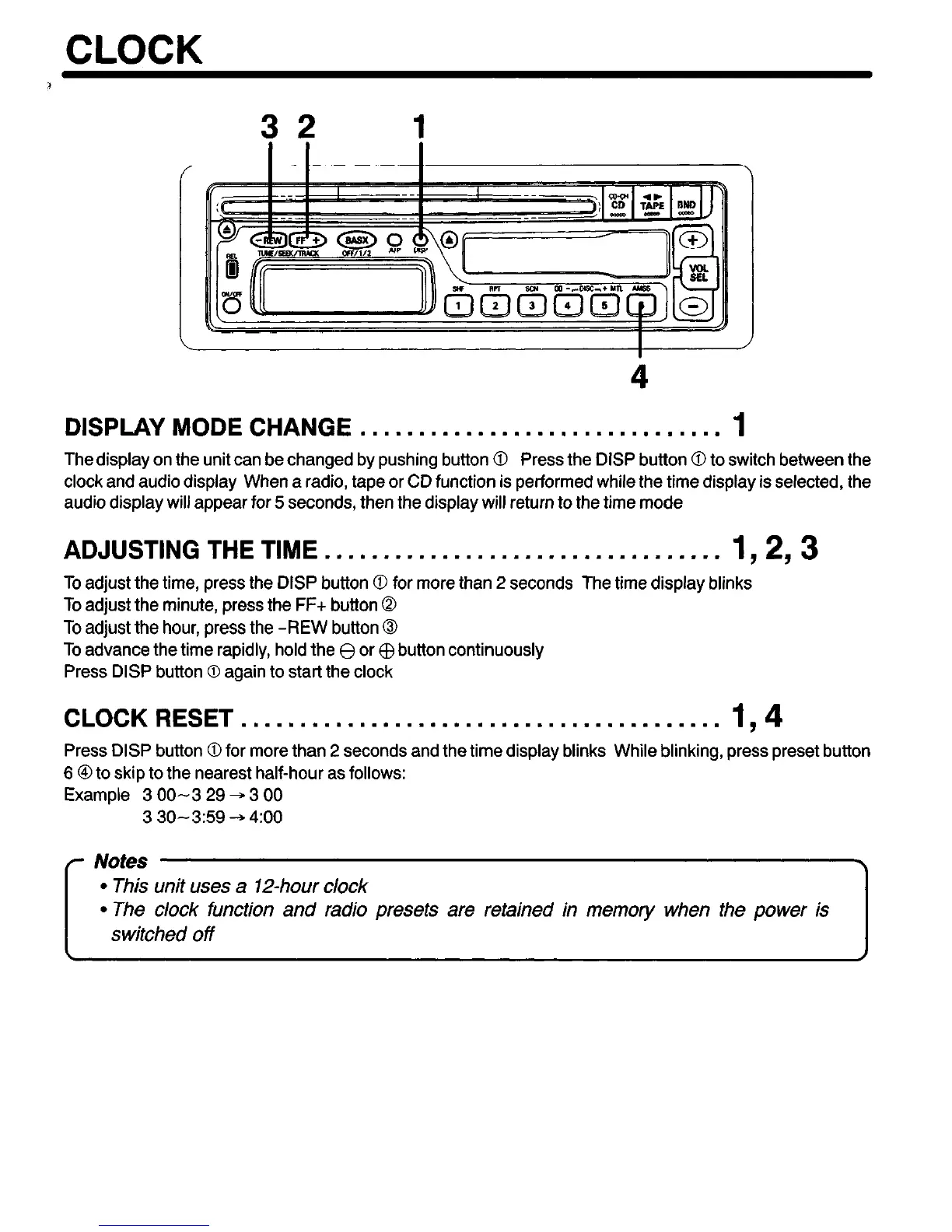
32
1
DISPLAY MODE CHANGE . . . . . . . . . . . . . . . . . . . . . . . . . . . . . . . 1
The display on the unit can be changed by pushing button 0 Press the DISP button 0 to switch between the
clock and audio display When a radio, tape or CD function is performed while the time display is selected, the
audio display will appear for 5 seconds, then the display will return to the time mode
ADJUSTING THE TIME ..~..............~.~.......,.,.,..
1,293
To adjust the time, press the DISP button 0 for more than 2 seconds The time display blinks
To adjust the minute, press the FF+ button 0
To adjust the hour, press the -REW button 0
To advance the time rapidly, hold the 8 or $ button continuously
Press DISP button 0 again to start the clock
CLOCK RESET . . . . . . . . . . . . . . . . . . . . . . . . . . . . . . . . . . . . . . . . .
194
Press DISP button 0 for more than 2 seconds and the time display blinks While blinking, press preset button
6 @to skip to the nearest half-hour as follows:
Example 3 00-3 29 + 3 00
3 30-3:59 + 4:oo
I
l
This unit uses a 12-hour clock
l
The clock function and radio presets are retained in memory when the power is
switched off


 To Next Page