GENERAL OPERATION
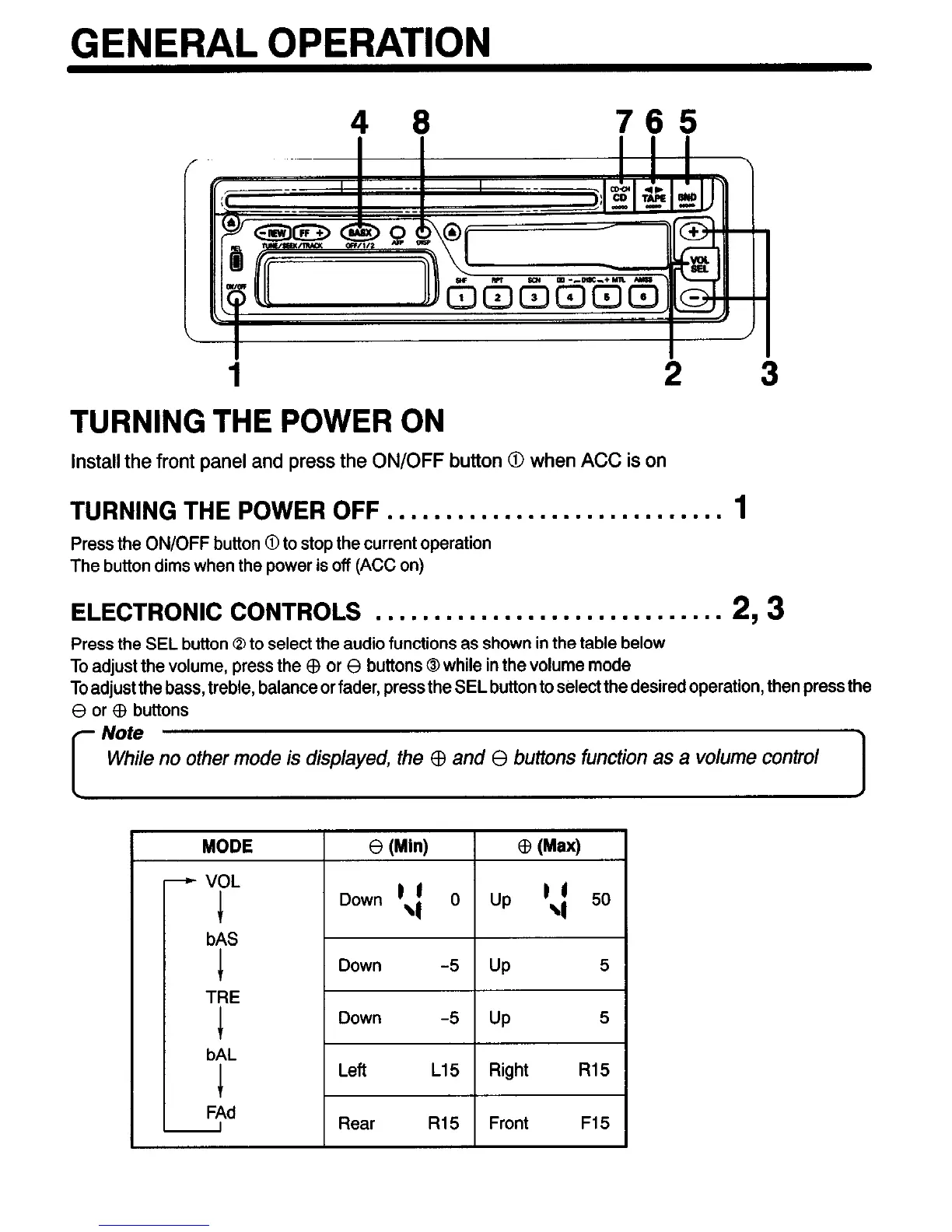
4 8 765
i
2 3
TURNING THE POWER ON
install the front panel and press the ON/OFF button 0 when ACC is on
TURNING THE POWER OFF . . . . . . . . . . . . . . . . . . . . . . . . . . . . .
1
Press the ON/OFF button 0 to stop the current operation
The button dims when the power is off (ACC on)
ELECTRONIC CONTROLS . . . . . . . . . . . . . . . . . . . . . . . . . . . . . .
293
Press the SEL button Q to select the audio functions as shown in the table below
To adjust the volume, press the $ or 8 buttons 0 while in the volume mode
To adjust the bass, treble, balance or fader, press the SEL button to select the desired operation, then press the
0 or G3 buttons
r
Note
While no other mode is displayed, the $ and 8 buttons function as a volume control
MODE 8 (Min) cI3 (Max)
I I
r “p’ / Down ‘,I 0 1 Up ‘4 50
-7-


 To Next Page