RADIO OPERATION
\
I I I I I I
I
3
SELECTING RADIO MODE
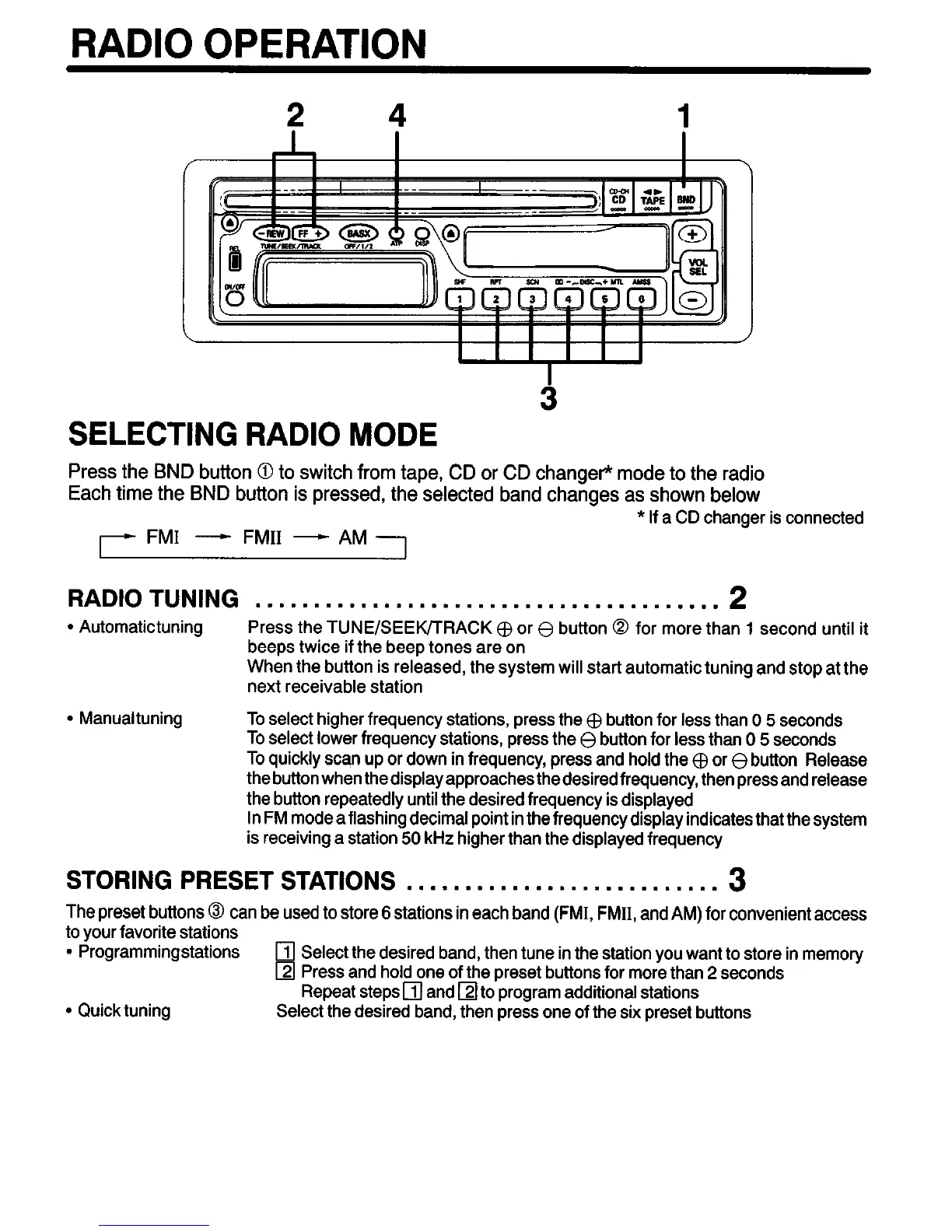
Press the BND button 0 to switch from tape, CD or CD changer* mode to the radio
Each time the BND button is pressed, the selected band changes as shown below
* If a CD changer is connected
FM1 - FM11 - AM
RADIO TUNING
. . . . . . . . . . . . . . . . . . . . . . . . . . . . . . . . . . . . . . . .
2
l
Automatictuning Press the TUNE/SEEK/TRACK @ or 8 button @ for more than 1 second until it
beeps twice if the beep tones are on
When the button is released, the system will start automatic tuning and stop at the
next receivable station
l
Manualtuning To select higher frequency stations, press the @ button for less than 0 5 seconds
To select lower frequency stations, press the 0 button for less than 0 5 seconds
To quickly scan up or down in frequency, press
and hold the @ or 8 button Release
thebuttonwhen thedisplayapproachesthedesiredfrequency, thenpressand release
the button repeatedly until the desired frequency is displayed
In FM mode a flashing decimal point in the frequency display indicates that the system
is receiving a station 50 kHz higher than the displayed frequency
STORING PRESET STATIONS . . . . . . . . . . . . . . . . . . . . . . . . . . .
3
The preset buttons @ can be used to store 6 stations in each band (FMI, FMII, and AM) for convenient access
to your favorite stations
l
Programmingstations
q
Select the desired band, then tune in the station you want to store in memory
q
Press and hold one of the preset buttons for more than 2 seconds
Repeat steps
q
and
q
to program additional stations
l
Quick tuning Select the desired band, then press one of the six preset buttons


 To Next Page