Notes
l
When using a two-speaker installation, the Green, Green/Black, Violet, violet/Black wires, which
are used for a four-speaker installation, are not used The ends of these wires must be covered
with electrical tape to prevent them from shorting to the unit or the vehicle chassis
NG
l
When using a two-speaker installation, set
the FADER control to the center position
l
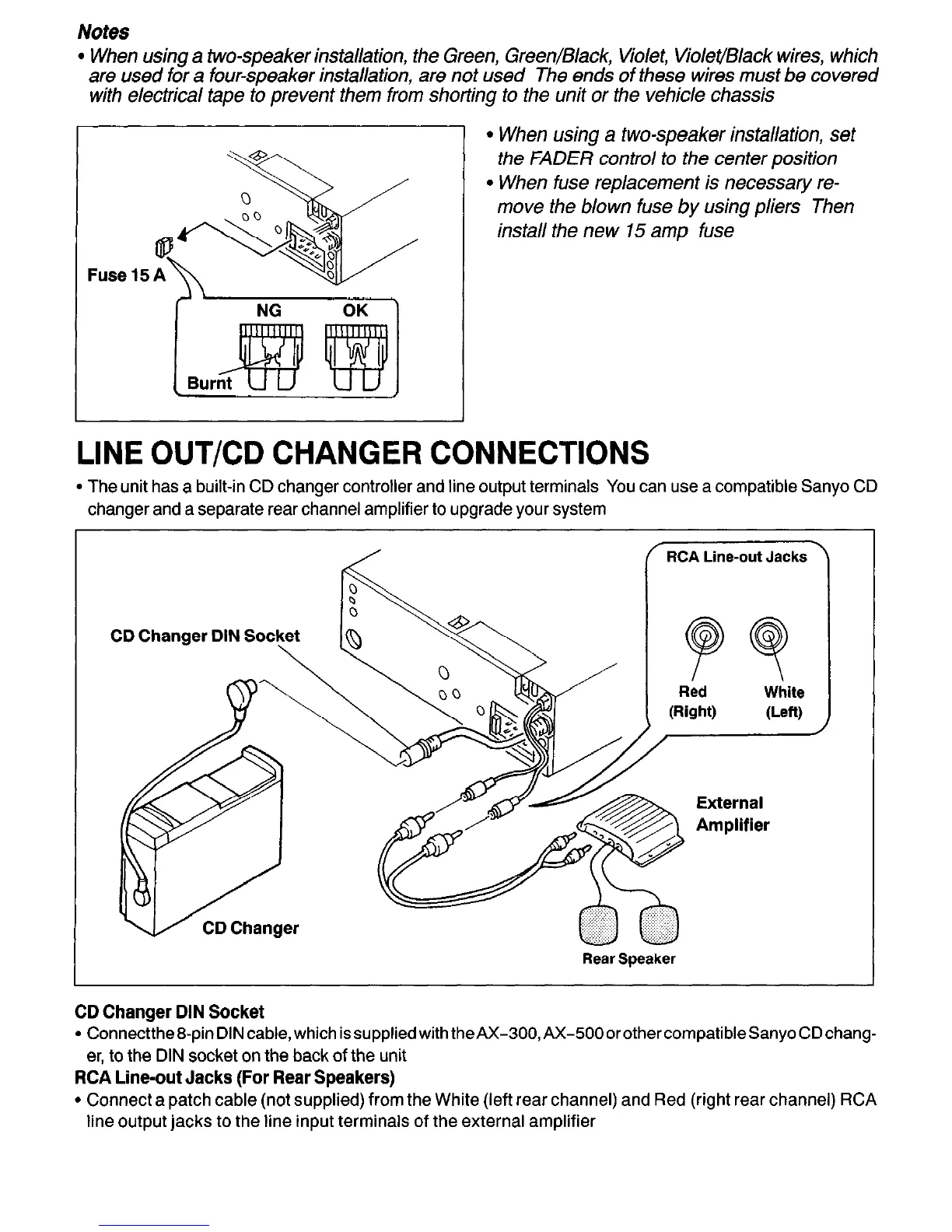
When fuse replacement is necessary re-
move the blown fuse by using pliers Then
install the new 15 amp fuse
LINE OUT/CD CHANGER CONNECTIONS
l
The unit has a built-in CD changer controller and line output terminals You can use a compatible Sanyo CD
changer and a separate rear channel amplifier to upgrade your system
RCA Line-out Jacks
Red
(Right)
wlite
(Len)
CD Changer DIN Sot
Rear Speaker
External
Amplifier
CD Changer DIN Socket
l
Connectthe&pinDINcable,which issuppliedwith theAX-300,AX-500orothercompatibleSanyoCDchang-
er, to the DIN socket on the back of the unit
RCA Line-out Jacks (For Rear Speakers)
l
Connect a patch cable (not supplied) from the White (left rear channel) and Red (right rear channel) RCA
line output jacks to the line input terminals of the external amplifier
-28-


 To Next Page